
Apple Patents a Tiered Permission System for Devices That Share Control of One Gadget
When two phones both try to control the same speaker, who wins? Apple has filed a patent that gives each device a different level of authority, so there's always a clear answer.
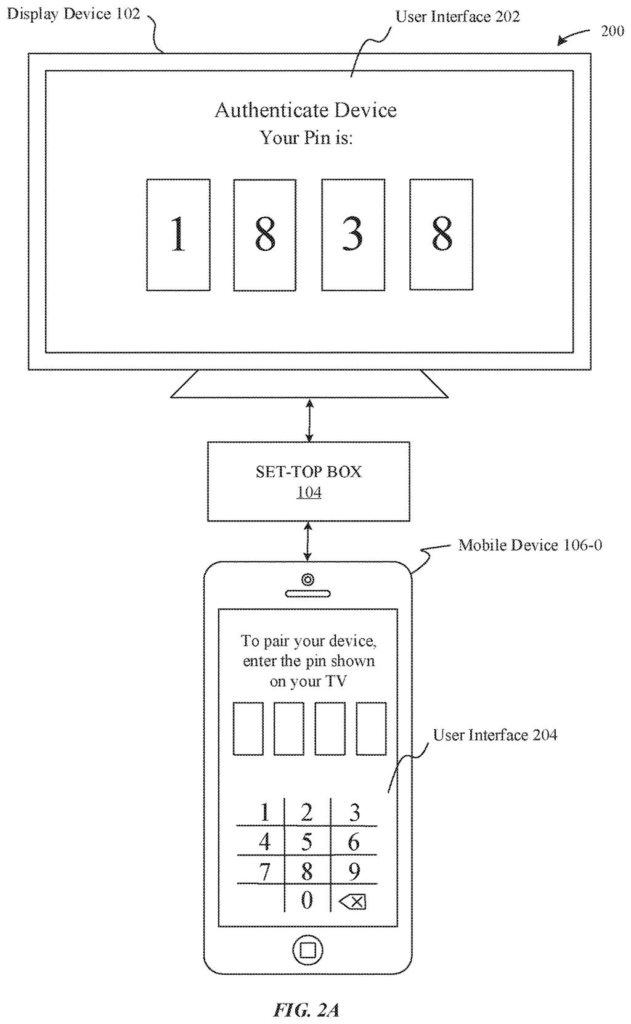
What Apple's device permission tiers actually do
Every time a second phone tries to pair with a Bluetooth speaker your friend already owns, something has to decide what that second phone is allowed to do. Right now, most devices either block the newcomer entirely or hand over full control, which can feel clunky or insecure.
Apple's patent describes a system where the first device to pair with a shared gadget gets the highest level of control, like an admin account on a computer. Later devices that connect get a narrower set of permissions. If a second device wants to do something outside its allowed range, the host gadget puts up a notice and asks the admin device to approve it first.
That approval step is the key part. Instead of either blocking the action or allowing it, the host gadget waits for a green light from whoever has top-level access. Think of it like a front-desk buzzer: your guest can ask to come in, but you have to press the button.
… identifying at least one administrative device that is authorized to permit the host device to perform the at least one action; displaying, by way of at least one user interface on a display device with which the host device is communicatively coupled, an indication that the host device is awaiting an authorization to perform the at least one action; …
Translation: The device figures out which parent gadget is in charge and puts a waiting message on its screen.
How the host device assigns and escalates permissions
The patent describes a host device (a speaker, TV, or similar shared gadget) that manages a hierarchy of permissions across multiple paired wireless devices.
Here is the basic flow:
- The first wireless device to pair receives Level 1 permissions, effectively making it the administrator. It can change settings, approve requests, and perform any action the host supports.
- Subsequent devices that pair receive a lower permission tier, limiting what they can ask the host to do on their own authority.
- If a lower-tier device requests an action the host is not authorized to perform for that device, the host displays a message on a connected screen saying it is waiting for authorization, then forwards the request to whichever admin device is available.
- Once the admin device sends approval, the host carries out the action.
The claim is written around the host device doing the work, not the phone apps. The host itself tracks which paired devices sit at which permission level, identifies the right admin to ask, and waits for sign-off. This keeps the logic close to the hardware being shared, rather than scattering it across each phone's software.
In response to pairing with the second wireless device, the host device can grant a second level of permissions for controlling the host device to second wireless device, where the second level of permissions is distinct from the first level of permissions.
Translation: When another device connects, it gets a completely different set of control powers than the first one.
What this means for shared speakers, TVs, and home hubs
Shared devices, whether a living-room speaker, a hotel TV, or a car's infotainment system, have always had a messy multi-user problem. Whoever pairs last often ends up in charge by accident, and there's no reliable way for an owner to stop a guest from changing things they shouldn't touch. A tiered, admin-approval model would give the original owner a real safety net.
For your everyday household, this could mean your HomePod or Apple TV recognizes your phone as the manager and treats a visitor's phone as a limited guest, automatically. Any settings change the guest tries to make would ping your phone first. Apple's long bet on shared-device home accessories fits neatly with that picture, even if this specific patent covers any host-device category, not just Apple's own products.
Apple's 22nd filing we've tracked since May in our device-to-device handoff watchlist builds on ideas like sharing content when devices are near and pushing content across all devices.
The whole system described here runs on software and communication rules between devices, with no new hardware required. A background update to an existing phone or speaker could carry most of it.
The trickiest piece is making sure the primary owner's phone reliably receives and can respond to permission requests from the shared device, which demands tight coordination across Apple's various platforms. That is a real engineering effort, but it is a coordination problem rather than an invention problem.
What emerges from this, if built well, is a smoother experience for anyone sharing a speaker, TV, or similar device with guests or family members, where the owner stays in quiet control without having to hover.
Get our take in your Top Stories
Liked this breakdown? Add Patentlyze as a preferred source on Google, and our plain-English take shows up more often in your Top Stories the next time Apple patent news breaks.
There are more where this came from
We read every patent application Big Tech publishes and send you the ones worth knowing. Plain English, free, every week.
The drawings
13 drawing sheets from US 2026/0278066 A1 · click any drawing to enlarge


Show the other 5 sheets


Want this weekly breakdown for a company we don't cover? Patentlyze Pro →
Be the first to weigh in