
Microsoft Files Patent for an AI Assistant That Knows What's Open on Your Screen
Microsoft has filed a patent application for an AI assistant that checks which windows you have open before it answers, so a request like 'summarize the one on top' can work. A second, separate AI does the screen reading so your conversation doesn't get crowded out.
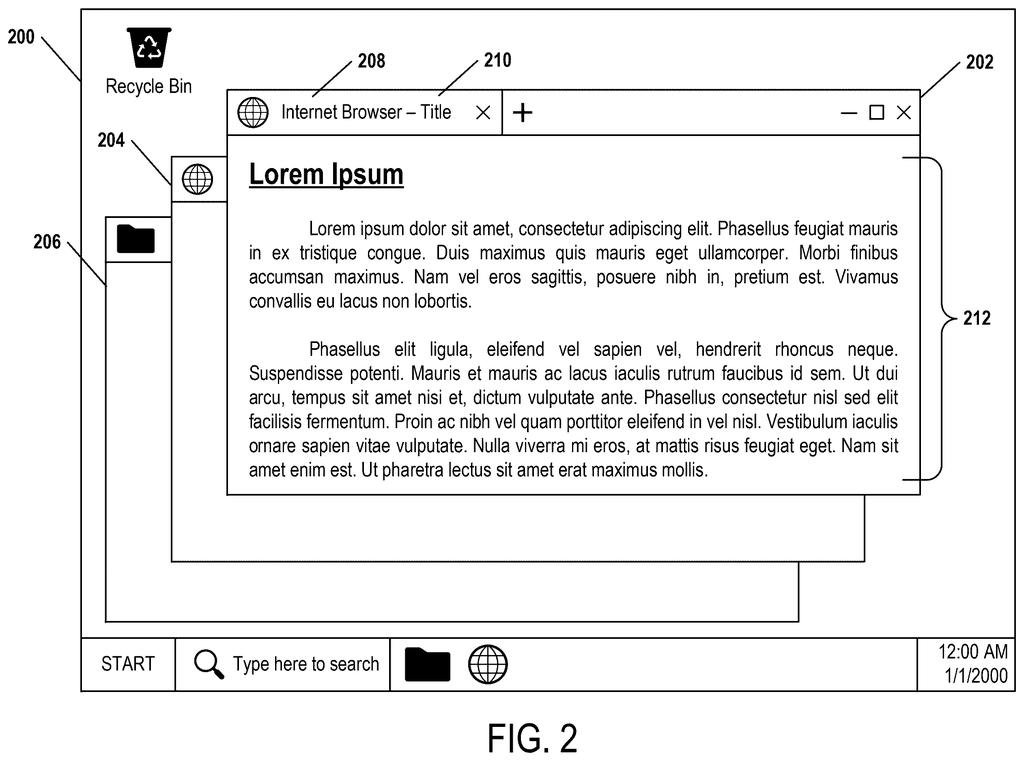
What Microsoft's screen-aware AI assistant does
Imagine you have two browser tabs open, each with a different laptop review, and you ask an AI chatbot, 'Which of these is cheaper?' Most chatbots can't see your screen, so you would have to copy and paste both pages first.
Microsoft's patent application describes a way to skip that step. When you ask a question that depends on what you're doing, the assistant checks your computer's current state: which windows are open, what order they are stacked in, which apps they belong to, and the text inside them. It packs that into a tidy format and hands it to the AI along with instructions on how to read it, including a hint that the window on top probably matters most.
Because your screen changes constantly, the check happens fresh each time you ask, so the answer reflects what is open right now.
calling an OS state retrieval tool to perform a plurality of application programming interface (API) calls to retrieve current OS state information …
Translation: The system uses special tools to fetch details about what apps and windows are currently active.
How the two chatbots split up the work
The system starts with a question typed to an AI chatbot. The AI decides whether the question depends on what is on your screen. If so, it calls an OS state retrieval tool, a helper program that makes several requests to the operating system (called API calls, which are standard ways for one program to ask another for information) to learn what is open.
The tool collects things like the active windows, their order, app names, window titles and content. It then formats everything into a data structure (a predictable layout the AI can read, like a form with labeled fields) describing the graphical window context. A prompt travels with it, spelling out how to read the layout and which details matter most. The filing says the data can include screenshots, which a multi-modal model (one that handles images as well as text) can read, with instructions to pull the text out of the image.
The patent also describes a two-model version:
- A first large language model (LLM, the type of AI behind modern chatbots) talks with you and remembers the conversation.
- It hands screen questions to a second LLM, which can be stateless (it keeps no memory between requests), calls the retrieval tool, and produces an intermediate answer.
- The first model reworks that answer using your conversation history and shows it to you.
… formatting the current OS state information into a data structure describing graphical window context that is readable by the AI module …
Translation: It translates that active screen data into a format the artificial intelligence can easily understand.
What this means for asking AI about your screen
If you use an AI assistant on a PC, the practical gain is fewer copy-and-paste chores. You could ask about 'the article I just had open' or request a comparison between two windows, and the assistant would work from what is actually on your screen. The filing's own example is summarizing an article by its title or by referring to the topmost window.
For Microsoft, the filing points at where Windows assistants could go: knowing your context without being told. The description even names Windows Management Instrumentation, a built-in Windows feature for reading system state, as one way to gather the data. The two-model split also addresses a real limit, since a chatbot has only so much room to remember a conversation, and screen data eats into it.
Microsoft's 20th filing we've tracked in our AI agents acting for you watch since July builds on earlier applications like trimming pages for AI and reading your screen unprompted.
The benefit you would notice is small and daily: you stop copying text from one window and pasting it into a chat box. You just say 'summarize the one on top' and the assistant knows what you mean.
The two-chatbot split matters for a less obvious reason. Screen contents fill up a chatbot's limited short-term memory, and a long conversation can push your earlier questions out of it. Giving the screen reading to a second helper keeps the chat's memory of what you said intact.
The core idea, handing a chatbot a tidy snapshot of your open windows, is simple, and the filing claims nothing fancier than that. Whether it feels useful depends on how well it reads messy real-world screens, and the patent offers no results on that.
Get our take in your Top Stories
Liked this breakdown? Add Patentlyze as a preferred source on Google, and our plain-English take shows up more often in your Top Stories the next time Microsoft patent news breaks.
There are more where this came from
We read every patent application Big Tech publishes and send you the ones worth knowing. Plain English, free, every week.
The drawings
6 drawing sheets from US 2026/0310693 A1 · click any drawing to enlarge


Want this weekly breakdown for a company we don't cover? Patentlyze Pro →
Be the first to weigh in