
Apple's New Patent Keeps Unsafe Programs From Running on Your Device
Every program on your device starts life carrying settings inherited from whatever started it. Apple's patent application would have the operating system scrub those settings before the program runs a single line.
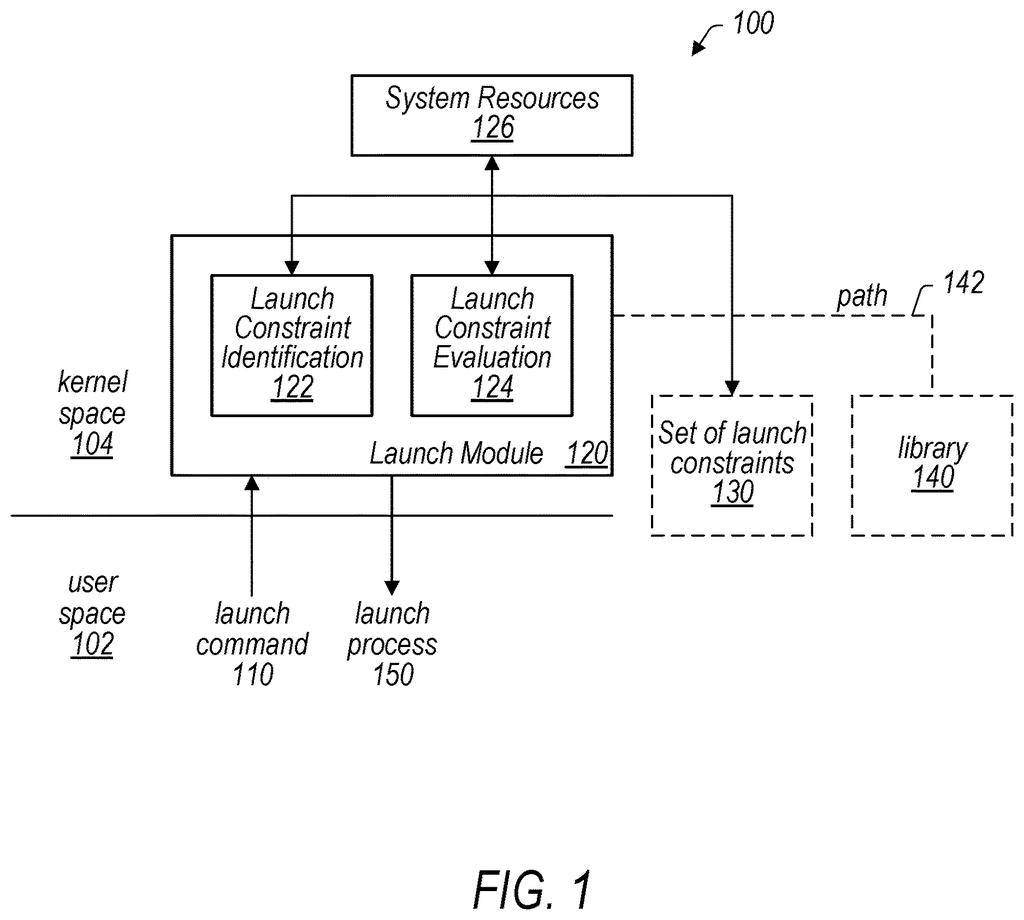
What Apple's launch-time gatekeeper actually does
Imagine a building with one locked storeroom, where only one person is supposed to enter, carrying only the tools they signed for. Now imagine someone swaps the toolbox at the door. Your phone and computer face a version of this every time one program starts another.
Apple's patent application describes a gatekeeper built into the core of the operating system (the kernel). Before a program starts, the gatekeeper looks up the rules that apply to that program. If the starting conditions don't match, it can clean them up first, wiping or resetting background settings the program would otherwise inherit from whatever launched it.
The filing also describes rules that can block a launch entirely, such as an app that only starts from protected storage, or only when the right program asks for it.
… modifying, by the kernel, the execution environment to generate a sanitized execution environment by altering at least one environment variable to comply with the restriction …
Translation: The system cleans up the software's settings before letting it run safely.
How the kernel scrubs a program's settings first
When one program (the parent) asks the operating system to start another (the child), the kernel receives that request. The kernel then finds a set of launch constraints: extra rules that apply to that one program, on top of the checks every launch already gets.
The claims focus on a specific kind of rule: restrictions on environment variables. These are named settings a program inherits from its parent, such as the current user's name or the default folders where commands are found. The kernel compares the child's settings against the rule. Before launching, it produces a sanitized environment by changing at least one variable so it complies, then starts the program with the cleaned-up version.
The claims describe several ways to do the cleanup:
- Unset or remove variables that are not allowed.
- Set certain variables to specific required values.
The rules can arrive in a few places. A parent can pass them in the launch request, a program can carry them inside its own digital signature, or the kernel can look them up in a trust cache (a signed list of approved programs held in protected kernel memory). The filing describes a key-value rule format with logical operators, optional rules that are skipped on older system versions, and a report-only mode that logs failures without blocking anything.
The kernel identifies a process-specific launch constraint, which is a precondition for launching the child process.
Translation: The operating system checks specific security rules before starting any new program.
Why a clean start protects your Apple devices
The practical payoff is protection against programs being tricked at startup. The filing explains that a tampered starting environment can make a privileged program read data from the wrong place, and that cleaning it up from inside the program is too late, because libraries may already have loaded. Having the kernel do it first means the program never sees the untrusted settings.
The description also lists uses beyond security that are possibilities, not claimed features: a gambling app that only opens inside a region where gambling is legal, an adults-only app that waits for age verification, or a messaging app blocked while motion sensors suggest you're driving. For you, the everyday result of the claimed part would be invisible: system helpers on your Apple device that are harder to hijack.
Apple's third filing since July in our watchlist on the AI guardrails race follows one on catching bad AI location data and one on AI 3D model limits.
You will almost never see this feature working. If it does its job, nothing happens: a background helper on your Apple device starts, does its work, and nobody tampered with its settings on the way in.
The benefit is the failure you never experience. A hijacked system helper can reach files or use powers it should never have, and a clean start shuts one of the doors an attacker could use. The claims cover a narrow, practical fix: scrub the inherited settings before launch.
The flashier ideas in the description, like an app that refuses to open outside a legal gambling zone or a texting app that stays shut while you drive, are listed as brainstorming. Treat them as extras. The everyday value here is plain protection you will never have to think about.
Get our take in your Top Stories
Liked this breakdown? Add Patentlyze as a preferred source on Google, and our plain-English take shows up more often in your Top Stories the next time Apple patent news breaks.
There are more where this came from
We read every patent application Big Tech publishes and send you the ones worth knowing. Plain English, free, every week.
The drawings
20 drawing sheets from US 2026/0310492 A1 · click any drawing to enlarge


Show the other 12 sheets


Want this weekly breakdown for a company we don't cover? Patentlyze Pro →
Be the first to weigh in