
From Flat to Layered: Adobe Patent Automates Design File Creation
Imagine getting a finished design as a flat JPEG and being asked to edit it. Adobe's new patent describes a system that could reconstruct that image into separate, editable layers automatically.
What Adobe's image-to-layers conversion actually does
Picture this: a client sends you a screenshot of a website design, or a JPEG of a poster, and asks you to tweak it. Right now, you'd have to rebuild the whole thing from scratch in a tool like Photoshop because the file is 'flat,' meaning everything is baked together into one image with no editable parts.
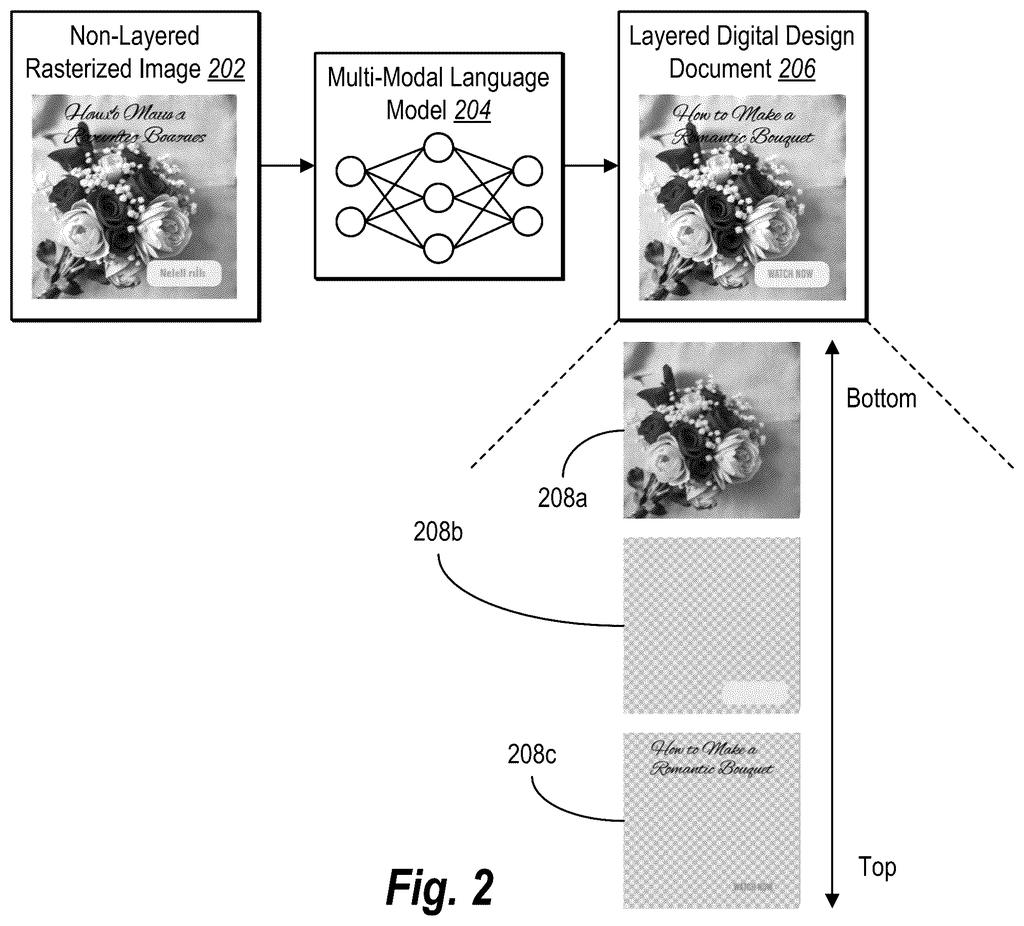
Adobe's patent describes a system that analyzes a flat image, figures out what the individual design pieces are (text, buttons, backgrounds, icons, and so on), and then reassembles them into a proper layered design document you can actually edit. It calls this step-by-step analysis a 'design plan architecture,' which is just a fancy way of saying it first makes a map of what's in the image before it starts pulling things apart.
The result gets delivered straight to a design application's interface, so you could theoretically open a screenshot and immediately start moving elements around, changing colors, or swapping out text as if you'd built the file yourself.
How Adobe extracts and rebuilds design elements from a flat image
The patent describes a three-stage pipeline:
- Design plan generation: The system first analyzes the reference image and produces a 'design plan architecture,' essentially a structural map that identifies and categorizes design elements like text blocks, graphic shapes, backgrounds, and UI components before any extraction begins.
- Element extraction: Using that map as a guide, the system then isolates each identified element from the flat image, separating them from one another even when they visually overlap or share pixels.
- Document construction: The extracted elements are assembled into a layered digital design document, where each element sits on its own independent layer, and the finished file is passed to the graphical user interface of a client device.
The key idea is that the plan-first approach (making a map before cutting anything out) lets the system make smarter decisions about what belongs together and what should be separated. Without that planning step, a naive system might cut a drop shadow away from the button it belongs to, or merge two overlapping text elements into one.
The patent doesn't name a specific AI model, but the extraction and classification steps strongly imply the use of computer vision (software that interprets images the way humans read a page) at multiple stages.
What this means for designers working from screenshots or mockups
For designers, the most painful part of inheriting someone else's work is receiving a flat file with no editable source. This patent points toward a future where Adobe's tools could automatically reverse-engineer any image into a working design file, saving hours of manual reconstruction.
There's also a broader implication for your workflow: if this capability lands in something like Photoshop or Adobe Express, importing a competitor's mockup, a screenshot from a website, or even a printed-and-scanned flyer could become a starting point rather than a dead end. That's a real quality-of-life shift for freelancers, agencies, and anyone who works with design assets they didn't create themselves.
This is a genuinely useful idea aimed squarely at a frustration every designer has felt. The hard part is the extraction quality: separating overlapping elements from a flat image is a difficult computer vision problem, and the patent's 'design plan architecture' framing suggests Adobe knows it needs a planning layer to do it well. If the output is clean enough to actually edit, this could become one of those features people wonder how they lived without.
Get our take in your Top Stories
Liked this breakdown? Add Patentlyze as a preferred source on Google, and our plain-English take shows up more often in your Top Stories the next time Adobe patent news breaks.
There are more where this came from
We read every patent application Big Tech publishes and send you the ones worth knowing. Plain English, free, every week.
The drawings
13 drawing sheets from US 2026/0212558 A1 · click any drawing to enlarge


Show the other 5 sheets


Want this weekly breakdown for a company we don't cover? Patentlyze Pro →