
Samsung Files Patent for a Screenshot Feature That Sends Coupons and Tickets to the Right App
Your screenshots are a pile of good intentions: coupons you meant to use, tickets you meant to save, addresses you meant to look up. Samsung's patent application has the phone read them and hand you the right app.
What Samsung's screenshot reader actually does
Imagine you screenshot a coffee coupon on Monday, a movie ticket on Wednesday and a restaurant's address on Friday. A month later they're all buried in your gallery, and the coupon has expired.
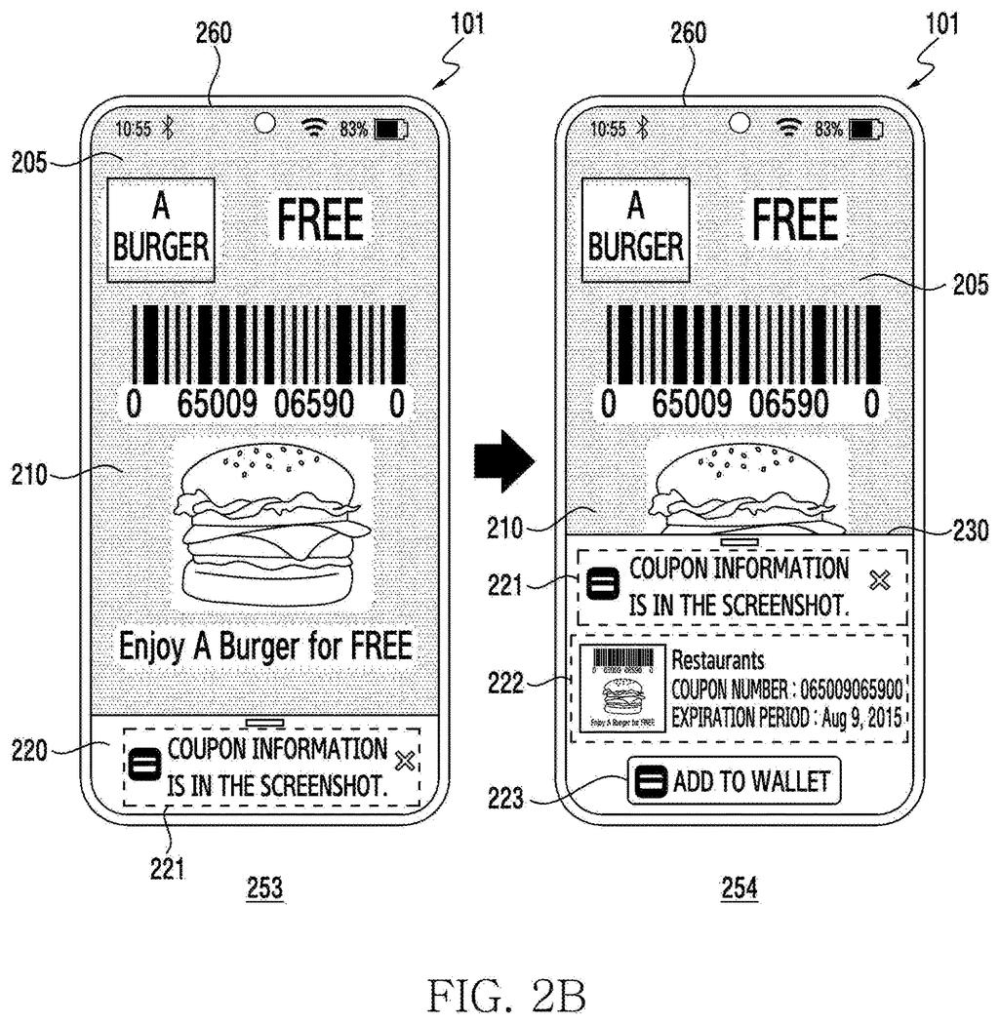
Samsung's patent application describes a phone that reads those screenshots for you. Tap an analyze button and the phone pulls out the text, works out what kind of image it is, and offers a button for the right app: a wallet app for the coupon, a map for the restaurant, a calendar for the ticket.
Tap that button and the app opens with the details already typed in, so you skip the copying and pasting. The phone can also nudge you before a coupon runs out. If it can't find a sensible app, it simply tells you there's nothing it can do.
display, through the display, a still image including one or more image objects corresponding to text, based on an input for analyzing the still image being displayed, obtain text information corresponding to the one or more image objects of the still image …
Translation: The device looks at a screenshot and reads the text inside it.
How the phone turns a screenshot into an action
When a still image or screenshot is on screen, you tap an analyze button. The phone runs optical character recognition (OCR, software that reads printed words inside a picture) to pull out the text. That text goes to an AI model, possibly a large language model (the same family of AI behind chatbots), along with an instruction written in plain language. The model returns a category, the key details and a short summary.
From the category, the phone picks an app and shows a small window over the screenshot with a button for it. The filing's examples include:
- A coupon goes to a wallet app, with the product name, barcode number and expiry filled in.
- A restaurant or shop goes to a map app, with a route from where you are.
- A movie ticket goes to a calendar app, with the date and time.
- A product you might buy goes to a reminder app.
The app can also receive the image itself, even a cropped piece of it. If the right app isn't installed, the window offers a button to install it instead. A screenshot that fits several categories can show several buttons, and the AI step can run on the phone or on a server.
The filing adds extras. The phone can look up information the image lacks, such as where a coffee coupon can be used. It can sort screenshots by category with expiry dates, and time a reminder to your habits, like warning you on the weekend if you usually use coupons then. If you change a category, it applies that correction to similar images later.
… select a designated application corresponding to the still image from among a plurality of applications, based on at least a portion of the text information …
Translation: It figures out which app belongs with that text, like a ticketing or coupon app.
What this means for your pile of screenshots
If you save screenshots of coupons, tickets and addresses, this would turn your gallery into a to-do list that partly does itself. The typing is the annoying part of using a saved coupon or adding an event, and the filing aims to remove it. Sorting by category with expiry dates and weekend-timed reminders also tackle the real reason coupons go unused: you forget they exist.
For Samsung, the filing shows a phone that treats a screenshot as something to act on, linking its AI to the apps already on your phone. It is a patent application, so nothing here says the feature will ship. Still, every piece it describes, from reading text to filling in forms, is something phones can already do, which makes the idea easy to picture on a phone you own.
Samsung's 13th filing we've tracked since July in our AI agents that act for you watchlist builds on earlier applications like one on approval decisions and one on automatic security checks.
Every shortcut like this costs something, and the biggest bill here is trust. To work, your phone has to read everything in your screenshots, and the filing says the AI step can run on a server instead of on the phone. Screenshots of boarding passes, receipts and messages are personal, so where that text goes matters more than any convenience.
The second cost is guessing wrong. An AI model decides whether your image is a coupon, a place or a ticket, and a bad call means a button for the wrong app. Samsung covers this with a 'no action' message and lets you change a category, which is a sensible escape hatch.
The trade reads as worth it. Screenshots are already how people save things they mean to act on later, and a button that does the typing for you removes a chore. The open question is whether the reading stays on your phone.
Get our take in your Top Stories
Liked this breakdown? Add Patentlyze as a preferred source on Google, and our plain-English take shows up more often in your Top Stories the next time Samsung patent news breaks.
There are more where this came from
We read every patent application Big Tech publishes and send you the ones worth knowing. Plain English, free, every week.
The drawings
31 drawing sheets from US 2026/0320999 A1 · click any drawing to enlarge


Show the other 23 sheets


Want this weekly breakdown for a company we don't cover? Patentlyze Pro →
Be the first to weigh in