
Google Files Patent for Holding Down an App Icon and Speaking Your Command
Hold your finger on an app icon, and your phone could offer a short list of things you can say. Speak one, let go, and it happens.
What Google's touch-then-talk patent does
A man in a busy kitchen has flour on one hand and a message about pizza buzzing on his phone. He wants to answer, but typing is out, and talking to a voice assistant means remembering the right phrase.
Google's patent application describes a middle path. You press and hold something on your screen, like an app icon or a notification, and the phone shows a short list of things you can do with it. While your finger stays down, you speak. A notification might offer reply, snooze or delete. Let go, and the phone carries out what you said.
There is a safety net, too. After you lift your finger, a short countdown gives you time to cancel if the phone misheard you. The filing's own example has the phone turning burrito into burrata, and the countdown gives you a moment to catch it.
… receiving, by the computing device, a touch input that selects a UI element of the plurality of UI elements; determining, by the computing device and responsive to the selection of the UI element, one or more actions applicable to an application associated with the UI element; …
Translation: The phone or computer figures out what shortcuts belong to the app you just pressed.
How a long press turns into a voice command
The filing describes a UI manager (software that handles what you see and tap) running on a device with a touchscreen, a microphone and a speaker. Claim 1 covers a simple chain: you touch an item on the screen, the device works out which actions fit the app behind it, it displays those actions, you pick one by voice, and the device carries it out.
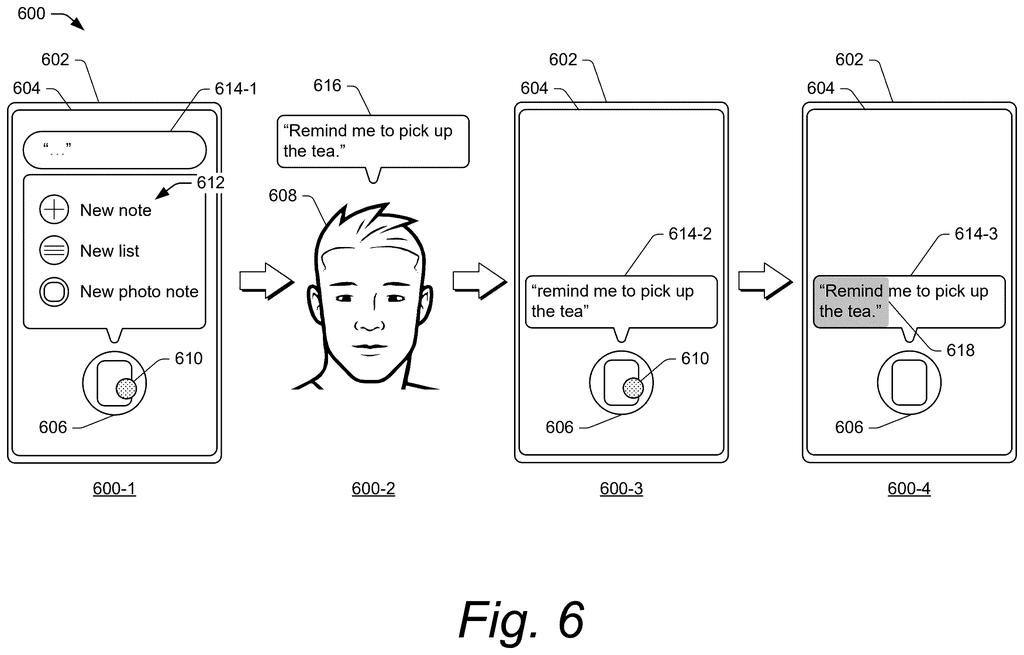
In the main example, you press and hold. The options appear as voice hints (short words like new note, reply or share), and a bubble with a blinking cursor shows where your spoken words will land. You talk while holding, and lifting your finger tells the phone you are done. A variation lets a quick long press end before you speak, with a short silence ending your command. If there are five or more options, they can be highlighted one at a time.
Deciding which actions to show can work three ways:
- A list supplied by the app's developer
- Developer rules run in reverse, so instead of matching your speech to a command, the phone generates example phrases from the rules
- A large language model (an AI text system) that reads the code behind the item and writes the options
The filing also describes an audio-only version for when the screen is off or out of reach, where the device reads the options aloud. A countdown before the action runs gives you time to cancel a misheard command.
… receives a first user selection (e.g., touch input) of a GUI element and determines one or more actions that are associated with the selected GUI element. The UI manager outputs the one or more actions for display, receives a second user selection (e.g., voice input) of an action, and performs, responsive to the second user selection, the action.
Translation: You touch an icon to see a menu, then speak out loud to pick what happens next.
Why talking to your apps could get easier
If this ever shows up on your phone, it could mean fewer trips through menus and fewer guesses about what to say to a voice assistant. When your hands are full or your eyes are busy, a press followed by a few words could handle a reply, a favorite or a reminder. The on-screen hints also fix a familiar annoyance: you can see what the phone understands instead of guessing.
The filing lists phones, watches, tablets, smart glasses, smart speakers and cars as possible devices, so the idea is meant to travel well beyond one screen. The countdown matters too. Voice mistakes are common, and a short window to cancel makes talking to your phone feel less risky when you are sending a message.
Google's 49th filing we've tracked since May in our AI agents that act for you watchlist builds on its big-question research tool and photo research agent applications.
Claim 1 covers a simple two-step sequence: touch something on the screen, then speak a choice from the options that appear. Any device that follows that pattern falls inside the claim, regardless of whether it uses AI, requires a long press, or belongs to a particular product category.
That breadth matters because the claim does not limit itself to a specific type of screen element or app. One touch on anything, anywhere on the display, triggers the chain.
If granted, this claim would reach any phone or tablet that shows voice-selectable options after a tap, which describes a wide slice of how modern devices already behave. The order of inputs is the fence around the claim: voice alone or touch alone stays outside it, but the combination in that sequence does not.
Get our take in your Top Stories
Liked this breakdown? Add Patentlyze as a preferred source on Google, and our plain-English take shows up more often in your Top Stories the next time Google patent news breaks.
There are more where this came from
We read every patent application Big Tech publishes and send you the ones worth knowing. Plain English, free, every week.
The drawings
9 drawing sheets from US 2026/0310403 A1 · click any drawing to enlarge


Want this weekly breakdown for a company we don't cover? Patentlyze Pro →
Be the first to weigh in