
Google Patents a Post-Screenshot Menu That Suggests What to Do Next
Every time you take a screenshot, you lose a few seconds hunting through menus to share or edit it. Google is patenting a smarter interrupt: a single pop-up that reads the content and offers the right next steps immediately.
What Google's instant screenshot action menu actually does
Ever taken a screenshot and then spent twenty seconds tapping through apps just to send it to someone? Google is working on a fix.
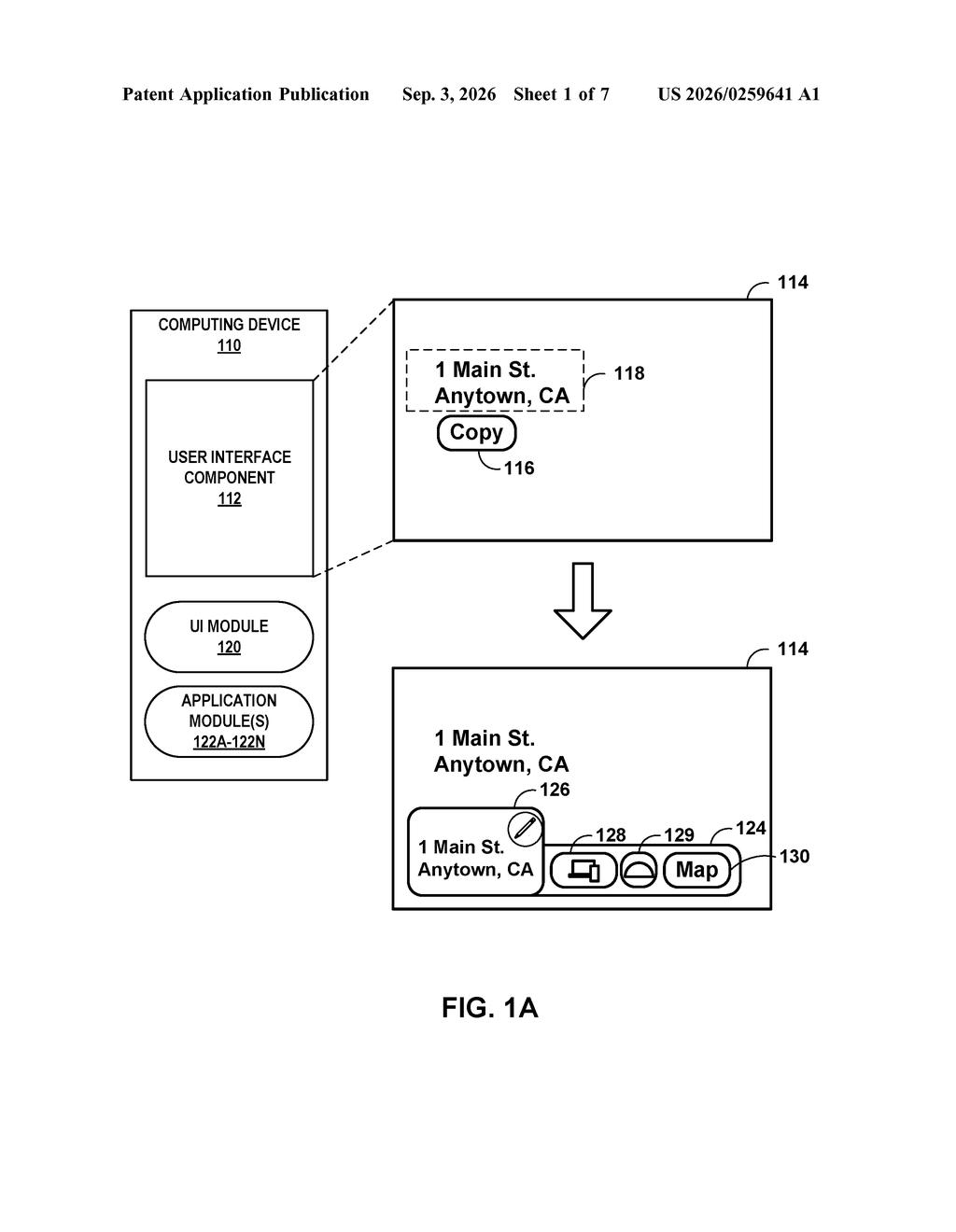
The patent describes a small menu that appears on your screen the moment you capture a screenshot or screen recording. That menu doesn't just offer generic options. It can suggest actions tailored to what's in the image, like opening a specific app, sending it to another device you own, or jumping straight into an editor. You pick one tap, and the thing is done.
The key addition on top of what Android already does today is the recommended actions layer. Instead of always showing the same edit and share buttons, the system can look at the captured content and push forward the option most likely to be useful. Captured a receipt? It might suggest a budgeting app. Grabbed a map? It could offer navigation.
… outputting, by the one or more processors and for display at a display device, a graphical user interface element that includes indications of a plurality of actions, wherein the plurality of actions include one or more of an edit action, a cross-device sharing action, a cross-application sharing action, or one or more recommended actions associated with the content …
Translation: After taking a screenshot, the device displays a menu of options like editing, sharing, or smart suggestions.
How the GUI element surfaces edit, share, and recommended actions
The patent covers a method for handling captured content, primarily screenshots, on a computing device. When a user triggers a capture action, the device outputs a graphical user interface (GUI) element before the user has to go hunting for anything.
That GUI element bundles up to four categories of action:
- Edit action: open the captured image in a markup or cropping tool
- Cross-device sharing action: push the content to another device the user owns, like sending a phone screenshot directly to a laptop
- Cross-application sharing action: route the content to a different app on the same device
- Recommended actions: context-aware suggestions derived from what was captured
The recommended actions component is where the patent gets interesting. The system analyzes the captured content and surfaces actions that are specific to it, rather than offering a one-size-fits-all list. The claim language is broad enough to cover text recognition, image classification, or other signals without specifying the exact method.
The user then makes a single selection, and the device executes that action. The whole flow is designed to collapse what currently takes three or four navigation steps into one.
What this means for Android's screenshot and sharing flow
For everyday Android users, Google's push to reduce friction in its sharing flows this is a quality-of-life fix for one of the most common things people do on a phone. Screenshots are one of the most-used features on any mobile operating system, and the current flow, where a small toolbar fades away and you then have to hunt through the share sheet, adds unnecessary steps.
The deeper interest here is the recommended actions feature. If the system can reliably read what you captured and suggest a useful next step, it starts to look less like a UI improvement and more like a layer of on-device content understanding baked into the OS itself. That has implications for how Google ties its AI features into everyday phone interactions.
Google's 32nd filing we've tracked since May in our agents that act for you watch follows one that self-fixes code and one that spots apps on screen.
Getting this to users requires no new hardware at all, just a software update to how phones already handle screenshots.
The missing piece is the "recommended actions" layer, which means the phone has to understand what's in the screenshot well enough to suggest something useful. Google's camera and photo tools already do this kind of image reading, so the infrastructure exists, the question is how reliably it works when applied to arbitrary screen content.
The patent's claim covers a wide range of actions together, editing, sharing to another app, sharing to another device, and smart suggestions, which suggests Google is staking out the whole approach rather than one narrow version of it. That breadth is a sign this is closer to a product decision than a research experiment.
Get our take in your Top Stories
Liked this breakdown? Add Patentlyze as a preferred source on Google, and our plain-English take shows up more often in your Top Stories the next time Google patent news breaks.
There are more where this came from
We read every patent application Big Tech publishes and send you the ones worth knowing. Plain English, free, every week.
The drawings
7 drawing sheets from US 2026/0259641 A1 · click any drawing to enlarge


Want this weekly breakdown for a company we don't cover? Patentlyze Pro →
Be the first to weigh in