
Google Files Patent for One Button That Finishes a Chore Across Several Apps
Google's patent application describes a small panel that notices which apps you use back to back, then lets one tap carry out the whole chain, like turning a text into a to-do item and replying 'got it.'
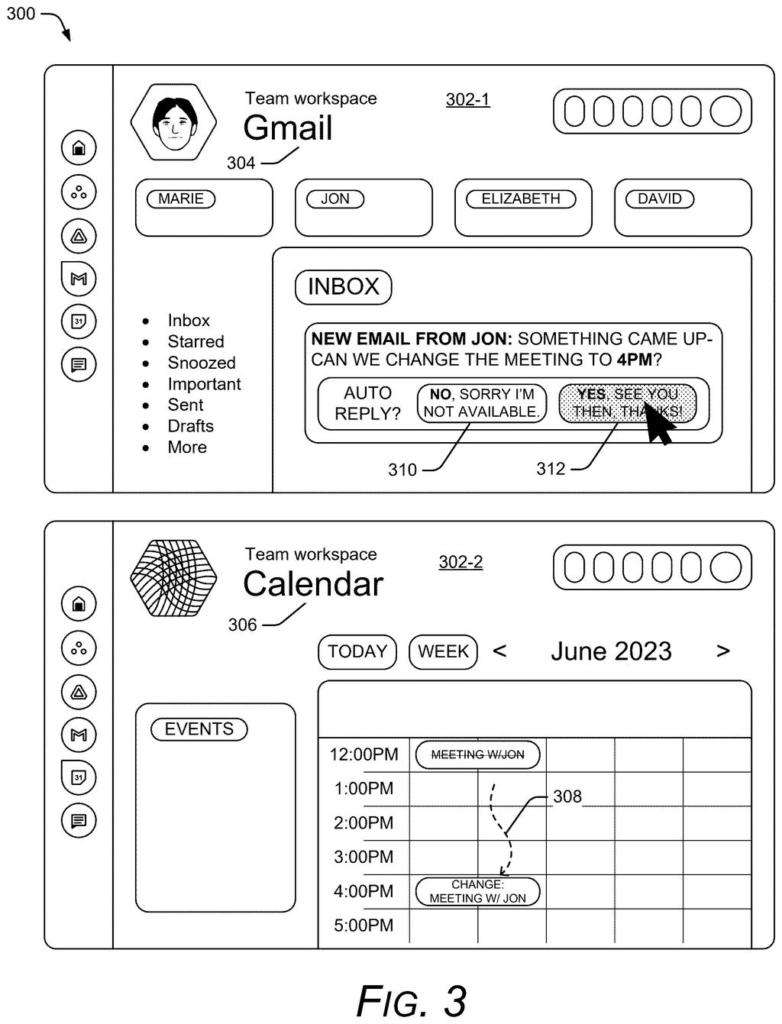
What Google's multi-app widget actually does
Right now, finishing one chore often means hopping between apps that each look and behave differently. A coworker texts you a request, you copy a line, paste it into a to-do app, then go back to the thread to reply. Google's patent application calls that kind of switching confusing and slow.
Its fix is a small panel that learns which apps you tend to use together. Based on your habits, it builds a set of buttons, each one reaching into a different app. Tap them in order, or tap a single button that runs the whole chain, and the text becomes a to-do item while the sender gets a quick reply.
The goal is that you stay in one place while the apps do the work behind the scenes.
… creating a multi-function widget, the multi-function widget including selectable controls to perform multiple functions including at least a first function and a second function of the multiple functions, the first function and the second function associated with the first and second disparate software applications …
Translation: Building a single button panel that controls tasks across different apps.
How Google links apps through usage history
The system has two jobs. First, a component the filing calls an association manager works out which apps you use together. It looks at your usage history, the order you do things in, and whether one step uses the result of another. A machine-learned model (software trained on past behavior to spot patterns) can help. In one example, after you select text from a notification, there is a 37% chance you will drag it into a to-do list, and a 76% chance you will then reply to the sender.
Second, it builds a multi-function widget (a small panel of buttons) from those links and shows it in one interface, automatically and without you asking. Each button talks to a different app through inter-process communication, or IPC (a way for one program to send commands to another and get an answer back). The filing lists several ways to do this, including APIs (doorways apps offer to other software) and message queues.
In the 'To-Do Builder' example, the panel offers three steps:
- Select text from a text message or email.
- Add that text as an item in a to-do app.
- Reply 'got it, will handle soon' to the sender.
A single 'Perform ALL' button can run all three. The claims also cover passing one app's result to the next, a calendar-invite example, and a panel that resizes to show the result.
… enable users to quickly access, alter, or interact with multiple disparate software applications through one or more widgets within a user interface.
Translation: Letting people manage multiple different apps from one screen.
What this could change about your phone chores
If this ever ships, it would change something small but constant: the number of taps between a request and a finished chore. Phones already have home-screen widgets, but those usually show one app's information. A panel that stitches several apps together could cover the daily loop of checking messages and turning them into tasks, with fewer screens in between.
The idea also leans on your history, so it would only work if you allow it to see your app activity. The description says users would get controls over what is collected, and that personal details would be removed or generalized. Google says the payoff is fewer inputs and less processing, and its examples use Gmail and Calendar.
Google's 53rd patent we've tracked since May on agents that act for you adds to a pattern that includes the TV-sensing assistant and the news-impact analyst.
No new hardware required. Everything described here is software that could run on a phone or laptop you already own, and the filing name-checks Gmail and Calendar as examples.
The real hurdle is getting other apps to cooperate. For one panel to trigger actions across a texting app, a to-do app, and a calendar, each of those apps has to agree to send and receive commands from it, and the filing outlines several ways that handshake could work. Apps from companies outside Google would have to opt into that arrangement voluntarily.
A version limited to Google's own apps looks like a straightforward software update. The version that works across every app on your phone depends on other developers going along, which is a slower, harder road.
Get our take in your Top Stories
Liked this breakdown? Add Patentlyze as a preferred source on Google, and our plain-English take shows up more often in your Top Stories the next time Google patent news breaks.
There are more where this came from
We read every patent application Big Tech publishes and send you the ones worth knowing. Plain English, free, every week.
The drawings
33 drawing sheets from US 2026/0319767 A1 · click any drawing to enlarge


Show the other 25 sheets


Want this weekly breakdown for a company we don't cover? Patentlyze Pro →
Be the first to weigh in