
Google Files Patent to Show You the Big Plays You Missed While a Livestream Was Paused
Pause a live football game to answer the door, and Google's idea is that your screen keeps working while you're gone. When you come back, you'd find a short list of the touchdowns you missed, each one a tap away.
What Google's pause-and-catch-up feature does
You're watching a live game on your phone and the doorbell rings. You hit pause, deal with the delivery, and come back to a stream that is now 20 minutes behind. Your choices are to scrub around blindly or to fast-forward and hope you don't skip the good stuff.
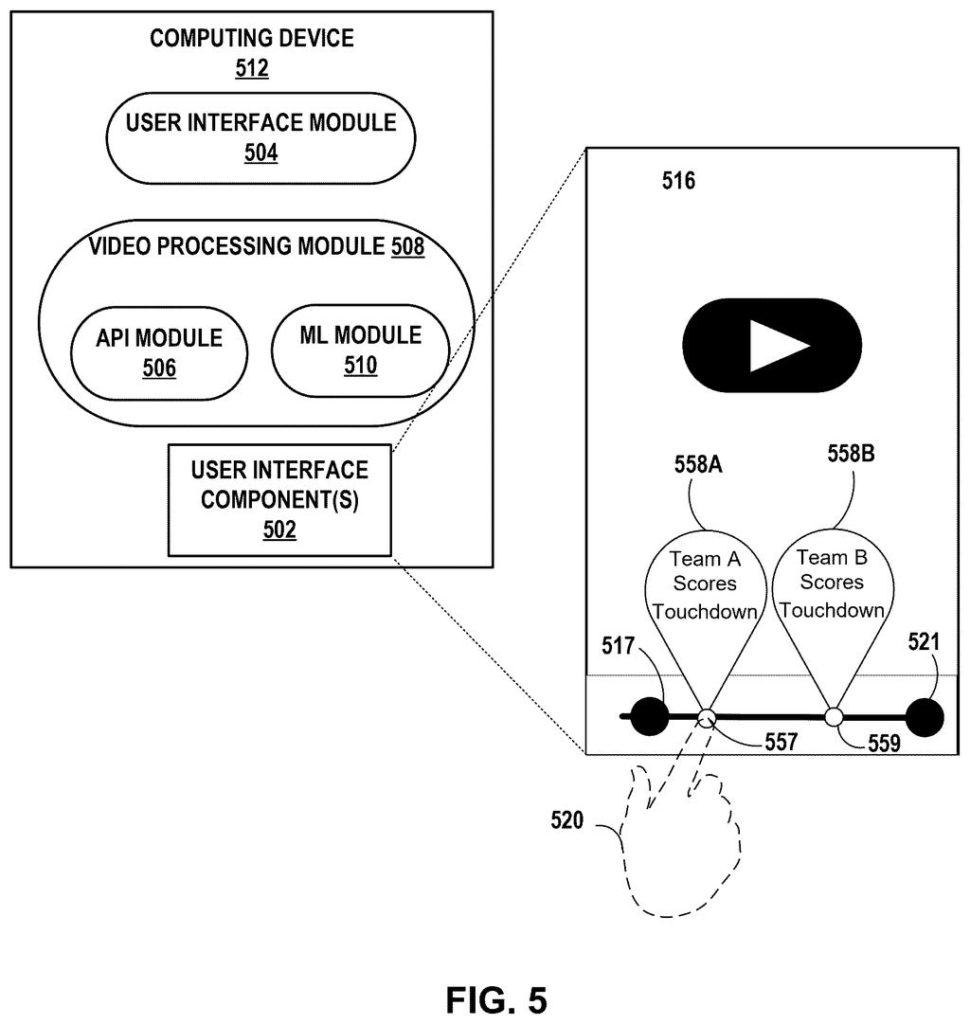
Google's patent application describes a fix. While your stream sits paused, an AI model keeps reading the broadcast, using things like the transcript, the video, and the audio. It picks out the moments that matter, such as a touchdown, and ignores things like a timeout. Then it writes a short label for each one, like "Team A scores touchdown."
When you return, those labels sit on top of the paused screen. Tap one, and the video jumps to the moment that play began. The idea is that you catch up on what counts without hunting for it.
identifying, by the computing device, a subset of events from the plurality of events by at least applying a machine learning model to the content, wherein each event from the subset of events has at least a threshold level of importance …
Translation: AI filters the missed action to find the most important moments while you are away.
How the AI picks and labels the key moments
The claims cover a method, a device, and a stored-software version of the same idea. Once you pause a livestream, the device keeps receiving the broadcast's content. It then uses a machine learning model (software trained to recognize patterns) to find a subset of events that clear a threshold level of importance. Each one must have started somewhere between the moment you paused and the live edge.
The same model then writes a short summary of each chosen event. The screen is updated with an indication of each summary, and it keeps updating as new events happen, until you ask to return to live. Tapping a summary moves playback to the time that event began.
The description fills in several details:
- Inputs: a transcript, video frames, and audio.
- Importance: can be set by your preferences or past viewing, with your consent. One example is that you usually jump to touchdowns.
- Placement: labels can sit on the scrub bar (the timeline slider) at the spot where the play starts.
- Multiple streams: it can keep tracking a paused game while you watch a different livestream in another app.
- Where it runs: on your phone, or offloaded over your home network to a stronger device. A TV could lean on your phone, for example.
One example rule given for the summaries is a cap of 50 characters.
Responsive to receiving a user input that selects the indication of the summary of the first event, the computing device adjusts a playback position of the livestream to the time at which the first event begins.
Translation: Clicking on a summary instantly jumps the video right to that exciting moment.
Why a paused game could become a highlight reel
If you watch live sports or breaking news on your phone, you know the pain of pausing and falling behind. This feature would turn a paused stream into a quick catch-up list, so you'd skip the dead air and still see the plays you care about. The filing says it could work across different streaming apps, because it can be handled by the phone's operating system instead of each app.
The patent office has approved this application, but it has not been issued yet. Once Google pays the final fee, it should be issued as a granted patent. Google's filing doesn't name a product, so treat it as an idea for now, but it fits naturally with phones, TVs, and streaming boxes.
Google's 44th filing in the AI vision patents we cover since May follows a two-stage image cleanup application and a facial expression editing application that we've tracked.
The risk in handing an AI the job of spotting big moments is that it will get some wrong. A mislabeled highlight costs you one tap to dismiss; a missed play costs you nothing the feature promised to save, and you end up scrubbing anyway.
The quieter cost is that catching up requires a background process reading your screen and audio the whole time you are away. Google says this runs locally on your device, which limits exposure, but the process is still there.
On balance, the trade holds. The feature is optional, the errors are recoverable, and even a rough summary beats ten minutes of blind scrubbing.
Get our take in your Top Stories
Liked this breakdown? Add Patentlyze as a preferred source on Google, and our plain-English take shows up more often in your Top Stories the next time Google patent news breaks.
There are more where this came from
We read every patent application Big Tech publishes and send you the ones worth knowing. Plain English, free, every week.
The drawings
10 drawing sheets from US 2026/0332863 A1 · click any drawing to enlarge


Show the other 2 sheets


Want this weekly breakdown for a company we don't cover? Patentlyze Pro →
Be the first to weigh in