
Apple Patents a Bigger Phone Keyboard You Can Read Inside a Headset
A headset's cameras show you the world a little blurrier than your own eyes do, and that can turn your phone's keyboard into a smudge. Apple's patent application has the phone redraw its keys bigger the moment your headset needs you to type.
What Apple's bigger headset-friendly keyboard does
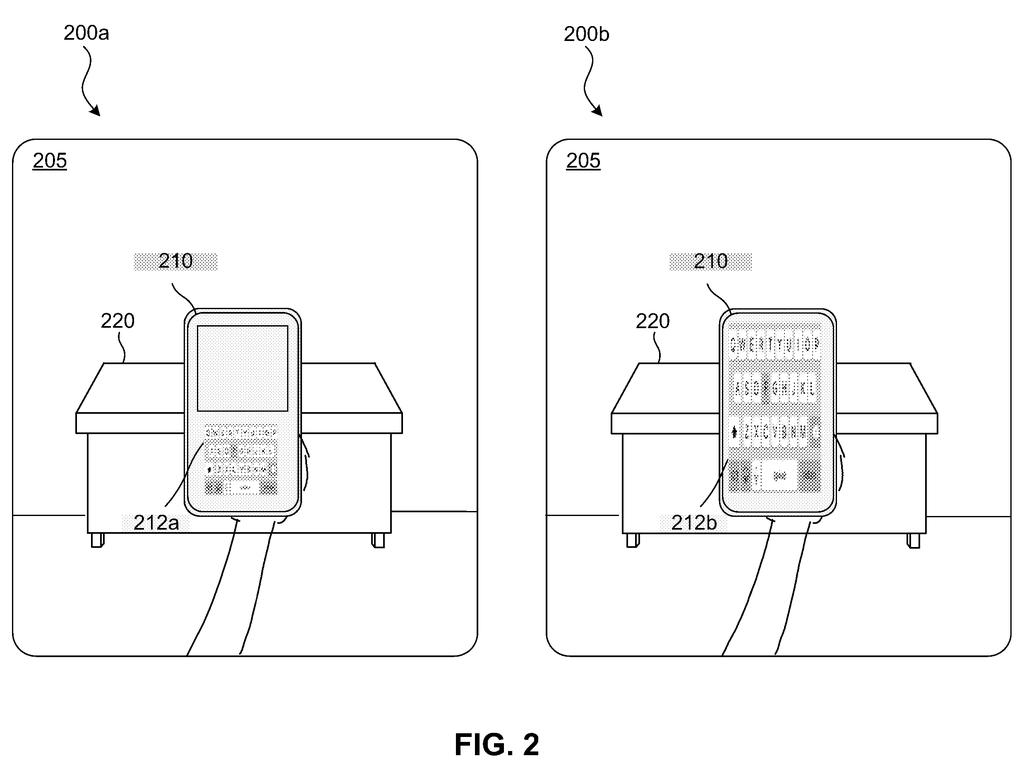
Put on a headset that shows you the room through its cameras, and your phone's keyboard can turn into a blur. The filing says the headset's picture is less sharp than your own eyesight (it gives 20/35 as an example, against a normal 20/20), so tiny keys may be unreadable at normal reading distance. Holding the phone right up to your face is one workaround, and the filing calls that uncomfortable.
Apple's fix is to let the headset tell your phone what it needs. When you open a text box in the headset, it asks your phone or tablet to redraw its keyboard bigger, bolder or brighter, so the keys are easy to read through the headset's camera view. The headset can also float word suggestions near the phone.
The filing also adds a privacy check. The big keyboard could stay off on a bus, a plane or in a coffee shop, or when other people are close enough to see what you type.
transmitting a command instructing the second electronic device to display, via a second display device of the second electronic device, the input interface having one or more input controls in an augmented format having a second visual characteristic differing from the first visual characteristic …
Translation: The phone tells the headset to show a modified version of the keyboard.
How the phone and headset agree on a bigger keyboard
The method in claim 1 runs on the phone or tablet, not the headset. The phone receives a notification asking it to show an input interface (the keyboard or other on-screen controls), works out what type of device is asking, and draws the controls in an augmented format (a different, easier-to-read look) when the viewer is looking through pass-through video, meaning the headset's live camera view of the room. You type, and the phone sends your input back to the headset.
The filing describes several ways the headset could decide it's time to ask:
- A text box opens in the headset's own interface.
- You look at the phone (the headset's eye tracking tries to tell a real look from a stray eye flick).
- The phone is within a set distance or facing you.
- You are wearing the headset and touching the phone.
On the phone, the changes include larger keys (up to filling the whole screen), different color, higher contrast and bolder text. Dependent claims tie the minimum size to the headset's characteristics, the distance between the devices, a minimum character size and the lighting in the room.
The headset can add extras around the phone: a 3D pop-up bubble for the key you pressed, auto-correct and auto-fill suggestions (typing 'aut' offers 'auto', 'automobile' and 'automatic'), spatial audio for key presses, and a virtual function-key bar above the phone. The drawings also show a smartwatch version.
… a user device (e.g., an HMD) may be enabled to receive touchscreen input via input controls displayed by a remote device (e.g., a mobile phone, a tablet computer, etc.) using a display mode enhanced for pass-through viewing.
Translation: A headset can accept touch input from a phone that uses a special display mode for camera pass through.
What this means for typing on a headset
Entering text is a chore on any headset, and this filing starts from the idea that a touchscreen you already own is a good place to do it. You get real keys to press, and the phone does the work of making them readable. That could mean an iPhone or iPad that turns into a headset keyboard on its own when you glance at it.
The privacy rules matter too. The filing says the big keyboard could stay off in public places, or when other people are near enough to see your screen. Apple Vision Pro could be one such headset, though the filing names only a generic head-mounted device.
Apple's 86th filing we've tracked since May in our AR glasses work builds on efforts like room scan error recovery and an uncertain food tracker.
Claim 1 covers a phone or tablet that receives a request from a headset, figures out what type of device is asking, and adjusts how its input controls look so they are readable through the headset's camera view of the room. The word "input controls" rather than "keyboard" means sliders, pickers, and signature fields all fall inside the boundary.
The tight condition is that the controls must work specifically for pass-through viewing, where the headset camera shows the real room and overlays the phone screen inside it. A phone that simply enlarges its keyboard for an ordinary user would sit outside that wording entirely.
If granted, this claim would reach anyone building exactly this handshake between a headset and a phone or tablet. The dependent claims add factors like distance, lighting, and minimum character size, which are sensible engineering choices that narrow the claim further rather than expand it.
Get our take in your Top Stories
Liked this breakdown? Add Patentlyze as a preferred source on Google, and our plain-English take shows up more often in your Top Stories the next time Apple patent news breaks.
There are more where this came from
We read every patent application Big Tech publishes and send you the ones worth knowing. Plain English, free, every week.
The drawings
7 drawing sheets from US 2026/0310330 A1 · click any drawing to enlarge


Want this weekly breakdown for a company we don't cover? Patentlyze Pro →
Be the first to weigh in