
Apple Patent Moves Keyboard Mode Indicators Directly Next to Your Cursor
Apple is working on a system that shows you exactly what typing mode you're in by placing a small indicator right next to your cursor, so you're never caught off guard by caps lock, dictation, or any other mode silently switching on you.
What Apple's cursor-linked mode indicators actually do
Imagine you're typing an email and you hit caps lock without realizing it. A FEW WORDS LATER, you notice everything is in capitals. Or you trigger dictation mode by accident, and your device starts transcribing what you say instead of letting you type. These little surprises happen all the time.
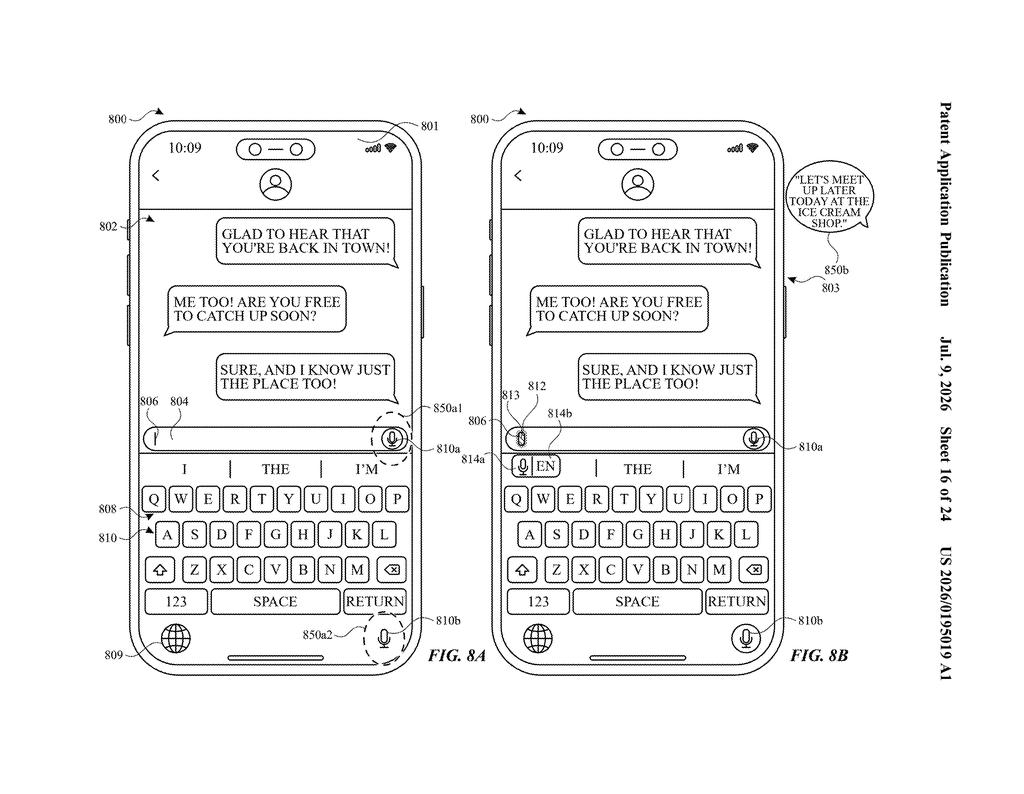
Apple's patent describes a system that puts a small visual indicator right next to your text cursor whenever a specific keyboard mode kicks in. So if caps lock is on, you'd see a signal right where you're typing. Switch to dictation mode, and a different indicator shows up in the same spot. No need to glance at a toolbar or status bar.
The patent also covers displaying special effects while dictation is active, and even showing a text transcription when you say a command word. The idea is to keep all the relevant feedback exactly where your eyes already are, which is right where the words appear on screen.
How the system tracks and displays mode changes at the cursor
The patent describes a computer system that monitors the state of different keyboard input modes and responds by displaying a corresponding visual indicator directly at the position of the insertion point indicator (the blinking cursor you see when typing).
Specifically, the system handles at least two distinct modes:
- First keyboard mode (for example, caps lock): when this mode is active, a first-style indicator appears at the cursor location.
- Second keyboard mode (for example, dictation): when this mode is active, a different indicator replaces or supplements the first one at the same location.
Beyond the basic indicators, the patent extends to dictation mode specifically. While dictation is active, the system can display visual effects tied to that state. It can also show a live transcription when the user speaks a command keyword, meaning spoken commands are visually acknowledged right in the text field rather than silently processed.
The whole approach is about anchoring status information to the cursor itself rather than scattering it across toolbars, status bars, or notification banners. The system checks which set of criteria is satisfied (essentially which mode is on) and renders the appropriate indicator accordingly.
What this means for typing and dictation on Apple devices
For anyone who types on an Apple device, the practical payoff is fewer surprises. Keyboard mode confusion, especially with caps lock and dictation, is one of those minor annoyances that adds up over a day of work. Anchoring the indicator to the cursor means your eyes never have to leave the text to figure out what mode you're in.
The dictation-specific features are worth noting separately. As Apple pushes voice input harder across iOS, iPadOS, and macOS, giving users clear, in-context feedback about when the device is listening and what it heard becomes genuinely important. This patent suggests Apple is thinking carefully about how to make that experience feel less like a black box.
This is a small but thoughtful quality-of-life patent. It won't make headlines, but the underlying problem it solves, not knowing what mode your keyboard is in without hunting for a status indicator, is something real users hit constantly. If this ships, it's the kind of change that makes a device feel more polished without anyone being able to point to exactly why.
There are more where this came from
We read every patent application Big Tech publishes and send you the ones worth knowing. Plain English, free, every week.
The drawings
24 drawing sheets from US 2026/0195019 A1 · click any drawing to enlarge
Want this weekly breakdown for a company we don't cover? Patentlyze Pro →
Be the first to weigh in