
Microsoft Patents a Persistent Clipboard That Recommends What to Do With Your Copied Content
You copy an address and Windows automatically asks if you want to open it in Maps. That's the basic idea behind Microsoft's new patent for a smarter clipboard-like layer that lives on your desktop and suggests actions based on whatever you've just grabbed.
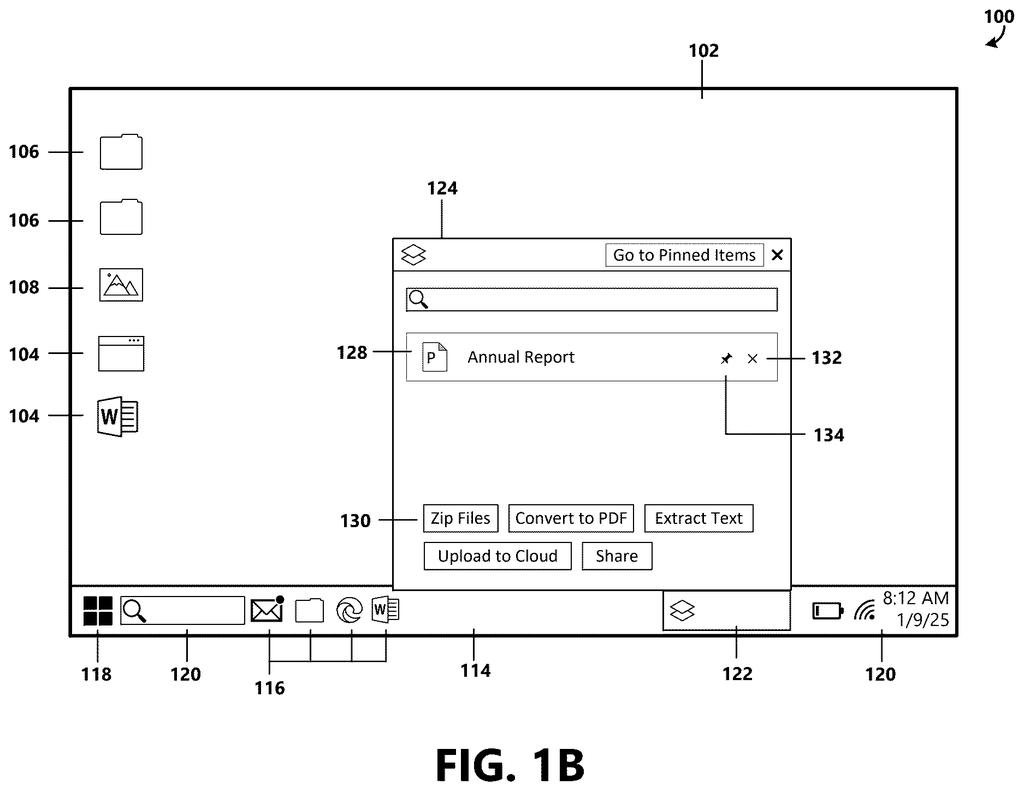
What Microsoft's content holding layer actually does
Imagine you copy a phone number from a webpage. Instead of just sitting invisibly in your clipboard, the copied content appears in a small persistent panel on your desktop, and Windows suggests actions you might want to take: call it, save it as a contact, or look it up. That's the core idea here.
Microsoft's patent describes a "content holding layer," essentially a visible staging area on the desktop where anything you select or copy lands. The system figures out what type of content it is (a phone number, an image, a document, a link) and uses that to recommend relevant next steps, displayed as clickable buttons right alongside the item.
Think of it as the clipboard getting a major upgrade. Right now your clipboard is invisible and holds one thing at a time. This system would make it a persistent, intelligent sidebar that keeps track of things you've collected and nudges you toward doing something useful with them.
How the system detects content type and surfaces actions
The patent describes a "content holding element" that lives on the operating system desktop. When you select or copy a content item, the system captures not just the content itself but its associated metadata, storing both in a database tied to the holding layer.
A "content holding application" then displays a representation of what you've collected. Crucially, the system analyzes the content type (the category of thing you selected, such as an image, address, phone number, or file) and uses that classification to determine which actions make sense. Those actions are then shown as selectable elements, basically buttons or menu options, so you can act on the item immediately without hunting through menus.
Key behaviors the patent describes include:
- Detecting a selection in the computing environment and identifying its content type
- Adding a representation of the item to a persistent holding application on the desktop
- Looking up one or more recommended actions appropriate to that content type
- Displaying clickable controls to execute those actions directly
The system essentially sits between "I copied something" and "I did something with it," turning a passive clipboard into an active action-recommender.
What this means for the Windows desktop experience
The standard clipboard has barely changed since the 1970s. It holds one item, you can't see it, and it gives you zero guidance on what to do next. A persistent, context-aware holding layer would change the basic rhythm of how you move information around in Windows, making it faster to act on things you collect while browsing, reading, or working.
For Microsoft, this fits a broader pattern of embedding AI-adjacent intelligence directly into the Windows shell rather than forcing users into specific apps. If this ships, it could become the foundation for deeper Copilot integration at the desktop layer, where the OS itself starts prompting next steps rather than waiting for you to figure them out on your own.
This is a genuinely useful idea for everyday computer users, not just power users. The clipboard is one of those things everyone uses constantly and nobody thinks about until it fails them. A visible, action-aware holding layer is the kind of quality-of-life improvement that sounds minor until you've used it, at which point going back feels painful.
There are more where this came from
We read every patent application Big Tech publishes and send you the ones worth knowing. Plain English, free, every week.
The drawings
13 drawing sheets from US 2026/0211705 A1 · click any drawing to enlarge


Want this weekly breakdown for a company we don't cover? Patentlyze Pro →
Be the first to weigh in