
Microsoft Patents a System for Navigating Screenshot Interfaces with a Keyboard
What if you could navigate a screenshot of a desktop interface using just arrow keys or a gamepad? Microsoft is patenting exactly that — a system that analyzes a content capture, identifies every UI element in it, and lets you move through them directionally as if they were real, live controls.
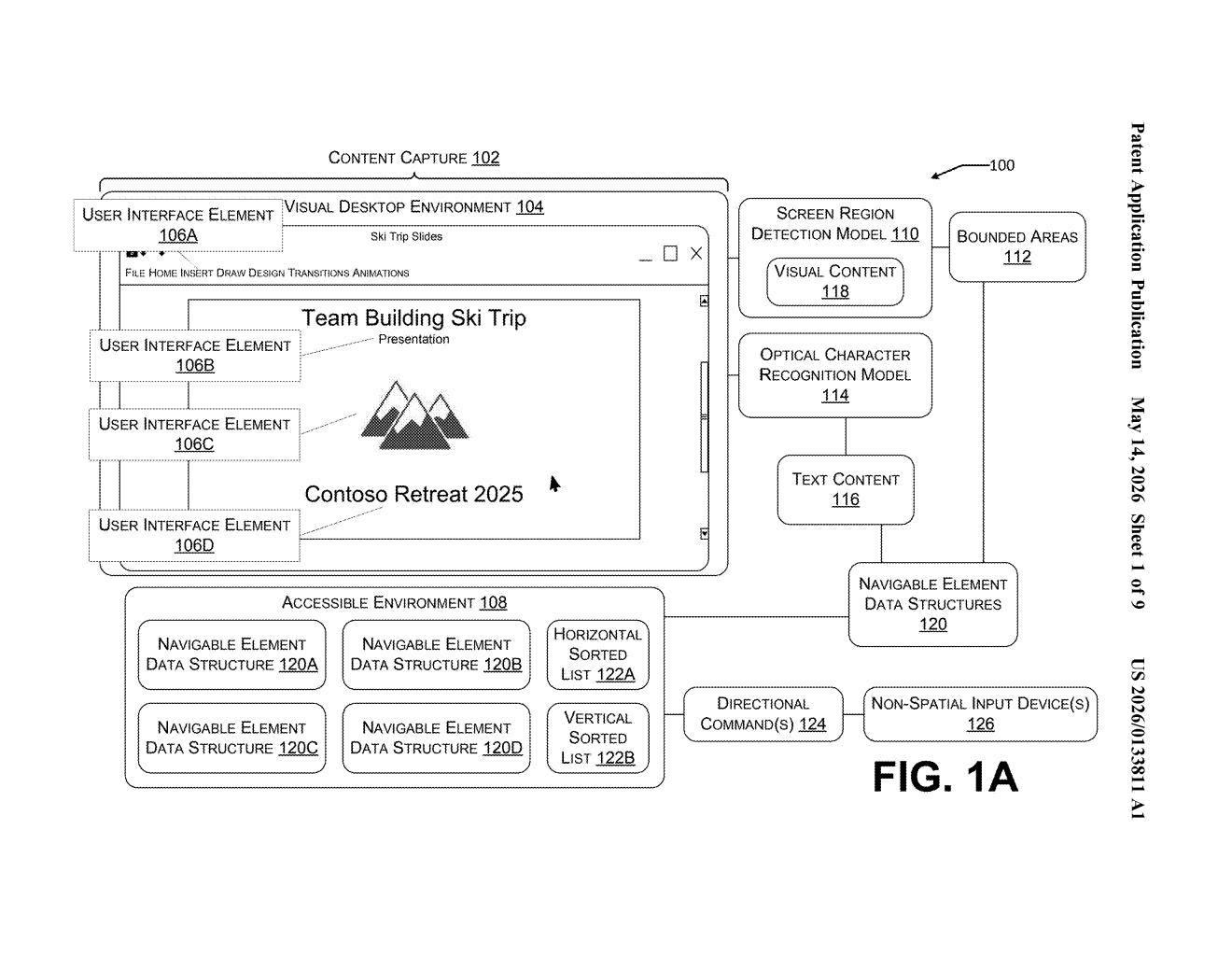
How Microsoft turns static screenshots into keyboard-navigable UIs
Imagine you're using a computer but you can't use a mouse. You rely on a keyboard, a gamepad, or some other device that works with buttons and directions rather than pointing at things on screen. Most of the time, that's fine — but what happens when a piece of software shows you a screenshot or a visual snapshot of an interface rather than a real, interactive one? Suddenly, navigating it becomes nearly impossible for assistive technology users.
Microsoft's patent describes a system that solves this by analyzing that screenshot, identifying every button, text box, and element visible in it, and building a hidden navigable layer on top. You can then press directional keys to jump between elements, just like tabbing through a normal app.
Think of it like adding a proper road map to a city that previously only existed as a photograph. Instead of being stuck looking at the image, you can actually move through it — left, right, up, down — in a way that feels predictable and logical.
How the system maps UI elements to directional navigation data structures
The system starts by taking a content capture — essentially a screenshot or visual recording of a desktop environment — and running it through computational models (likely computer vision or ML-based detection) to identify individual UI elements like buttons, menus, text fields, and icons.
For each detected element, the system records its bounded area (the rectangular region it occupies on screen) and its content (either text or an image). These get packaged into individual navigable element data structures — think of them as smart containers that know where an element lives and what it says or shows.
Those containers are then organized into a sorted list based on horizontal or vertical position, which gives the navigation a logical spatial order — left-to-right, top-to-bottom, the same way a human eye would scan a screen. The full set of these structures forms the accessible environment.
- When a user presses a directional key or gamepad input, the system identifies which element is currently focused.
- It uses the sorted list and the bounded area positions to calculate which element is logically next in that direction.
- It then shifts UI focus to that element, allowing the user to interact with it.
What this means for accessibility and assistive technology users
For the hundreds of millions of people who use assistive technologies — screen readers, switch controls, keyboards, gamepads — inaccessible visual interfaces are a constant wall. This patent tackles a specific and frustrating gap: interfaces that look interactive but are actually just images, leaving non-mouse users stranded with no way to navigate them.
Microsoft has long invested in accessibility (Xbox's adaptive controller, Windows Narrator, etc.), and this filing fits that pattern. It's particularly relevant as more AI-generated or legacy-rendered interfaces appear in enterprise software and remote desktop tools, where UI elements are often presented as visual captures rather than live interactive components. If this makes it into Windows or Azure Virtual Desktop, it could meaningfully improve the experience for a real and underserved set of users.
This is genuinely useful accessibility work, not a flashy consumer feature. It addresses a specific, well-documented pain point — visual interfaces that assistive technology can't parse — with a methodical, engineering-first approach. The fact that it comes from a five-person team at Microsoft rather than a splashy AI lab announcement makes it more credible, not less.
There are more where this came from
We read every patent application Big Tech publishes and send you the ones worth knowing. Plain English, free, every week.
Want this weekly breakdown for a company we don't cover? Patentlyze Pro →