
Microsoft Patent Filing Reveals Real-Time AI Research Suggestions for Note-Taking Apps
Imagine typing meeting notes and having a sidebar automatically surface a relevant summary from your company's internal documents, without you asking. That's exactly what Microsoft is patenting.
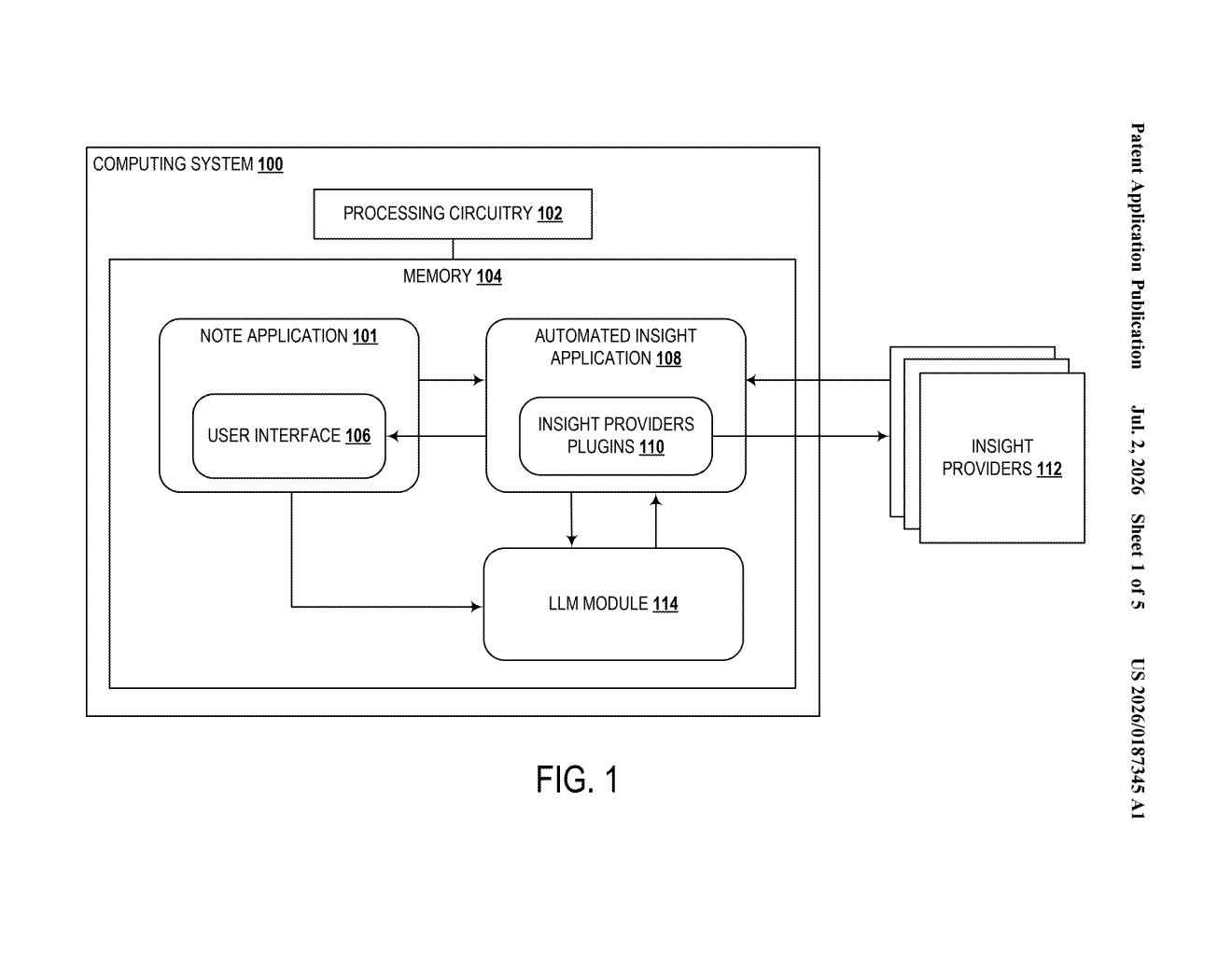
What Microsoft's AI note assistant actually does
Picture yourself writing notes in an app like OneNote. You type a few sentences about a project, and before you even finish, a panel appears on the side showing a brief summary of related information pulled from a connected database, whether that's company files, a knowledge base, or some other data source.
That's the core idea here. Microsoft's patent describes a system where an AI watches what you're typing in real time, figures out what kind of information would be useful, searches for it automatically, and then shows you a short summary of what it found. You stay in your note the whole time.
If you like what the AI pulled up, you can tap a button to drop that summary directly into your note. If you don't, you ignore it. The AI does the background research; you decide what stays.
How the LLM and RAG pipeline feed your notes
The system runs a large language model (LLM) continuously in the background as a user writes in a note application. The LLM watches the evolving content and identifies what kind of database query would return useful context (for example, if you're writing about a quarterly budget, it might search for related financial summaries).
That query feeds into a process called retrieval-augmented generation (RAG), which means the AI doesn't just generate text from memory but actively searches a real database for actual documents or records. Think of it as the difference between asking a friend what they remember about a topic versus asking them to look it up and read you the relevant parts.
The retrieved content is then summarized by the same LLM and displayed inside the note application in real time, without the user switching to a search tool or browser.
- The AI monitors note content as it's written
- It forms a search query and retrieves matching content from a database
- A summary of that content appears in-app automatically
- The user can accept the summary and merge it into their note with a single action
What this means for OneNote and Microsoft 365
For Microsoft, this fits squarely into its broader push to embed AI assistance inside Microsoft 365 tools like OneNote. Rather than requiring a user to copy text, open Copilot, paste it in, and copy back the result, this patent describes that entire loop happening inside the note itself, automatically.
For everyday users, the practical upside is fewer interruptions: you keep writing while the app does the background research. The interesting design question is how well the system knows when not to surface suggestions, since a panel popping up every few sentences could quickly become more annoying than helpful.
This is a tidy, focused patent that describes something Microsoft could realistically ship inside OneNote or Loop within a year or two. It's not a bold new idea, but it's a specific, well-scoped implementation of AI-assisted writing that fills a real gap in current note apps. Worth watching if you follow Microsoft 365's Copilot roadmap.
Get our take in your Top Stories
Liked this breakdown? Add Patentlyze as a preferred source on Google, and our plain-English take shows up more often in your Top Stories the next time Microsoft patent news breaks.
There are more where this came from
We read every patent application Big Tech publishes and send you the ones worth knowing. Plain English, free, every week.
Want this weekly breakdown for a company we don't cover? Patentlyze Pro →