
Microsoft Patents a Browser That Suggests Actions Based on What You're Reading
Most browser features hide in menus nobody opens. Microsoft is filing for a system that watches what's on your current tab and surfaces relevant tools right when you need them.
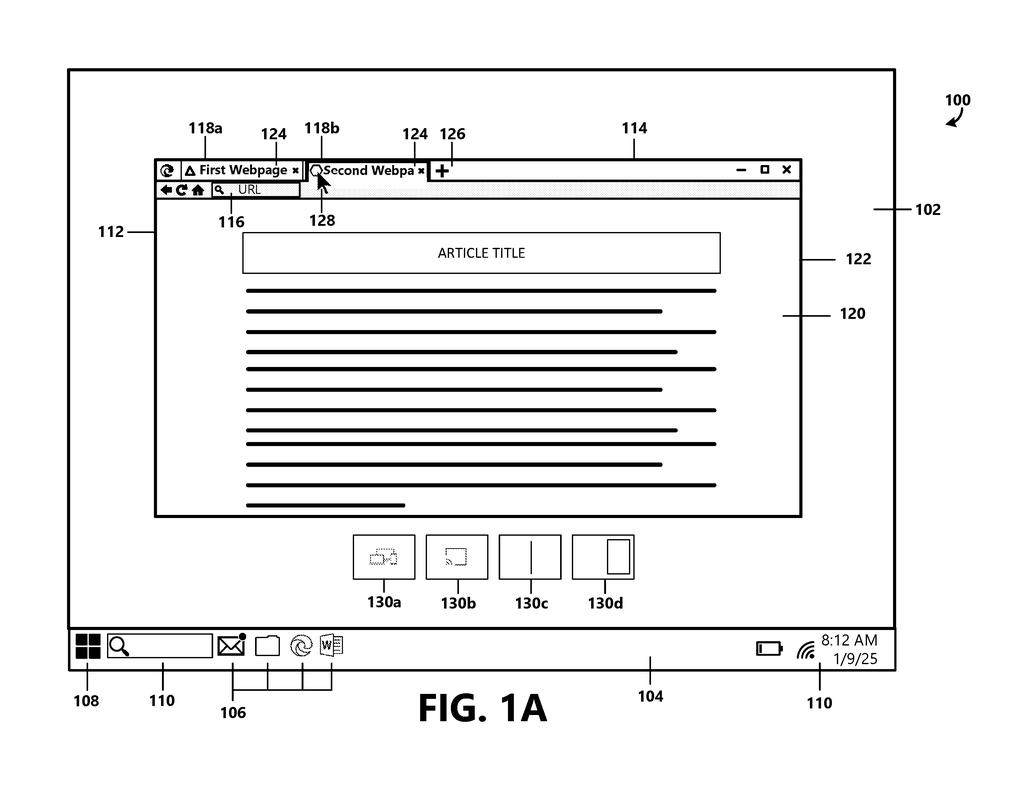
What Microsoft's page-aware browser tool actually does
A tab full of shopping results sits open while you hunt through browser menus looking for a side-by-side comparison view. You probably didn't know the feature existed. That's the exact problem this patent addresses.
Microsoft's system would have the browser read the content of whatever tab you're looking at, then suggest actions that actually make sense for that content. Reading a long article? It might offer a reader mode. Looking at a data table? It could suggest a different display layout. The suggestions appear as small visual hints, not buried settings.
The key trigger is intent: the system watches for signs that you're about to arrange or adjust a tab, then steps in with relevant options. You pick one, the browser does it. No digging required.
… enable a web browser to recommend or present features to a user based on the content of a web page …
Translation: The browser suggests helpful shortcuts by looking at what you are reading.
How the browser detects context and picks which actions to show
The patent describes a browser system built around three linked steps: detecting context, matching actions, and presenting choices visually.
First, the system receives an input tied to a specific tab. That input, described as a trigger, signals the user's intent to adjust or reorganize how the tab is displayed. The browser then analyzes contextual information from the tab's content, meaning it looks at what kind of page is loaded, whether that's a news article, a product listing, a spreadsheet, or something else.
Based on that content type, the system selects a set of browser actions relevant to that context. These can include display configurations (different ways to arrange or view the content) as well as specific actions the user can take on the page.
Those actions are then shown as graphical action elements, small visual indicators that illustrate what each action would do. The patent specifically calls these transient, meaning they appear temporarily, not as permanent clutter. The user's second input selects one, and the browser carries it out on that tab.
… determine, based at least in part on the contextual information, one or more browser actions applicable to the tab …
Translation: It figures out which tools make sense for the current page.
What this means for everyday browser navigation
For most people, browser menus are a maze of features they never find. A system that surfaces the right tool at the right moment lowers the barrier to actually using what's already there. You don't learn a new setting exists; it just appears when the browser thinks you need it.
The design is built around Edge, Microsoft's browser, which already ships with reading modes, split-screen options, and tab organization tools that most users ignore entirely. If this system works well, those features stop being invisible. The catch is that all the value depends on how accurately the browser reads your intent and how cleanly it reads the page content, two things that are easy to get slightly wrong in ways that feel annoying fast.
Microsoft's 431st filing in our Microsoft coverage since May continues its AI code work, building on rewriting old software and finding better code references.
The cost this design accepts is attention. Every time the browser surfaces a suggestion uninvited, it pulls the user's focus away from whatever they were doing, even briefly. Microsoft is betting that the help offered is worth that interruption, and for people who never find useful browser tools because menus are buried and confusing, that bet reads as a reasonable one.
The system lives or dies on how accurately it reads a page's content. A misread means a useless suggestion, and useless suggestions train people to ignore everything the browser says, including the good ones.
Execution is the whole story here. The idea of offering contextual help based on what someone is looking at is familiar across software, and what separates a feature people appreciate from one they immediately turn off is almost entirely about timing and precision.
There are more where this came from
We read every patent application Big Tech publishes and send you the ones worth knowing. Plain English, free, every week.
The drawings
14 drawing sheets from US 2026/0277401 A1 · click any drawing to enlarge


Want this weekly breakdown for a company we don't cover? Patentlyze Pro →