
Microsoft Patent Covers AI Prompts That Automatically Adapt to Your Document Context
Instead of making you type an AI prompt from scratch, Microsoft is patenting a system that reads what you're working on and hands you a short list of relevant suggestions before you even ask.
How Microsoft's context-aware AI suggestions work
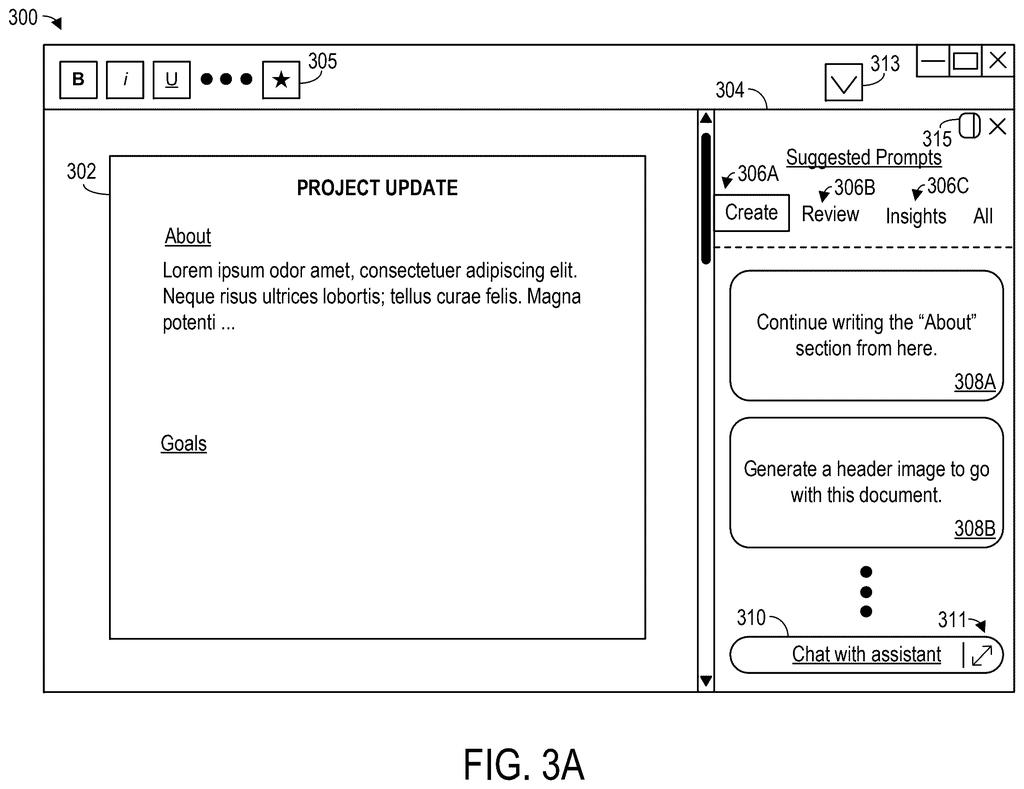
Imagine you're editing a contract in Word and you've just scrolled to the liability section. Instead of you stopping to type something like 'summarize this clause' or 'flag any unusual terms,' the app already has a few smart suggestions waiting for you, tailored to that exact section.
That's what this Microsoft patent describes. It watches the document you're in, notices things like what you're looking at, what type of document it is, and what you've been doing in the session, and then generates a list of AI actions you might actually want right now. You pick one, and the AI runs it.
The key idea is that the prompts aren't generic. They shift depending on context, so what you see while reviewing a spreadsheet would look very different from what you see while reading a legal brief. It's an attempt to make AI assistance feel less like a search bar and more like a helpful coworker who already knows what you're working on.
… determining a current prompt domain that pertains to the document access session, wherein the current prompt domain is selected from two or more different prompt domains …
Translation: The system figures out what topic category your current work falls into.
How the system picks which prompts to show you
The patent describes a pipeline with three inputs feeding into a prompt generation system:
- Document content data: the actual text or data in the file you have open
- Document context parameters: metadata about the session, things like document type, what part of it you're viewing, and what actions you've already taken
- Current prompt domain: a category or mode that determines the flavor of suggestions shown (the patent mentions choosing from two or more different domains, so think modes like 'editing,' 'reviewing,' or 'analyzing')
The prompt generation system, which the patent describes as ML-driven (meaning it uses machine learning models to reason about your situation), takes all three inputs and produces a set of candidate prompts. These are shown in the document UI as clickable suggestions.
When you pick one, the system runs whatever AI operation that prompt represents directly on the document. The whole loop, from reading context to surfacing suggestions to applying an action, is designed to happen without the user writing a single word of their own prompt. The patent also distinguishes between at least two distinct prompt domains, meaning the system can switch modes depending on what kind of work is being done, rather than offering a one-size-fits-all menu.
… one or more candidate prompts are received, specifying one or more respective machine learning (ML)-mediated document interaction operations that could be applied to the digital document.
Translation: AI suggestions appear that let you run automated tasks directly on your file.
What this means for Microsoft 365 and Copilot
Microsoft has been building its Copilot AI assistant into every corner of Microsoft 365, but the consistent complaint about AI tools is that they require you to already know how to prompt them. This patent is a direct response to that friction. By surfacing context-aware suggestions automatically, Microsoft would lower the barrier for users who aren't comfortable writing AI prompts from scratch.
For Microsoft, this also ties into a broader strategy of making Copilot feel embedded in the document experience rather than bolted on. If this approach ships, the AI assistant stops being a sidebar you type into and starts behaving more like an active part of the editing surface itself.
This is a straightforward quality-of-life patent aimed at making Copilot accessible to the large chunk of Office users who find blank AI chat boxes intimidating. It's not technically ambitious, but it's practically important. The real test will be whether the context detection is accurate enough to surface prompts that feel genuinely useful rather than just noise.
Get our take in your Top Stories
Liked this breakdown? Add Patentlyze as a preferred source on Google, and our plain-English take shows up more often in your Top Stories the next time Microsoft patent news breaks.
There are more where this came from
We read every patent application Big Tech publishes and send you the ones worth knowing. Plain English, free, every week.
The drawings
16 drawing sheets from US 2026/0228292 A1 · click any drawing to enlarge


Show the other 8 sheets


Want this weekly breakdown for a company we don't cover? Patentlyze Pro →