
Sony Patents a Two-Press System for Faster Accessibility Options on Your TV
Turning on captions or audio descriptions on a modern TV can take five menu levels and a dozen button presses. Sony's new patent tries to collapse all of that onto a single remote button with two different press types.
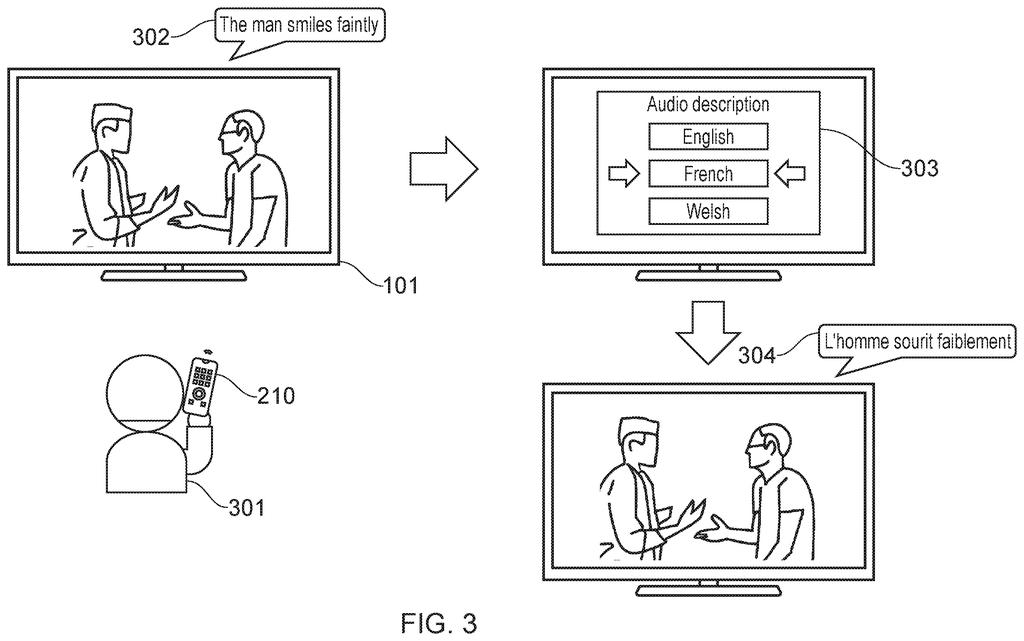
What Sony's two-press accessibility menu actually does
Every time you sit down to watch a movie and realize the subtitles are in the wrong language, you dig through a settings menu that seems designed to be as slow as possible. Getting from your couch to the right accessibility option, whether that's captions, audio descriptions, or a sign-language overlay, can feel like filling out a tax form.
Sony's patent describes a remote control system where one dedicated button handles the whole job. A short press cycles through the top-level options (say, subtitles vs. Audio description). A long press (or a different kind of press) drops you into a second layer of choices for whichever option you were already looking at. If you were browsing subtitle languages, a long press takes you straight into subtitle language choices, not back to the main menu.
The key detail is that the system remembers the context of your first press. So if you land on Spanish subtitles at the top level, going deeper brings up Spanish audio options, not a random list starting at the top.
cycling through a plurality of accessibility options in a first level of the hierarchy to select an accessibility option of a first type when receiving a signal indicating a first press of a predetermined key on a control device …
Translation: You can scroll through a list of accessibility features by pressing a specific button on your remote once.
How the short-press and long-press hierarchy is structured
The patent describes a two-level hierarchical menu for accessibility settings, controlled entirely by one button on a remote (the patent calls it a "predetermined key").
- First press type (short press): Cycles through options at the top level of the hierarchy, for example scrolling through subtitle languages one at a time.
- Second press type (long press or similar): Jumps into a second level of the hierarchy, a sub-menu specific to whatever option was highlighted at the first level.
- Language continuity: The critical rule in the claim is that navigating down to the second level keeps you in the same language context. If you were on French subtitles at level one, the second level opens French-related options (like French audio description), rather than resetting to a default.
The mechanism relies on the device distinguishing between at least two types of button input (duration, pressure, or number of presses) and treating them as separate navigation commands. The patent covers the method broadly, so it could apply to a TV, a set-top box, or any apparatus with a control device. No touch screen required.
… navigating to a second level of the hierarchy to select an accessibility option of a second type when receiving a signal indicating a second press of the predetermined key, the first press and the second press of the predetermined key are of different types …
Translation: Pressing that same button a second time in a different way opens a deeper menu of more specific settings.
What this means for viewers who rely on accessibility features
For the roughly one in five people who regularly use TV accessibility features, the friction of finding the right setting mid-show is a real, recurring frustration. A system that puts captions, audio descriptions, and language switching behind one button with two press depths removes most of that friction, especially for users with motor impairments who may find multi-step menus physically exhausting.
Sony has a large stake in the living-room screen business through its Bravia TV line and PlayStation ecosystem, so a patent in this area fits a clear product direction. The language-continuity detail (where pressing deeper keeps you in the same language context) is the part that makes this practically useful rather than just theoretically tidy. The broader push toward single-button accessibility design is one thread among the new Big Tech patents Patentlyze tracks across the consumer-electronics space.
Sony's 363rd filing among the applications we've tracked since May joins earlier work on sharper holograms and crack-detecting sensors in our Sony coverage.
The payoff for the viewer here is small but real: fewer button presses at an annoying moment, and less chance of accidentally landing in the wrong language sub-menu. For users who navigate accessibility menus frequently, whether due to hearing loss, low vision, or language preferences, shaving that friction down matters more than any single hardware spec. The language-continuity rule is the part worth noticing, since most current TV menus reset context every time you go deeper, which is the root cause of the frustration this patent targets.
Get our take in your Top Stories
Liked this breakdown? Add Patentlyze as a preferred source on Google, and our plain-English take shows up more often in your Top Stories the next time Sony patent news breaks.
There are more where this came from
We read every patent application Big Tech publishes and send you the ones worth knowing. Plain English, free, every week.
The drawings
13 drawing sheets from US 2026/0246991 A1 · click any drawing to enlarge


Want this weekly breakdown for a company we don't cover? Patentlyze Pro →
Be the first to weigh in