
Adobe Patents a Way to Fill Holes in 3D Models Using Plain-Text Descriptions
Editing a 3D model has always meant painstaking manual work to patch or replace parts without wrecking the whole shape. Adobe's new patent describes a system that lets you mark a region, type a description, and have two AI models do the geometry work for you.
What Adobe's 3D object fill tool actually does
Right now, if you want to swap out part of a 3D model, say replacing a car door or changing the shape of a chair leg, you typically have to sculpt or model the replacement piece by hand and then carefully blend it into the existing geometry. It's slow, and small mistakes in one spot can distort the whole model.
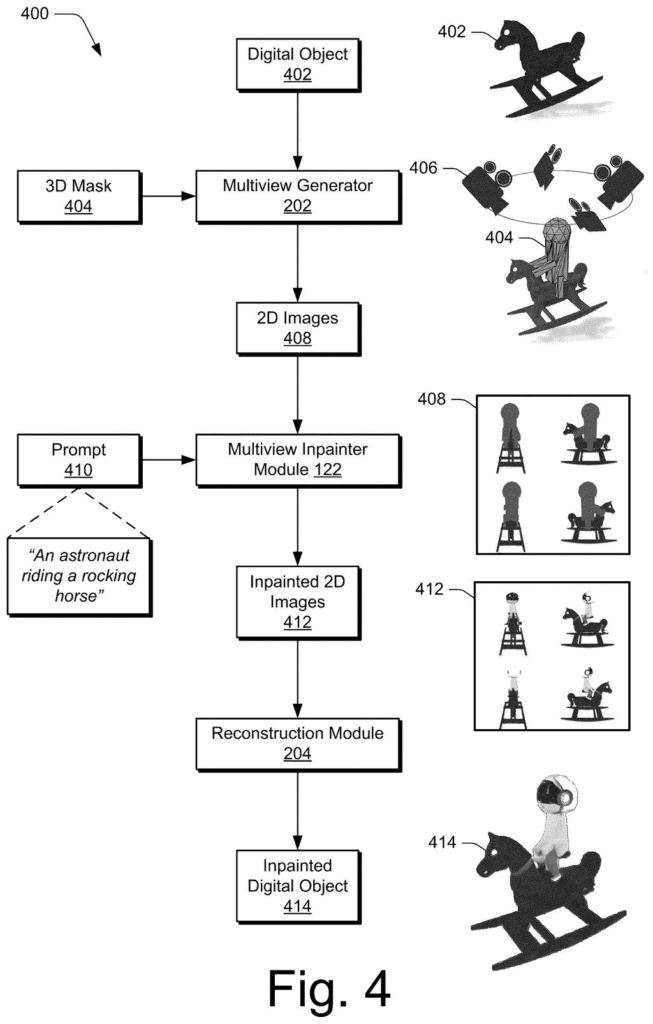
Adobe's patent describes a different approach. You highlight the part of the 3D model you want to change, type a short description of what you want there instead, and two AI models handle the rest. The first model looks at the model from many different angles and fills in the marked area in each of those flat views. The second model takes all those filled-in flat views and rebuilds a complete, consistent 3D shape from them.
The result is a finished 3D object with the new part baked in, ready to display or edit further. You never have to manually sculpt the replacement piece or worry about whether it fits the surrounding geometry.
receiving, by a processing device, a first three-dimensional (3D) object, a mask indicating a region of the first 3D object in which to inpaint a second 3D object, and a text description of the second 3D object …
Translation: The system takes a 3D model, a highlighted area to fill, and a written description of what should be added to that spot.
How two AI models divide the inpainting work
The patent describes a pipeline with two distinct machine-learning models working in sequence.
First, a user provides three inputs: an existing 3D object, a mask (a painted selection identifying which region should be replaced), and a text description of whatever should fill that region. Think of the mask like the selection tool in Photoshop, but applied to a three-dimensional shape.
The first model then renders the 3D object from multiple camera angles, producing a set of flat 2D images. For each of those images, it performs inpainting (the same technique used in 2D image editing to fill in missing or selected areas) guided by the text description. Each flat view gets a coherent, text-consistent fill.
- Multiple 2D views are generated from different angles around the object.
- Each view is inpainted separately but consistently based on the text prompt.
- The filled views are passed to the second model for reconstruction.
The second model then takes all those inpainted 2D views and reconstructs a full 3D representation from them, a process called multi-view reconstruction (turning a collection of photographs or rendered views back into geometry). The output is a single, unified 3D object with the new part integrated.
A first machine-learning model generates multiple two-dimensional (2D) views of the first 3D object and the mask. For each 2D view, the first machine-learning model generates a third 3D object that includes the second 3D object inpainted on the first 3D object.
Translation: The AI creates several flat images of the model to figure out how to realistically blend the new object into the empty space.
What this means for 3D artists and designers
For 3D artists, the practical payoff here is time. Replacing or adding a part to an existing model currently requires modeling skill, manual blending, and multiple correction passes. A text-driven fill tool would make that kind of iteration fast enough to happen mid-workflow, not as a separate project.
Adobe already sells tools across the creative stack (Photoshop, Substance 3D, Firefly), so a patent like this fits a clear direction toward bringing AI-assisted editing to 3D the same way Firefly brought it to flat images. The latest Big Tech patents in the AI-generated 3D space show multiple companies racing toward text-to-geometry tools, and this filing positions Adobe to extend its existing creative software ecosystem rather than cede that ground.
This is the 25th Adobe filing we've tracked in AI photo editing since May, adding to work like a video flow scorer and a color-comparing fill fix.
Replacing part of a 3D model used to mean rebuilding it by hand and hoping the new piece looked natural from every angle. This tool lets you paint over the part you want changed, describe what should appear there, and receive a finished result that holds together when rotated.
The approach works by solving the problem in stages: filling the selected area across several flat views of the object, then assembling those views back into a full shape. Breaking it up that way keeps each step manageable and reduces the chance that one hidden flaw ruins the whole model.
For a designer or small studio, the real test comes the moment a client spins the model and the patched area either holds or falls apart. Getting that moment right consistently is what separates a useful tool from an impressive demo.
Get our take in your Top Stories
Liked this breakdown? Add Patentlyze as a preferred source on Google, and our plain-English take shows up more often in your Top Stories the next time Adobe patent news breaks.
There are more where this came from
We read every patent application Big Tech publishes and send you the ones worth knowing. Plain English, free, every week.
The drawings
8 drawing sheets from US 2026/0253350 A1 · click any drawing to enlarge


Want this weekly breakdown for a company we don't cover? Patentlyze Pro →
Be the first to weigh in