
Apple Patent Reveals Voice Commands That Respond to What's on Your Screen
Your phone already knows what it's showing you, Apple wants it to listen for only the words that matter in that moment, making voice control sharper and less likely to misfire.
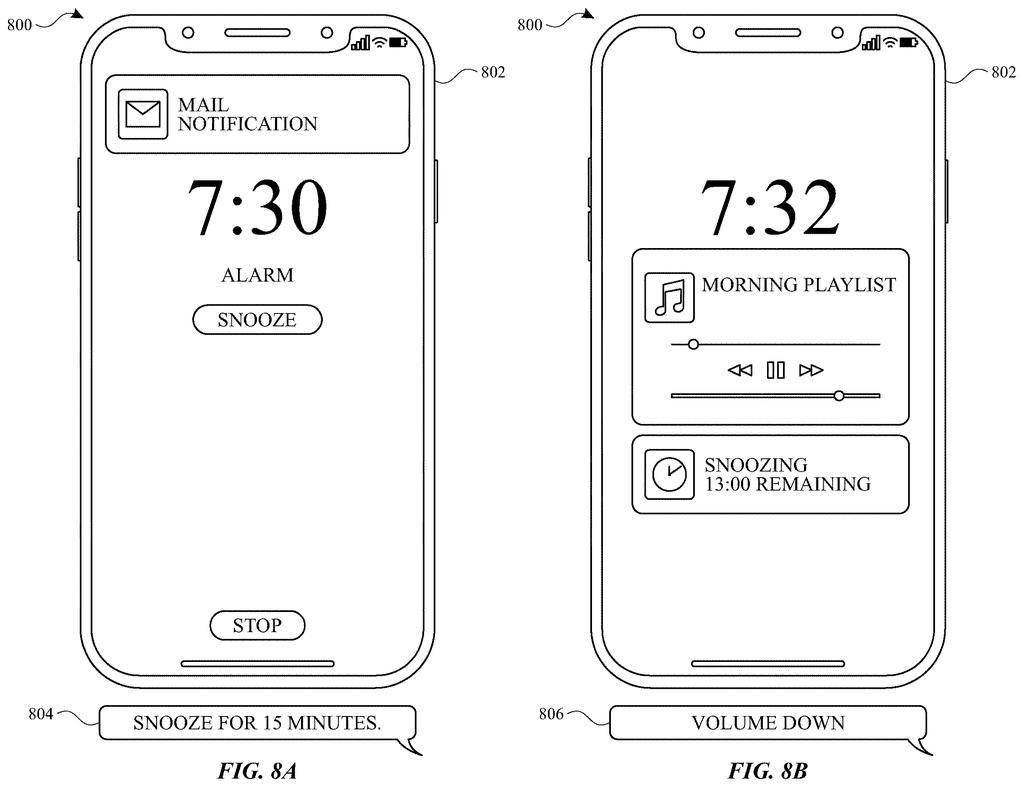
What Apple's context-aware voice control actually does
A person across the room barks a command at their phone, but the assistant mishears it, or worse, acts on the wrong thing entirely. That's a frustrating but common problem with today's always-listening voice controls, and it's one Apple wants to fix.
The idea in this patent is straightforward: instead of holding every possible command in its head at once, your device looks at what's currently on the screen and picks a small, focused list of words to listen for. If you're looking at a music player, it's primed for words like "pause" or "next." If a photo is front and center, it's listening for something like "share" or "delete."
When you speak, the device checks whether your words match that short, screen-specific list. If they do, it acts. This targeted approach means fewer accidental triggers and faster, more accurate responses, because the assistant isn't searching through thousands of possible commands every time you open your mouth.
displaying a first user interface including at least a first element; selecting a first set of one or more keywords, wherein a first keyword of the one or more keywords corresponds to the first element of the first user interface; receiving a speech input; determining whether the speech input includes at least one keyword of the first set of one or more keywords …
Translation: The device looks at your screen and prepares keywords based on what you see.
How the device picks and matches keywords to the screen
The patent describes an electronic device that constantly monitors its own current user interface to determine which voice commands are relevant at any given moment.
Here's the basic flow the patent lays out:
- The device displays a screen with one or more interactive elements (a button, a media control, a menu option).
- It selects a keyword set, a short list of words or phrases, where each keyword maps directly to something visible on that screen.
- When speech comes in, the device runs a fast check: does this audio contain any keyword from the current list?
- If it finds a match, it triggers the action tied to that specific on-screen element.
The key technical distinction here is contextual selection. Traditional voice assistants maintain enormous command vocabularies and try to match incoming speech against all of them at once. This system narrows the target at recognition time, which reduces the search space (the number of possible matches the system has to consider) and can make the whole process faster and more accurate.
The patent focuses on the device-side logic, the instructions living in memory and executed by the processor, rather than any cloud processing step, suggesting this could run locally on the device itself.
… contextual data is obtained and used to select a set of keywords (e.g., words or phrases) for voice control of an electronic device …
Translation: The system uses on screen details to figure out what voice commands you might use.
What this means for Siri and hands-free iPhone use
For everyday iPhone or iPad users, this would make hands-free control feel far less like a guessing game. If you're cooking and a recipe is on screen, the phone would already know the words you're likely to say next, so you wouldn't have to speak loudly or precisely to get a response. That's a real quality-of-life improvement for accessibility users in particular, who rely on voice control as their primary input method.
Apple's continued investment in on-device Siri improvements points toward making the assistant less dependent on cloud lookups. A system that narrows its listening based on screen context fits that direction: the smaller the keyword list, the less processing power and time the match requires, which matters on a handheld device with a finite battery.
Apple's second filing we've tracked on our AI agents that act for you watchlist since July builds on its earlier Siri multi-app work.
Claim 1 covers any device that shows a user interface, pulls keywords from what's currently on screen, listens for those words in speech, and then acts on them. That's a deliberately wide circle, with no requirement for any particular hardware, voice engine, or type of screen.
In practice, that breadth means the claim could reach phones, car dashboards, televisions, or any other screen-aware device that responds to voice by looking at what's displayed first. Any company building that kind of system would be operating inside Apple's claimed territory.
The claim lives or dies on whether "selecting keywords from the live interface" is meaningfully different from older methods that matched spoken words to a preset list for each app. That's the question an examiner will force Apple to answer, and the answer determines how much of that wide circle actually holds.
Get our take in your Top Stories
Liked this breakdown? Add Patentlyze as a preferred source on Google, and our plain-English take shows up more often in your Top Stories the next time Apple patent news breaks.
There are more where this came from
We read every patent application Big Tech publishes and send you the ones worth knowing. Plain English, free, every week.
The drawings
22 drawing sheets from US 2026/0260653 A1 · click any drawing to enlarge


Show the other 14 sheets


Want this weekly breakdown for a company we don't cover? Patentlyze Pro →
Be the first to weigh in