
Apple Patents a Way for Siri to Identify Objects in the Room Before Acting on Your Command
Instead of guessing which lamp or device you mean when you say "turn it off," a future Apple assistant could look at your room first, recognize the object you're near, and act on the right one.
How Apple wants Siri to use your camera as context
You're standing in a living room with three lamps, a TV, and a speaker, and you say "turn off the light." Your assistant has no idea which light you mean. This is one of the more frustrating parts of voice control today.
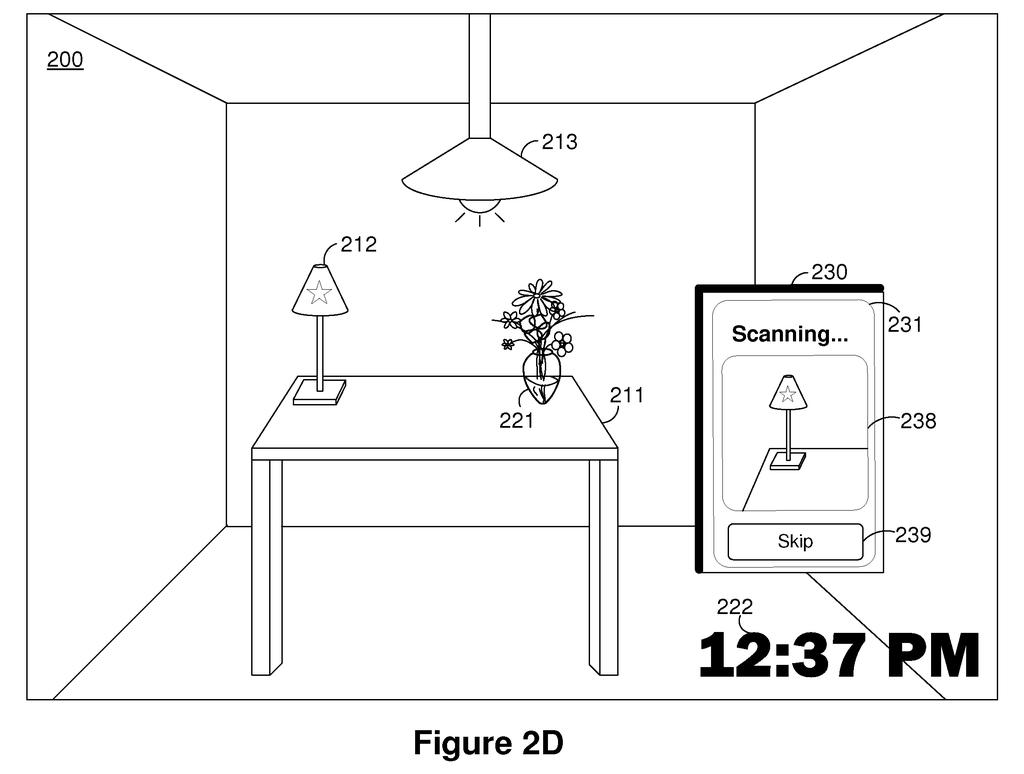
Apple's patent describes a fix. Before carrying out any command, the device uses its camera to scan the physical space and match what it sees against objects you've already registered with the system. When you say "turn it off," it knows which object you're looking at or standing near, and controls that specific device.
The enrollment step is the key piece: you'd point your camera at a device once, let the system build a visual profile of it, and from then on, your voice assistant can tell your floor lamp apart from your bedside lamp. No renaming, no app hunting, just point and speak.
obtaining a request to enroll an object; obtaining, using the image sensor, one or more images of the object; determining, based on the one or more images of the object, a visual model of the object; …
Translation: The system takes pictures of a physical item to build a digital visual profile of it.
Inside Apple's visual enrollment and command-matching system
The patent describes a two-stage system. First, there's an enrollment phase: a device with a camera (likely an iPhone or iPad) captures one or more images of a physical object, uses those images to build a visual model of that object, and stores the model alongside the object's network address (the identifier that lets a device send it commands on your home network). This is how the system learns what your specific desk lamp looks like.
Second, there's the runtime phase. When you speak a voice command, the camera captures the current environment and scans it for objects it recognizes from the stored visual models. If it spots a match, it retrieves that object's network address and constructs an instruction targeting that specific device.
The patent also covers disambiguation: when a command is ambiguous ("dim the light" with two lamps visible), the system uses environmental context to decide which object you most plausibly meant, rather than asking you to clarify or guessing randomly.
- Enrollment: camera images build a visual fingerprint for each object
- Storage: visual model is saved with the object's network address
- Recognition: live camera feed is matched against stored models at command time
- Instruction generation: matching object's address is used to route the command correctly
… detecting, in the image of the physical environment, an object based on a visual model of the object stored in the non-transitory memory in association with an object identifier of the object.
Translation: It scans the room to recognize that specific item using its stored visual memory.
What this means for smart home control and Siri accuracy
For anyone who has ever said "Hey Siri, turn off the light" and watched the wrong thing turn off (or nothing at all), this addresses a real and common friction point. Voice assistants today rely heavily on device names you've manually set up in apps. This system would let the camera do that work instead, making setup faster and commands more reliable.
On a broader level, Apple has been filing around camera-assisted environmental awareness in ways that suggest the camera is becoming a primary input layer for the assistant, not just for photos. If this reaches devices, the practical payoff is a home that responds to what you're physically near, not just what you remember to call things.
Apple's fourth filing we've tracked on our watchlist for AI agents that act for you since July builds on earlier applications like the smart home explainer and screen-aware voice commands.
The system works only as well as the setup step. If two lamps look similar, or if lighting when you first register a device differs from everyday conditions, the camera could misread which object you mean, and the wrong light turns on.
There is also a real privacy cost: the camera has to actively read your room to understand what you are pointing at. Apple tends to keep this kind of processing on the device itself, but the patent does not say so explicitly, and that gap matters.
The trade still reads as worth it. Asking ordinary users to manually name and organize smart home devices is a quiet but genuine barrier, and replacing that with a point-and-register camera step is meaningfully simpler. The benefit is real enough to absorb some enrollment friction and a few early misreadings.
Get our take in your Top Stories
Liked this breakdown? Add Patentlyze as a preferred source on Google, and our plain-English take shows up more often in your Top Stories the next time Apple patent news breaks.
There are more where this came from
We read every patent application Big Tech publishes and send you the ones worth knowing. Plain English, free, every week.
The drawings
12 drawing sheets from US 2026/0279358 A1 · click any drawing to enlarge


Show the other 4 sheets


Want this weekly breakdown for a company we don't cover? Patentlyze Pro →
Be the first to weigh in