
Samsung · Filed May 22, 2026 · Published Sep 24, 2026

Samsung Patents a Scroll Bar That Moves to Match Where Your Thumb Is

A scroll bar that chases your thumb sounds trivial until you've tried to read a long article one-handed on a big phone and realized the position indicator is hiding behind your palm the whole time.
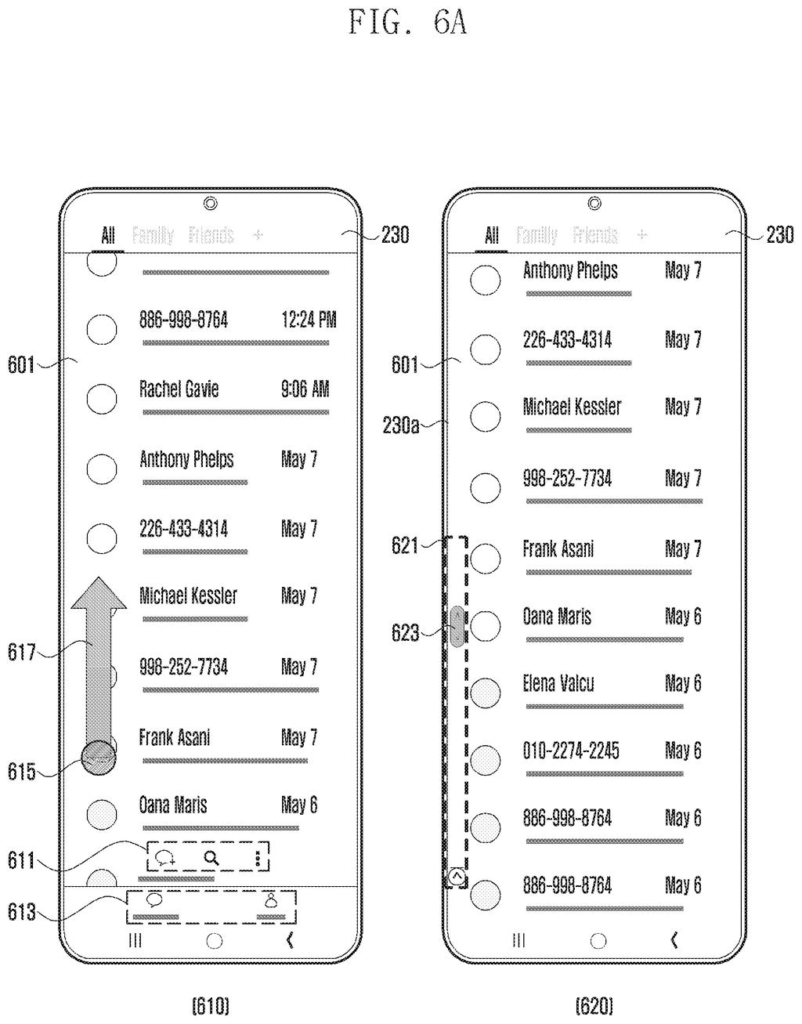
A phone screen displays a list of messages, with a scroll bar appearing on the left side in response to a thumb gesture. Drawing from patent filing US 2026/0288324 A1.
A phone screen displays a list of messages, with a scroll bar appearing on the left side in response to a thumb gesture.
See all 36 drawings from this filing ↓
Publication number US 2026/0288324 A1 US20260288324A1
Applicant Samsung Electronics Co., Ltd.
Filing date May 22, 2026
Publication date Sep 24, 2026
Inventors Seungwook NAM, Taehyun KANG, Sojin KIM, Myojin BANG, Jaemyoung LEE, Eunsun CHAE
US classification 715/786
Status when we published Waiting for an examiner (Jul 9, 2026)
Parent application is a Continuation of PCTKR2024019925 (filed 2024-12-06)
Document 19 claims

What Samsung's thumb-tracking scroll bar actually does

You're scrolling through a long article on your phone, holding it in your left hand, and the scroll bar is stubbornly parked on the right edge where you can't see it. Samsung's new patent wants to fix exactly that.

The idea is to split your screen into zones. If your touch input comes from the left side of the display, the scroll bar pops up on the left edge. Touch from the right, and it moves to the right edge. Touch somewhere in the middle, and the phone falls back to a sensible default position.

It sounds like a small quality-of-life tweak, but on the large-screened Galaxy phones Samsung sells, one-handed scrolling is a real daily friction point. Putting the scroll bar where your thumb already is means you can see your position in a document without rearranging your grip.

From the filing · CLAIM 1
… identify, when a scroll input based on a touch input is detected, an area on which the touch input is detected from among a first area, a second area, and a third area of the display …

Translation: The device figures out where your thumb is touching the screen.

How the display picks which edge gets the scroll bar

The patent describes a display system that monitors not just that a scroll gesture is happening, but where on the screen the finger first touches down.

The display is divided into three regions: a first area (left zone), a second area (right zone), and a third area (middle zone). When a scroll gesture is detected, the device checks which zone the touch landed in, then renders the scroll bar on the corresponding side edge of the screen. The middle zone has a pre-set default side it falls back to, which Samsung calls the "default area."

The scroll bar itself is shown only in a partial area of the chosen side surface, not the full edge length. That keeps it proportional to the visible content slice and consistent with how scroll bars normally behave.

Key components the patent identifies:

  • A touch-input detection layer that classifies the contact zone
  • Logic that maps each zone to a specific screen edge
  • A fallback default for ambiguous center-screen input
From the filing · THE ABSTRACT
… displaying, when it is identified that the touch input is detected in the first area of the display, a scroll b34-ar in a partial area of a first side surface of the display corresponding to the first area …

Translation: It pops up the scroll bar on the side matching your touch location.

What this means for large-screen phone usability

For most users on compact phones, scroll bar position is barely a concern. On a 6.8-inch Galaxy Ultra held one-handed, though, a right-edge scroll bar is simply out of reach for a left-handed grip, and it can sit directly under the thumb for right-handed users who then can't read it anyway.

This patent addresses a friction point that grows as phone screens get taller and wider. If Samsung ships this in a future One UI update, it would be one of those changes you notice only because something stopped annoying you, which is often the best kind of UX improvement. It also has clear relevance to foldable devices, where the usable display area shifts depending on fold angle and which hand is doing the work.

Samsung's 1344th filing we've tracked since May in our Samsung coverage follows work like the context-aware keyboard and the dual-AI object trainer.

Editorial take

Dividing the screen into three fixed zones is a reasonable shortcut, but it costs flexibility. A user whose thumb drifts across a zone boundary mid-scroll gets the wrong scroll bar position, with no correction.

That cost is probably acceptable for a first version. A fixed zone map gives users a learnable rule, and predictability matters more than perfection when a feature is this subtle.

The real risk is invisibility. Scroll bars are background furniture, and the people who would benefit most from this change are the least likely to notice it happened without a clear prompt from Samsung during setup.

Get our take in your Top Stories

Liked this breakdown? Add Patentlyze as a preferred source on Google, and our plain-English take shows up more often in your Top Stories the next time Samsung patent news breaks.

There are more where this came from

We read every patent application Big Tech publishes and send you the ones worth knowing. Plain English, free, every week.

The drawings

36 drawing sheets from US 2026/0288324 A1 · click any drawing to enlarge

Electronic device system overview., drawing sheet 1 from US 2026/0288324 A1
Sheet 1 Electronic device system overview.
Phone processor and display., drawing sheet 2 from US 2026/0288324 A1
Sheet 2 Phone processor and display.
Scroll bar display flowchart., drawing sheet 3 from US 2026/0288324 A1
Sheet 3 Scroll bar display flowchart.
Scroll bar display decision tree., drawing sheet 4 from US 2026/0288324 A1
Sheet 4 Scroll bar display decision tree.
Phone display areas., drawing sheet 5 from US 2026/0288324 A1
Sheet 5 Phone display areas.
Scroll bar on left side., drawing sheet 6 from US 2026/0288324 A1
Sheet 6 Scroll bar on left side.
Scroll bar on right side., drawing sheet 7 from US 2026/0288324 A1
Sheet 7 Scroll bar on right side.
Scroll bar on right side., drawing sheet 8 from US 2026/0288324 A1
Sheet 8 Scroll bar on right side.
Show the other 28 sheets
Samsung Patents a Scroll Bar That Moves to Match Where Your Thumb Is patent drawing, sheet 9
Sheet 9
Samsung Patents a Scroll Bar That Moves to Match Where Your Thumb Is patent drawing, sheet 10
Sheet 10
Samsung Patents a Scroll Bar That Moves to Match Where Your Thumb Is patent drawing, sheet 11
Sheet 11
Samsung Patents a Scroll Bar That Moves to Match Where Your Thumb Is patent drawing, sheet 12
Sheet 12
Samsung Patents a Scroll Bar That Moves to Match Where Your Thumb Is patent drawing, sheet 13
Sheet 13
Samsung Patents a Scroll Bar That Moves to Match Where Your Thumb Is patent drawing, sheet 14
Sheet 14
Samsung Patents a Scroll Bar That Moves to Match Where Your Thumb Is patent drawing, sheet 15
Sheet 15
Samsung Patents a Scroll Bar That Moves to Match Where Your Thumb Is patent drawing, sheet 16
Sheet 16
Samsung Patents a Scroll Bar That Moves to Match Where Your Thumb Is patent drawing, sheet 17
Sheet 17
Samsung Patents a Scroll Bar That Moves to Match Where Your Thumb Is patent drawing, sheet 18
Sheet 18
Samsung Patents a Scroll Bar That Moves to Match Where Your Thumb Is patent drawing, sheet 19
Sheet 19
Samsung Patents a Scroll Bar That Moves to Match Where Your Thumb Is patent drawing, sheet 20
Sheet 20
Samsung Patents a Scroll Bar That Moves to Match Where Your Thumb Is patent drawing, sheet 21
Sheet 21
Samsung Patents a Scroll Bar That Moves to Match Where Your Thumb Is patent drawing, sheet 22
Sheet 22
Samsung Patents a Scroll Bar That Moves to Match Where Your Thumb Is patent drawing, sheet 23
Sheet 23
Samsung Patents a Scroll Bar That Moves to Match Where Your Thumb Is patent drawing, sheet 24
Sheet 24
Samsung Patents a Scroll Bar That Moves to Match Where Your Thumb Is patent drawing, sheet 25
Sheet 25
Samsung Patents a Scroll Bar That Moves to Match Where Your Thumb Is patent drawing, sheet 26
Sheet 26
Samsung Patents a Scroll Bar That Moves to Match Where Your Thumb Is patent drawing, sheet 27
Sheet 27
Samsung Patents a Scroll Bar That Moves to Match Where Your Thumb Is patent drawing, sheet 28
Sheet 28
Samsung Patents a Scroll Bar That Moves to Match Where Your Thumb Is patent drawing, sheet 29
Sheet 29
Samsung Patents a Scroll Bar That Moves to Match Where Your Thumb Is patent drawing, sheet 30
Sheet 30
Samsung Patents a Scroll Bar That Moves to Match Where Your Thumb Is patent drawing, sheet 31
Sheet 31
Samsung Patents a Scroll Bar That Moves to Match Where Your Thumb Is patent drawing, sheet 32
Sheet 32
Samsung Patents a Scroll Bar That Moves to Match Where Your Thumb Is patent drawing, sheet 33
Sheet 33
Samsung Patents a Scroll Bar That Moves to Match Where Your Thumb Is patent drawing, sheet 34
Sheet 34
Samsung Patents a Scroll Bar That Moves to Match Where Your Thumb Is patent drawing, sheet 35
Sheet 35
Samsung Patents a Scroll Bar That Moves to Match Where Your Thumb Is patent drawing, sheet 36
Sheet 36
Browse all the drawings 36 drawing sheets
Patent filing page

Source. Full patent text and figures from the official USPTO publication PDF.
Reader comments

Be the first to weigh in

Start the discussion

Real name or a handle, either is fine. Comments are read by a person before they appear, so allow a little time. Keep it about the filing.