
Microsoft Patents a System That Reads Your Screen and Answers Questions You Didn't Ask
Most people ignore the AI features baked into their laptops because using them requires effort. Microsoft's new patent describes a system that skips the asking entirely, reading what's on your screen and surfacing relevant context the moment you need it.
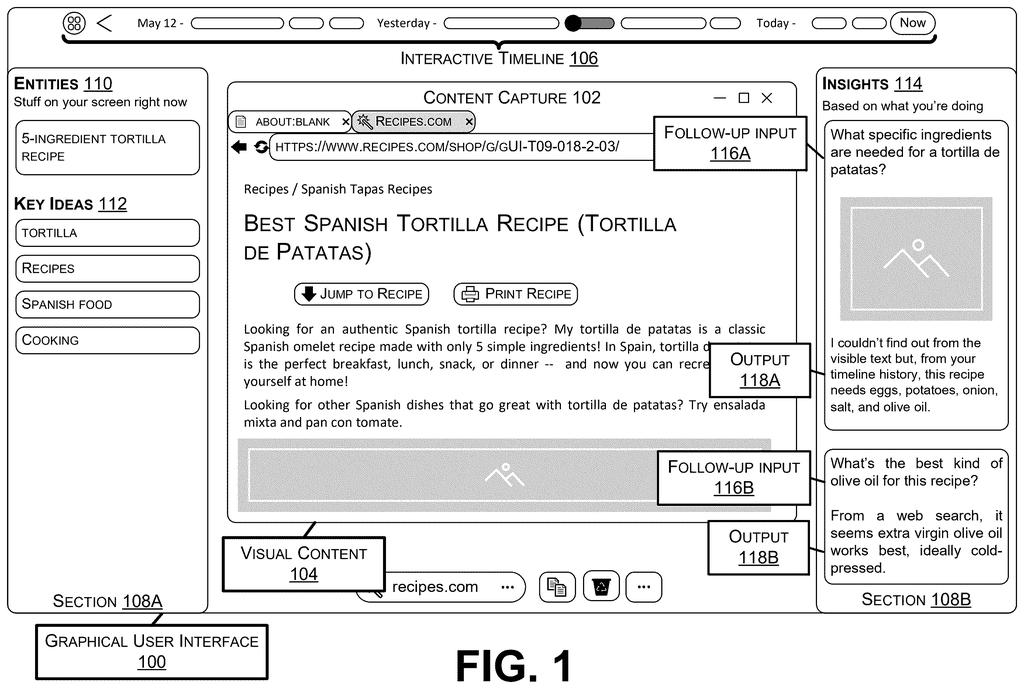
What Microsoft's automatic screen-reading AI actually does
Every time you pause on a paragraph you don't quite understand, or hover over a chart that needs more background, that hesitation is a small friction point. Most AI tools in that moment require you to copy the text, open a chat box, type a question, and wait. That's enough steps to make many people give up.
Microsoft's patent describes a system that watches for those moments automatically. When you do something that signals you might want more information, like pausing, hovering, or highlighting, it captures what's on your screen, figures out what the content is about, and then generates a relevant follow-up question plus an answer, all without you lifting a finger.
The result shows up in a section of your interface as a ready-made question and response. You didn't have to ask; the system noticed you might need it and did the work. It can also pull in extra information tied specifically to your account or context, so the answer is more relevant to you personally.
… determining, by the computational model, a follow-up input based on the semantic content of the content capture; retrieving, by the computational model supplemental information from a supplemental information repository; determining, by the computational model, an output corresponding to the follow-up input …
Translation: The system figures out what you might want to know next and automatically looks up the answers.
How the system captures content and decides what to explain
The patent describes a pipeline that starts with a user activity trigger, a detectable action like hovering, pausing, or highlighting text or images on screen. When that trigger fires, the system takes a content capture, essentially a snapshot of the relevant on-screen visual content.
That capture is sent to a computational model (the patent's term for what is effectively a large language model, the same category of AI behind tools like ChatGPT). The model does two things in sequence:
- It identifies the semantic content of the capture, meaning the underlying concepts or ideas, not just the raw words or pixels.
- It formulates a follow-up input, a question or prompt that a user would logically want answered given that content.
The model then retrieves supplemental information from a repository, which can be tied to the specific user entity (your account, your organization, your prior context). It uses that supplemental data to generate an output corresponding to the follow-up question. Both the question and the answer are rendered visibly in a section of the graphical user interface.
The key structural point is that the system determines what question to ask on your behalf. You don't type anything. The trigger is behavioral, the question is generated, and the answer is pre-loaded.
… the present system proactively extracts on-screen content via a content capture for analysis by a computational model (e.g., a generative language model) in response to a user activity trigger.
Translation: Your device takes screenshots on its own and runs them through an AI whenever you do something.
What this means for everyday Windows and Office users
For Windows and Office users, this kind of system could show up anywhere you read or view content: a Word document, a PDF in Edge, a slide deck, a spreadsheet. The promise is that you'd see a relevant explainer or follow-up automatically, trimming the back-and-forth of opening a separate AI chat window.
The practical friction here is consent and distraction. A system that proactively pops up information every time you pause risks feeling intrusive. the pattern in Microsoft's AI assistant filings points toward deeper, more ambient AI integration across Windows, and this patent fits that direction. Whether users actually want their screen watched that closely is a product question the patent doesn't answer.
Microsoft's 18th filing we've tracked since July on our AI agents working for you watchlist follows one that deploys network defenses automatically and one building agents from plain English.
This patent describes a software feature, not a hardware invention. The pieces it requires, capturing what's on screen, sending that to an AI model, and displaying a response, already exist in tools Microsoft ships today.
The shortest path to a real product is almost entirely a design problem: how fast does the response appear, and does it feel helpful rather than intrusive? Those are solvable questions, which puts this closer to launch-ready than most patent filings suggest.
The genuine risk is accuracy. If the system consistently guesses the wrong question on behalf of the user, it becomes noise rather than help, and noise that appears uninvited is worse than no feature at all.
There are more where this came from
We read every patent application Big Tech publishes and send you the ones worth knowing. Plain English, free, every week.
The drawings
6 drawing sheets from US 2026/0299972 A1 · click any drawing to enlarge


Want this weekly breakdown for a company we don't cover? Patentlyze Pro →
Be the first to weigh in