
IBM Wins a Patent for Sorting Confidential Documents Without Reading Them
IBM has been granted a patent for an AI that tells an invoice from a utility bill by writing a plain-English description of what the page looks like, then matching it against a checklist.
What IBM's layout-description sorter actually does
Sorting scanned paperwork into piles like invoices, bills of lading and utility bills usually works best when an AI has been trained on piles of sample documents. That is a dead end when the samples are confidential, don't exist yet, or training would eat too much time and computing power. IBM has now been granted a patent on a way around it.
Instead of training, the system looks at the page and writes a short description of its layout, something like "there is a title at the top in larger type, and one table on the lower half of the first page." Someone (you, or the system) writes similar descriptions for each document type.
If the two descriptions match closely enough (the filing gives 70% as an example), the file gets that label. If they don't, the system tries the next document type until one fits or the list runs out.
… generating, by the artificial intelligence system, respective natural language electronic feature descriptions that describe spatial layout characteristics of the one or more selected document layout features separate from textual content of the electronic document; …
Translation: The system describes a document layout in plain language without reading the actual words.
How a page gets turned into a written description
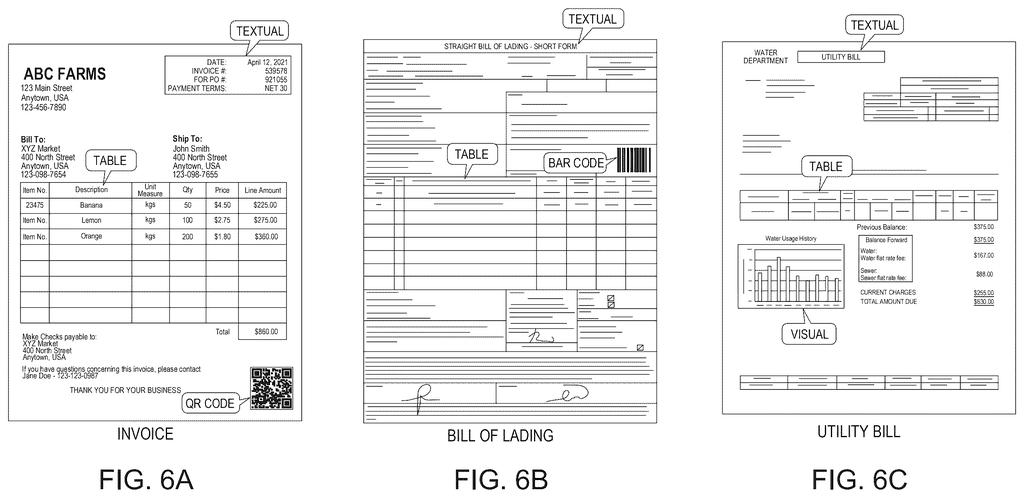
The system starts by scanning a document to produce layout data, meaning where things sit on the page rather than what they say. Models that read page images (the filing mentions optical character recognition and deep learning models) pick out features such as titles, tables, barcodes, icons, check boxes, watermarks, colors and page count.
Next it selects which features to look at. Each document type has weights on its features, based on how unique a feature is to that type and how often it shows up there, in the spirit of TF/IDF (a classic scoring method for how distinctive something is). Features that fall below a weight threshold are skipped, which saves processing time.
For each selected feature, a language model writes a free-form description. The filing's example reads: "One table is found. There are five columns... The table is located on the lower half of the first page." Claim 1 covers descriptions of spatial layout kept separate from the document's text.
Then comes the match:
- The descriptions are compared with the descriptions for a document type, using a text similarity measure such as cosine similarity (a score for how close two pieces of text are).
- If the score beats the matching threshold, the document gets that type.
- If not, the process repeats for the next document type.
Users can write the type descriptions and adjust the thresholds.
… classifying the electronic document as the particular document type based on exceeding a matching threshold with comparison of the respective electronic feature descriptions to one or more specified electronic feature descriptions for the particular document type.
Translation: It identifies document types by comparing their layout descriptions against established templates.
Why paperwork sorting without training matters
Companies that handle huge volumes of scanned paperwork often can't hand sample documents to an AI for training, because the files are private or too few. A method that needs only a written description of each document type lets a team set up sorting quickly, then pass the labeled files to the next step, such as pulling out data or filing them in the right folder. The filing says the actual text can be kept out of the comparison.
It is already a granted patent, though the final granted claims may read a little differently from the published application described here. For you, the effect would show up indirectly: bills, forms and invoices reaching the right desk faster.
IBM's tenth filing we've tracked since July in our on-device AI privacy watchlist builds on ideas like splitting AI between device and cloud and keeping private data safe during testing.
If you ever notice this, it will be because paperwork moved faster: an invoice lands with the right team, a utility bill goes to the right folder, and nobody had to feed a model a thousand sample scans first. That matters most for organizations whose documents are private or too scarce to train on.
The weak spot is easy to picture. Plenty of documents look alike, and a quote can share a title and a table with an invoice. How well this works depends on how carefully someone writes the layout descriptions and where the match threshold gets set, and a wrong label puts a document in the wrong pile.
Overall it is a practical, back-office filing with a clear benefit: less setup and fewer privacy worries when sorting documents.
Get our take in your Top Stories
Liked this breakdown? Add Patentlyze as a preferred source on Google, and our plain-English take shows up more often in your Top Stories the next time IBM patent news breaks.
There are more where this came from
We read every patent application Big Tech publishes and send you the ones worth knowing. Plain English, free, every week.
The drawings
15 drawing sheets from US 2026/0320100 A1 · click any drawing to enlarge


Show the other 7 sheets


Want this weekly breakdown for a company we don't cover? Patentlyze Pro →
Be the first to weigh in