
Apple Files Patent for Virtual Objects That Glide Between Surfaces on Their Own
Drag a virtual object past the edge of a table and, instead of flickering or popping, it glides across to the next surface by itself. Apple's patent covers that handoff.
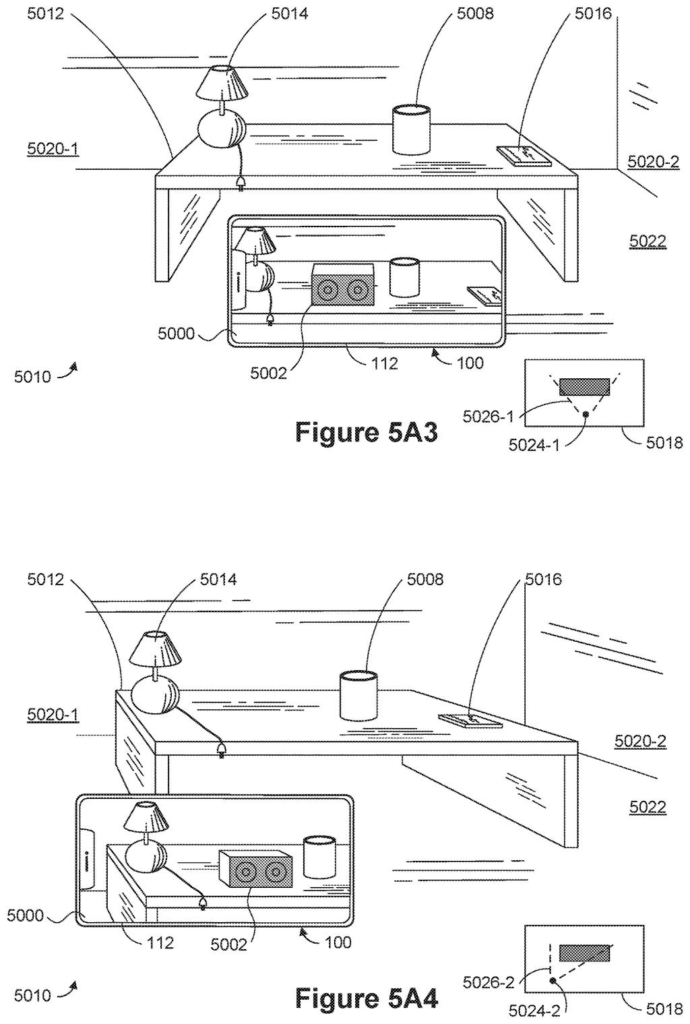
What Apple's patent does when you drag past an edge
Right now, dragging a virtual object around your room through a phone camera can look shaky. Apple's filing says existing methods can make the object flicker or look unstable when it crosses from one surface to another, and sometimes skip the in-between moments entirely, so the object just pops into place.
Apple's fix is a handoff. While you slide an object around one surface, say a tabletop, it follows your finger exactly. But drag it far enough toward a different object, and the system takes over and glides it across on its own, turning it to fit if the new surface sits at an angle.
The filing also describes a simulated shadow on whichever side of the object faces its surface. It also describes a rule that your drag has to hold for a set amount of time before the jump counts, so a stray wiggle doesn't send the object flying.
How the object decides to switch surfaces
The patent covers a method for a device with a camera, a screen and some kind of input, such as a touchscreen. The screen shows a live camera view of a room, with a virtual object placed so it appears to rest on a real object like a table. The description says the device builds a 3D model of the room from depth information and treats flat areas as planes (flat surfaces such as a tabletop or wall).
The claims split the behavior into two cases:
- Same object: if your drag keeps the virtual object on the surface it is already on, the object moves exactly as your input does.
- Different object: if your drag asks to move it onto a second physical object, the system moves it there with an animated transition that includes movement you did not make.
Dependent claims add detail. The jump can require that a condition stay met for a threshold time, or that your drag goes a set distance past the first object's edge. When the two surfaces are at an angle, the object can change orientation to fit the new one. Other claims keep its orientation fixed relative to the room during the animation. A shadow can appear on the side of the object facing its current surface, and you can still resize or rotate the object in place. Dragging it back triggers the same glide in reverse. The filing continues an application first filed in 2020.
What this means for placing virtual objects
If you have ever tried placing a virtual object in your room through a phone camera, you know the awkward moment when it crosses from one surface to another. This patent targets that moment. It would make the object slide cleanly onto its new spot instead of flickering or jumping.
The filing lists phones, tablets, headsets and augmented reality glasses among the devices that could run it, and names the iPhone and iPad as examples. It also argues that fewer fumbled drags mean fewer inputs and less wasted energy, which matters on a battery-powered device. It is a polish feature, but details like this decide whether AR feels steady or fiddly in daily use.
Apple filed its 89th application we've tracked in our Apple AR glasses watch since May, building on work like the see-through headset window and fixing room scans for virtual figures.
The price of this design is control. For a moment the object moves on its own and your finger is no longer in charge. If the system misreads your drag, you get a virtual object that leaps onto a surface you never wanted.
One claim adds a hold-time rule that guards against that. Requiring the drag to stay past the threshold for a set time cuts accidental jumps, but it adds a small pause every time you do mean it. Set the gap too wide and the feature feels sluggish. Set it too narrow and it feels twitchy.
The trade still looks worth making. Phones guess at the edges of real objects imperfectly, and hiding that guesswork behind a short glide looks better than showing a flickering object. It is a small feature, and a useful one.
Get our take in your Top Stories
Liked this breakdown? Add Patentlyze as a preferred source on Google, and our plain-English take shows up more often in your Top Stories the next time Apple patent news breaks.
There are more where this came from
We read every patent application Big Tech publishes and send you the ones worth knowing. Plain English, free, every week.
The drawings
70 drawing sheets from US 2026/0320930 A1 · click any drawing to enlarge


Show the other 52 sheets


Sheets 61 to 70 are in the full USPTO filing.
Want this weekly breakdown for a company we don't cover? Patentlyze Pro →
Be the first to weigh in