
Qualcomm Files Patent to Keep Zoomed-In Images Sharp Without Draining Your Battery
Pinch to zoom on a map and it looks great. Try it on most other things on your phone and you get a blurry stretch. Qualcomm describes a way to use AI for that zoom without choppy motion or a dead battery.
What Qualcomm's AI zoom patent actually does
Today, zooming into things on your phone mostly works inside a few apps, like maps or a web browser. Elsewhere, the usual trick of stretching pixels makes the picture blurry. Using AI to fill in fine detail looks better, but it is slow, so the zoom stutters, and it eats battery fast.
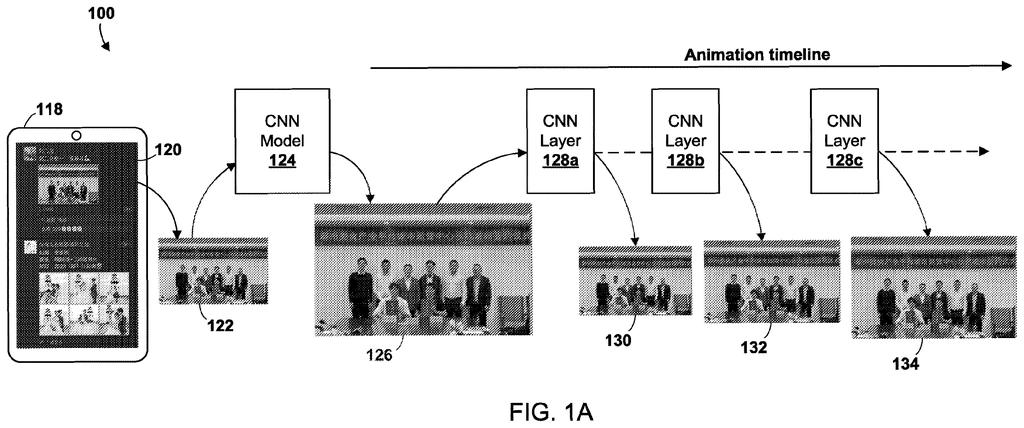
Qualcomm's patent application describes a middle path. When you spread two fingers on the screen, the phone works out the area you are zooming into and how big it should end up. Instead of running the AI on every single frame, it picks a few AI steps, each built for a different amount of enlargement, and uses them to make a handful of in-between pictures.
Played back in order, those pictures form a smooth growing animation that ends on a sharp, detailed final image.
… selecting two or more convolutional neural network (CNN) layers from among a plurality of CNN layers, each CNN layer comprising a scaling ratio that is less than the scaling ratio for the final zoomed presentation of the ROI …
Translation: The system picks multiple AI layers that each handle a small step of the zoom process.
How the zoom picks its in-between frames
The method in claim 1 starts with a zoom gesture, such as a pinch-out on a touchscreen. The device identifies the region of interest (the part of the image you are zooming into) and decides on a scaling ratio for the final view, meaning how much bigger that region should end up.
The key step is choosing two or more CNN layers (convolutional neural network layers, a type of AI image processing step) from a larger set. Each layer is trained for its own enlargement amount, and every selected layer must enlarge by less than the final zoom. Each one produces an intermediate image, larger than the original region but smaller than the final view.
The device then plays these intermediate images in order as an animation of the region growing on screen. The filing gives examples of enlargement ratios like 1.2, 2.1 and 3.6, and the claims note that at least one can be a non-integer (not a whole number).
The dependent claims add a few knobs:
- How many layers get used can depend on what the app showing the image needs.
- It can also depend on how much memory the device has free.
- The layers themselves can be generated based on the app's animation needs.
… generating an intermediate image from each of the selected CNN layers including a sequence of intermediate size image frames of the ROI, and rendering an animation of changes in a displayed size of the ROI …
Translation: It creates stepping stone pictures to make the zoom animation smooth without heavy processing.
Why zooming anywhere on your phone is hard
If this works as described, you could get a good-looking zoom on more of your screen, not just inside apps that built their own zoom. The filing says the problem today is that AI enlargement is too slow for smooth animation on screens that refresh 120 or 144 times a second, and it uses too much power.
The approach also cuts the number of times the heavy AI work has to run, which is where the battery savings would come from. The filing describes it running on laptops, smartphones and smartwatches, so it fits the chips Qualcomm makes. It is a patent application, so nothing here says a product is coming.
Qualcomm's 12th filing we've tracked in the AI photo editing race since July builds on earlier applications like pinching to fill missing areas and faster object selection.
Claim 1 is fairly broad. It covers any device that picks at least two AI layers, each with a smaller enlargement than the final zoom, makes in-between images from them, and plays those as an animation. It does not name a specific phone, chip, app or enlargement number.
That breadth matters. If granted as written, another maker doing a zoom animation built from a few differently sized AI steps would run into this wording, even if the details of its AI differ. The dependent claims about memory and app needs are narrower and add little protection on their own.
The idea itself is sensible and easy to grasp: do less AI work and still look sharp. As a patent, it is a modest, practical engineering fix, and what it will be worth depends on how the claims survive review.
Get our take in your Top Stories
Liked this breakdown? Add Patentlyze as a preferred source on Google, and our plain-English take shows up more often in your Top Stories the next time Qualcomm patent news breaks.
There are more where this came from
We read every patent application Big Tech publishes and send you the ones worth knowing. Plain English, free, every week.
The drawings
12 drawing sheets from US 2026/0330795 A1 · click any drawing to enlarge


Show the other 4 sheets


Want this weekly breakdown for a company we don't cover? Patentlyze Pro →
Be the first to weigh in