
IBM Files Patent to Swap Blurry Screen Shares for Readable Text When Your Connection Drops
When your connection gets bad enough that a shared screen turns to mush, most apps just give up on the video. IBM describes a different move: show you the words instead.
How IBM's text fallback rescues blurry screen shares
Imagine you're working on a document with a coworker over a screen share, and your Wi-Fi starts to struggle. The video turns to mush, and the text you're both staring at becomes a blur of gray smudges. Today, most apps either warn you about the bad connection or switch the video off entirely.
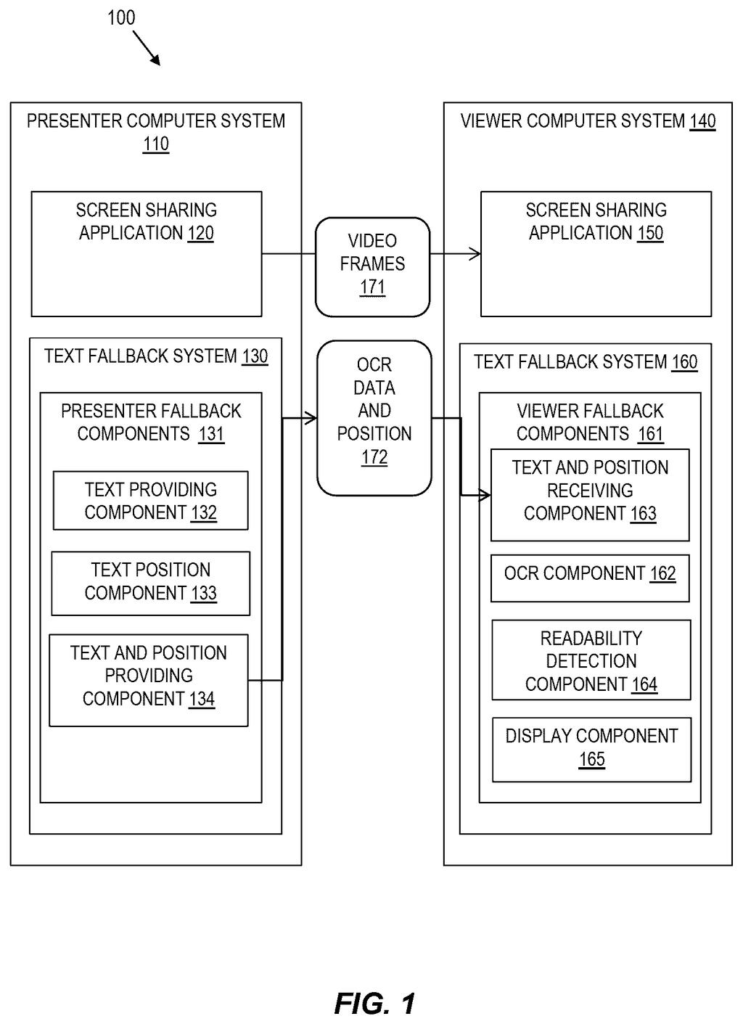
IBM's filing describes a fallback. The person sharing their screen also sends along the actual words on it, which takes far less data than video. Your computer keeps checking whether the video is still readable. If it isn't, it shows you the text instead, laid out roughly where it appeared on the sharer's screen.
When your connection recovers, you go back to the live video.
… detecting, by the processor of the computer system, a readability of text in a shared screen frame and determining if the readability in the shared screen frame is below a defined threshold …
Translation: The system constantly checks if the text in the video stream has become too blurry to read.
How the viewer's computer spots unreadable video
The patent splits the work between the person presenting and the person viewing. On the presenter's computer, the software runs OCR (optical character recognition, software that reads text out of an image) on each frame before it is sent. Because the frame hasn't been squeezed through a bad connection yet, this text is high quality. The presenter's computer also records where each piece of text sits: an x and y position, plus a height and width. It sends all of this alongside the video, for example as a simple JSON file (a plain list of text entries with their positions).
On the viewer's side, the software runs the same OCR on the video frame it actually received, checking selected key frames at a configurable rate such as every 0.5, 2 or 5 seconds. It then compares that result with the text the presenter sent. A word count can serve as the readability measure.
If the gap passes a set threshold (the description gives 50% word loss as an example), the viewer's screen switches from video to a rendered version of the presenter's text. That can be a plain text file or a mock-up of the presenter's screen using the position data.
- Good video: keep showing frames and keep checking.
- Unreadable video: show the received text.
- Recovery: keep monitoring, and return to video once the text is clear again.
Based on a determination that the shared screen frame is above the defined threshold, the method displays the shared screen frame and iterates the method.
Translation: When the connection is good enough, the software just shows the normal video feed like usual.
Why bad Wi-Fi might stop ruining your screen shares
If you've ever tried to read code or a spreadsheet on a shared screen with a weak connection, you know the usual choices are squinting or asking the presenter to send the file. A text fallback keeps the meeting moving. It matters most for working sessions where the words on screen are the whole point, like editing a document or reviewing code.
The idea would fit inside a screen sharing app, and the filing says it could also be an extension or a stand-alone program. For a company like IBM that sells collaboration and developer tools, it addresses a common complaint without asking anyone to upgrade their internet.
That makes this IBM's 421st filing in our IBM coverage since May, a corpus that spans ideas from a virtual bank advisor while shopping to smarter car update timing.
The building blocks here are ordinary: software that reads text on a screen and a quick check on whether that text is clear enough to see. No new hardware, no exotic infrastructure. That puts this very close to something a screen sharing app could add as a feature tomorrow.
The main limit is that both sides of the call need to be running the same tool. If the person presenting uses a different app, the feature simply does nothing, which means it works best inside a company that controls its own meeting software end to end.
It also only rescues words, not charts or photos or video. Within that narrow lane, though, the idea is clean and easy to explain: when the picture gets blurry, send the text instead. A screen sharing vendor could build this quickly, and most people on a video call would feel the benefit without ever knowing how it worked.
Get our take in your Top Stories
Liked this breakdown? Add Patentlyze as a preferred source on Google, and our plain-English take shows up more often in your Top Stories the next time IBM patent news breaks.
There are more where this came from
We read every patent application Big Tech publishes and send you the ones worth knowing. Plain English, free, every week.
The drawings
5 drawing sheets from US 2026/0341062 A1 · click any drawing to enlarge


Want this weekly breakdown for a company we don't cover? Patentlyze Pro →
Be the first to weigh in