
OpenAI Patents a Fix-It Button for Apps Its AI Builds and Breaks
When an app built with AI crashes, this OpenAI patent application has the same AI read the error report, explain it in plain language, and repair the code. The odd detail is that the AI is handed a labeled map of the code, because it can't count line numbers on its own.
How OpenAI's fix-it button repairs AI-built apps
Imagine you ask an AI to build you a little app, say one that draws a bar chart. You hit run and a wall of red error text fills the screen. It might as well be in another language, and you have no idea whether you caused the problem or the AI did.
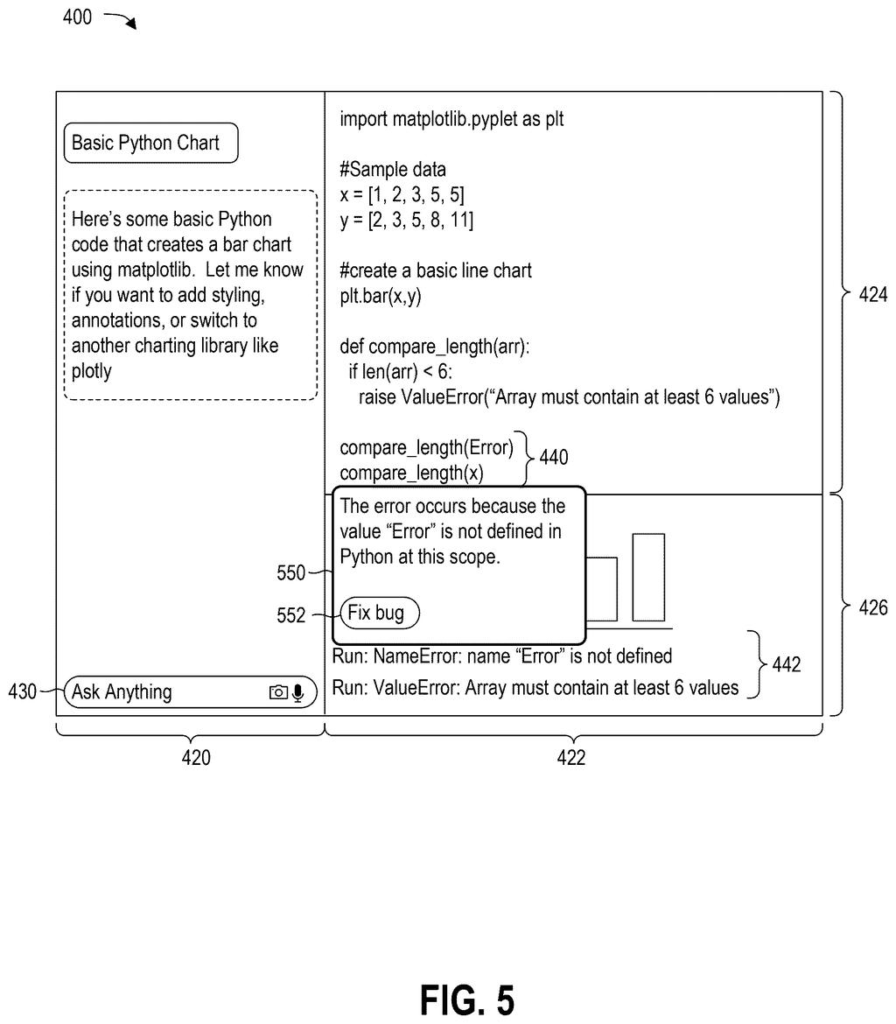
This OpenAI patent application describes a built-in fixer for that moment. The system notices the crash, sends the AI the error along with the relevant lines of code, and shows you a plain-language explanation of what went wrong, plus a suggested fix.
Click a button and your app goes back to the AI with that suggestion as a hint. The AI returns corrected code, and the system applies it. The filing says your app can keep its place through the repair, so you don't lose your progress.
… detecting a runtime exception based on executing the bespoke application, wherein the runtime exception includes a stack trace identifying a call order of functions of the bespoke application and one or more line numbers corresponding to code lines of the bespoke application associated with the call order …
Translation: Finding a crash and pinpointing the exact line of code that caused it.
How the error gets translated for the AI
When an app crashes, it produces a stack trace: a report listing the chain of functions that were running when things broke, along with line numbers in the code. The system watches for these crashes (called runtime exceptions) inside an online coding window where an AI builds and edits an app for you.
It then builds a debug prompt, which is just a message to the AI. The filing says a language model can't reliably count line numbers, so the prompt includes structured data, such as a small JSON record (a labeled data format) pairing each line number with its text. The prompt carries three things:
- The line numbers from the error
- The matching lines of code
- The features named in the stack trace, tied to those lines
The system also works out who caused the error. If the AI's own earlier edit did, it sends that edit back and applies a corrected patch (a bundle of code changes). If you caused it, it first runs static analysis (checking code without running it for things like syntax and type mistakes).
The AI's first answer appears as a suggestion. If you accept it, the suggestion goes back to the AI as a hint for a second pass, and the new patch is applied while the app keeps its earlier state.
… providing a debug prompt to a generative response engine that includes information associated with the application error; receiving a response from the generative response engine including a suggestion to resolve the application error …
Translation: Asking the AI to fix the bug and getting back a solution.
Why a fix-it button matters for beginners
If you've ever tried building something with an AI helper and hit a red error screen, this is the gap the filing targets. It says beginners struggle because error messages are cryptic and often point to lines that don't show the real cause, so people guess at fixes that can make things worse. A built-in explanation and one-click repair could keep you building instead of stuck.
The patent office has approved this application, and once OpenAI pays the final fee it should be issued as a granted patent. The example interface in the filing puts a chat panel beside a code editor, and it names ChatGPT and Canvas as examples of tools that could work this way.
OpenAI's fifth filing we've tracked in Enterprise AI since May follows one on a thinking-effort slider and one on a two-model compare tool.
Judged by how far it is from a working feature, this filing is short. It needs no new chip, no sensor and no new model. It needs a chat-and-code window, something that catches crashes, a message template and a button, and the filing points to Canvas as an example of the first piece.
The clever part is small and practical. A model can't count line numbers, so the system hands it the code with every line labeled. That is a formatting step in software, and software teams can try it quickly.
The catch is that the document shows no results. It describes the steps but never says how often the AI's second attempt actually fixes the problem. Verdict: routine engineering with a sensible shape, and the shortest route to a product is a button that appears next to an error.
Get our take in your Top Stories
Liked this breakdown? Add Patentlyze as a preferred source on Google, and our plain-English take shows up more often in your Top Stories the next time OpenAI patent news breaks.
There are more where this came from
We read every patent application Big Tech publishes and send you the ones worth knowing. Plain English, free, every week.
The drawings
14 drawing sheets from US 2026/0349913 A1 · click any drawing to enlarge


Show the other 6 sheets


Want this weekly breakdown for a company we don't cover? Patentlyze Pro →
Be the first to weigh in