
OpenAI
OpenAI · AI / ML · Filed Apr 4, 2025 · USPTO published Oct 8, 2026 · Oct 8 release
OpenAI Patents a Split-Screen Tool for Pitting Two AI Models Against Each Other
Every time a newer AI model arrives, the companies building on it have to ask whether it actually answers better than the old one. OpenAI's patent application puts both versions on one split screen and sends them the exact same question.
- Publication number
- US 2026/0310942 A1(US20260310942A1)
- Applicant
- OpenAI OpCo, LLC
- Filed · Published
- Apr 4, 2025 · Oct 8, 2026
- Inventors
- Jillian Khoo, Karolis Kosas, Scott Lessans, David Weedon
- Status when we published
- Waiting for an examiner
- Document
- 20 claims
- US classification
- 706/27
What OpenAI's two-pane AI test screen does
Imagine you run a company's customer-support chatbot, and a newer AI model has just come out. Before you swap it in, you want to know whether it answers your customers' questions better or breaks something that used to work.
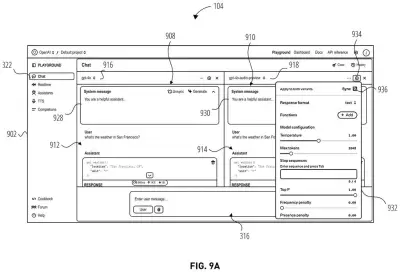
This patent application describes a testing screen split into two panes. You choose one version of the AI for the left pane and a different one for the right. Type a question once, and it goes to both. Each answer appears in its own pane, so you can compare them directly. A sync button fires the question at both at the same instant, so you can see which one answers faster.
The filing also describes a helper that matches the settings on both sides. That way, any difference you see comes from the AI version itself and not from a stray setting.
segmenting an interactive test interface into at least a first test pane and a second test pane to test at least two versions of the customized generative response engine side-by-side …
Translation: Splitting the screen into two windows lets developers test different AI models side by side.
How the screen lines up two AI versions
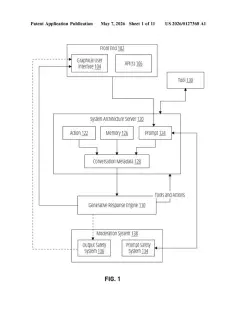
The patent describes a developer testing screen that is cut into at least two test panes. Each pane gets a configuration: a base model version (the underlying AI supplied by a publisher such as OpenAI), plus a system message (hidden instructions that set the AI's tone and rules) and optional settings like tools it may use. The filing says there can be any number of panes, with a scroll bar when they don't all fit on the display.
One shared prompt editor takes the test question and sends it to each pane's configuration. Each response is shown in its own pane for a person to judge. The main claim has the two panes use a first and a second base model version, and a dependent claim makes them different versions.
The dependent claims add two extras:
- Matching the settings. A "model comparison service" (a language model trained on what each model can do) learns how the two versions differ and adjusts the settings to fit. For example, it can shrink a newer model's context window (how much text it can take in at once) to match an older model's limit.
- Racing the models. A "synchronize messages" option sends the prompt to both at once, with each model running on separate processors, so response speed can be compared fairly.
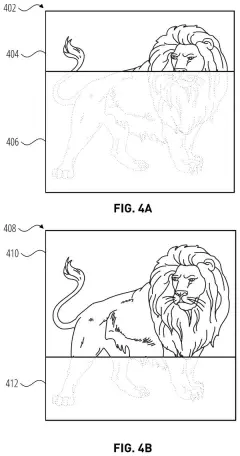
The description shows a test where one model, an audio-focused version, fails to read text in an uploaded image, while the other reads it fine. The filing also covers a voice-testing mode with a toggle for automatic turn detection (deciding when you've finished talking).
The present technology pertains to an interaction control interface for testing and developing a customized generative response engine (CGRE) that includes a base generative response engine version and system instructions/message that influence outputs generated by the CGRE.
Translation: This tool helps developers test and build custom AI versions by tweaking their underlying instructions.
Why developers would want to race two models
Every time an AI company releases a newer model, the businesses building on it face a choice: switch and hope, or test first. A side-by-side screen makes testing quick enough that more teams would actually do it, which could mean fewer surprise changes in the chatbots and assistants you use. The filing itself says tools like this can cut testing cycles from hours to minutes.
The settings-matching feature also keeps comparisons fair. If one model gets a bigger context window, a better answer might come from that setting and not from the model. The filing also lists models from other publishers, such as Anthropic's Claude Sonnet, as possible base versions, so this reads as a general-purpose tool for comparing AI engines.
OpenAI's fourth filing we've tracked on our AI guardrails race since September builds on earlier applications covering secure document answers and catching AI cheating.
Source: US 2026/0310942 A1 at the USPTO (PDF). Full patent text and figures are in the official publication.
Get our take in your Top Stories
Liked this breakdown? Add Patentlyze as a preferred source on Google, and our plain-English take shows up more often in your Top Stories the next time OpenAI patent news breaks.
Add Patentlyze on Google
One click.
There are more where this came from
We read the new patents from Big Tech, carmakers and more and send you the ones worth knowing. Plain English, free, every week.
The drawings · 32 sheets
32 drawing sheets from US 2026/0310942 A1 · click any drawing to enlarge


Show the other 24 sheets


More from OpenAI
All 58 OpenAI patents →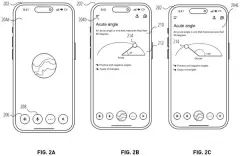
More in AI / ML
All 2,745 AI / ML patents →
Google
Google Patents a Mid-Generation Router That Picks the Right AI Model on the Fly
IBM
IBM Patents a Way to Catch When Its AI Language Tools Stop Making Sense
IBM
IBM Patents a System That Rewrites AI Responses That Break Its Own Rules
Nvidia
No comments yet