
Adobe Files Patent for AI That Adds Missing Edges to Your Photos With One Click
Turning a tall photo into a wide one usually means inventing the missing scenery yourself. Adobe's filing hands that job to AI after you pick a shape and slide the photo into place.
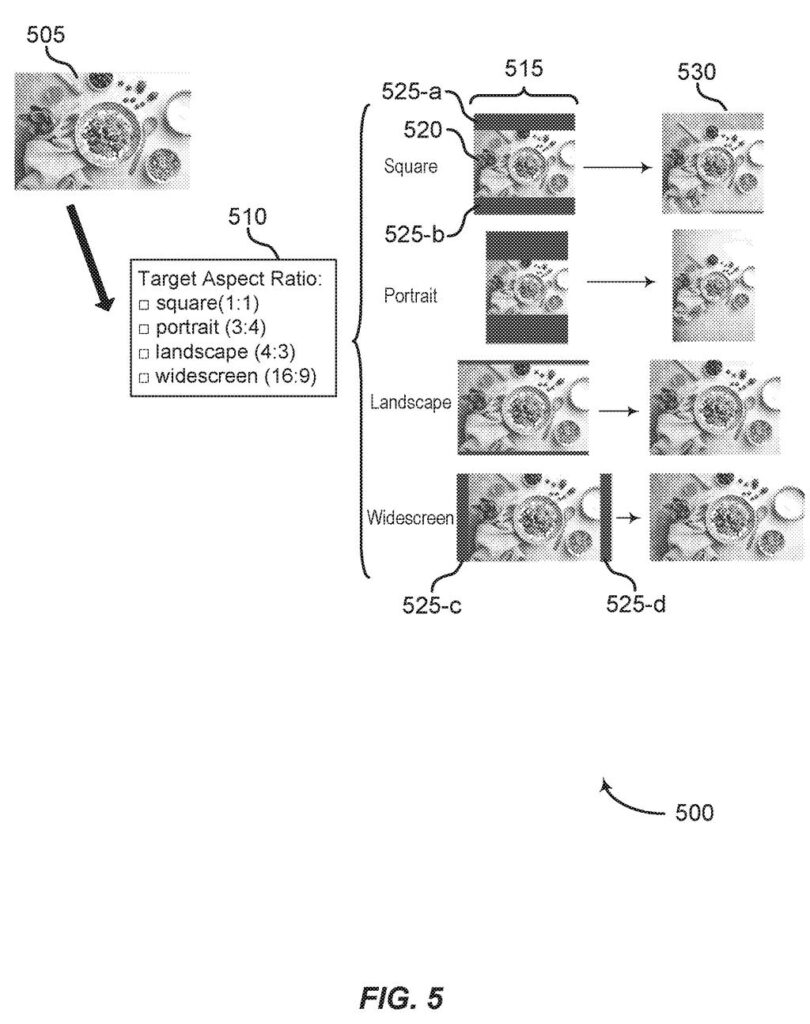
What Adobe's one-click photo extension does
Making a photo wider or taller than it was shot usually takes a string of manual steps: pick the new shape, place the photo inside it, create content for the empty space, then blend old and new so no seam shows. Adobe's patent application tries to boil that down to a single click.
You choose a shape from a short menu (square, portrait, landscape or widescreen), and an AI model paints in extra scenery on whichever sides need it. A slider lets you move the photo up, down, left or right inside the new frame, so you decide where the added space goes.
You can also type a short note, like "many French dishes on the table," to steer what the AI adds. A second slider trims messy edges off the original photo so the join looks clean.
… identifying an outpainting region within the target image frame for performing outpainting on the image based on the target aspect ratio and the positioning parameter; and generating, using a generative neural network, an extended image having the target aspect ratio by performing outpainting on the image based on the identified outpainting region.
Translation: The AI figures out the empty areas to fill and uses a neural network to draw the missing background.
How the shape menu and sliders steer the AI fill
The filing describes an editing tool that takes a photo plus a few choices from you, then uses a generative neural network (an AI model trained to create new images) to outpaint the photo. Outpainting means painting new content beyond the original edges.
Claim 1 covers the core sequence:
- You pick a target aspect ratio (the width-to-height shape), such as square (1:1), portrait (3:4), landscape (4:3) or widescreen (16:9), or a custom one.
- You set a positioning parameter, for example a slider from -1.00 to 1.00 that moves the photo up or down inside the new frame.
- The system works out which part of the frame is empty. That area becomes the outpainting region.
- The AI fills that region so the finished image matches your chosen shape.
Later claims add options. A text prompt (such as many French dishes on the table) steers what appears, and an image prompt can ask for a particular object. A dilation setting, a slider from 0.00 to 0.50, trims the photo's outer edge to remove seams. One selection can also extend several sides at once.
The description says the model is diffusion-based, meaning it builds an image by gradually removing random noise.
Why resizing photos could get less fiddly
If this ended up in an editing app, the practical gain is speed. Fitting one photo to a square post, a widescreen slide and a tall phone screen could take three clicks instead of three rounds of manual work, and the slider lets you choose which side gets the new scenery.
The filing says today's tools often rely on drawing boxes around the areas to fill, and that some run slowly or lose resolution at custom shapes. It names social media, digital art and presentations as uses, and says it aims at beginners as much as professional photographers and designers. Whether it shows up in a product is not something the filing says.
Adobe's 58th filing we've tracked since May in our AI photo editing watchlist joins earlier work on rotating objects in photos and keeping AI people stable on camera.
Claim 1 is short and wide. It asks for a handful of steps: take a photo, let the person pick a new shape and a position for the photo inside it, mark the empty area, and have an AI fill that area in.
Look at what it leaves out. The first claim names no particular type of AI model, and the text prompt, the edge-trimming slider and the multi-side fill all show up only in later claims. The broad idea is a menu of choices (shape plus placement) feeding a fill-in-the-blank AI.
That makes this a routine, product-minded filing. It will feel familiar to anyone who has resized a photo for a social post, and most of its value sits in how neatly the controls are packaged. Whether a claim this broad survives review is a separate question, and nothing in the document answers it.
Get our take in your Top Stories
Liked this breakdown? Add Patentlyze as a preferred source on Google, and our plain-English take shows up more often in your Top Stories the next time Adobe patent news breaks.
There are more where this came from
We read every patent application Big Tech publishes and send you the ones worth knowing. Plain English, free, every week.
The drawings
11 drawing sheets from US 2026/0350745 A1 · click any drawing to enlarge


Show the other 3 sheets


Want this weekly breakdown for a company we don't cover? Patentlyze Pro →
Be the first to weigh in