
Adobe Files Patent for Color Edits That Know a Beach From a Portrait
Adobe's latest patent filing teaches an AI photo editor to recolor a picture by first taking the color away and making the AI rebuild it. The goal is color edits that fit what is actually in the photo.
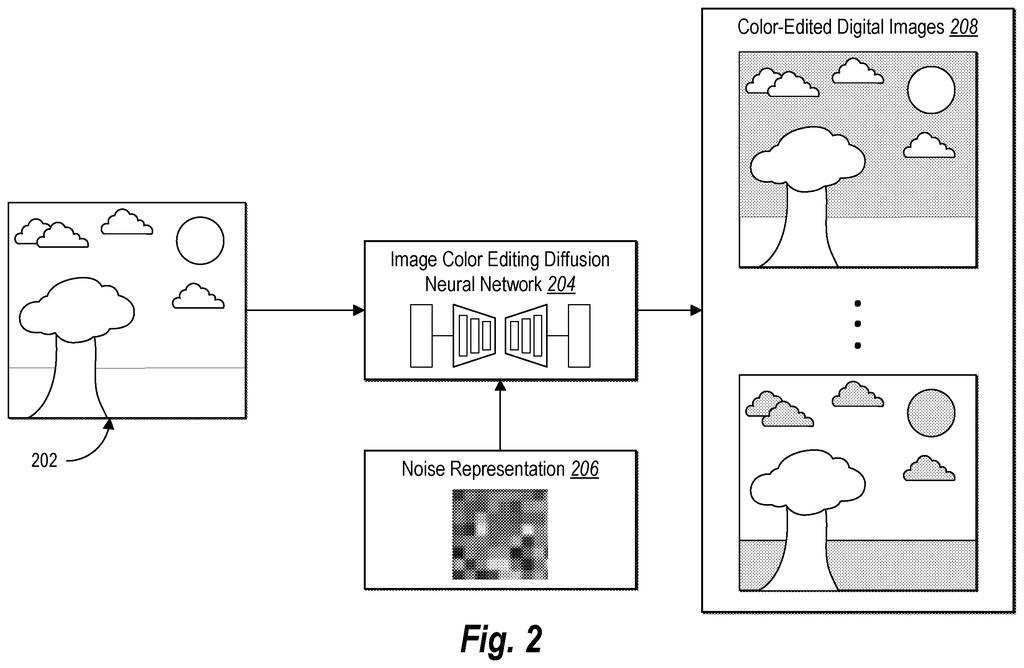
What Adobe's content-aware color editor does
A photo of a crowded beach at noon gets run through a color filter. The filter was built for moody night scenes, so the blue sky comes out midnight purple. If you have ever tapped an editing preset and winced, you know the feeling.
Adobe's patent application describes a way to teach an AI editor to avoid that. During training, the system takes pairs of photos, the original and a hand-edited version, and strips the color out of them. It leaves either a gray version or a version with only color and no brightness. The AI has to rebuild what is missing, which pushes it to learn what is actually in the picture: sky, skin, shirts, sand.
Once trained, it can offer several different color looks for the same photo, each one fitted to what the photo shows. The filing also describes copying the look of an example edit onto a new photo, or steering the result with a typed request.
… generating an incomplete digital image from the digital image or the ground truth color-edited digital image by removing a color space channel from the digital image or the ground truth color-edited digital image …
Translation: The system strips away color data to create an incomplete version of the picture for training purposes.
How Adobe trains its AI by removing color
The claims cover a training method for an image color editing diffusion neural network. A diffusion network is an AI image generator that starts from random static and removes the noise step by step until a picture appears. Here, every step is guided by the original photo, so the result shows the same scene in a new color style.
The training data is pairs of photos: an original and a version a person edited. The system then builds an incomplete image by removing a color space channel (one ingredient of how a picture stores color) from either photo. The claims give two examples: a grayscale version, or a version with the brightness (luminance) channel zeroed out so only color information remains.
The network is trained to produce the edited photo while also being shown these degraded copies. In effect it practices two side jobs, colorizing gray images and restoring missing brightness. A loss score (a measure of how far off its output is) for each job adjusts the network. Because sky, skin and shirts need different colors, the side jobs push it to learn what is in the picture.
Once trained, different random noise gives different looks for the same photo. The filing also describes copying the look of one before and after pair onto a new photo, and steering edits with typed prompts like 'change color tones of the lighting.' Adobe reports gains of 15%, 27% and 37% over a leading existing model on its own measures.
… generate, from the digital image utilizing an image color editing diffusion neural network, a color-edited digital image depicting the content in a second color style different from the first color style …
Translation: An artificial intelligence network transforms the original colors of a photo into a completely new style.
What this means for Adobe photo editing apps
If this reaches editing software, color tools could fit each photo instead of pushing one look onto everything. Your portrait could get color changes that treat skin and sky separately, and a sunny beach would stop drifting toward midnight purple. You could also get several options per photo and pick one, or borrow the look of a photo you like.
The filing names Photoshop, Premiere, Lightroom, Illustrator and Substance as places the technology could live, and says it can run on a server or on your own device. It is a patent application, so none of this is a promised feature.
That makes this Adobe's 53rd filing we've tracked since May in the AI photo editing race, a group that includes applications like sharper subject edges and auto object removal.
Color editing needs no new hardware. The claims cover only the training recipe, so the shortest route to a product runs through software Adobe already sells, hosted on its servers or on your own computer as the filing describes.
What has to exist first is the data: lots of original photos paired with versions a person edited by hand. Without those pairs, the stripped-color training trick has nothing to learn from. The filing also says it is a divisional of an application from August 2023, so the idea has had time to mature.
Verdict: a practical idea with a short road to Lightroom or Photoshop. The typed color requests and the copy-a-look-from-an-example feature would be the easiest to show off in a demo, while the training method is the piece you would never see.
Get our take in your Top Stories
Liked this breakdown? Add Patentlyze as a preferred source on Google, and our plain-English take shows up more often in your Top Stories the next time Adobe patent news breaks.
There are more where this came from
We read every patent application Big Tech publishes and send you the ones worth knowing. Plain English, free, every week.
The drawings
12 drawing sheets from US 2026/0340981 A1 · click any drawing to enlarge


Show the other 4 sheets


Want this weekly breakdown for a company we don't cover? Patentlyze Pro →
Be the first to weigh in