
Qualcomm Patents a Battery-Friendly Way to Keep Pinch-to-Zoom Sharp
Zooming on a phone usually forces a trade: blurry and fast, or sharp and stuttery. Qualcomm's patent application has the phone make the sharp version once, then shrink it back down to build the animation.
What Qualcomm's zoom patent actually does
Right now, how well zoom works depends on where you are on your phone. Inside a map app, pinching feels fine. Almost everywhere else, the screen has two weak options: a quick stretch that turns blurry, or AI sharpening that makes the animation stutter and drains your battery.
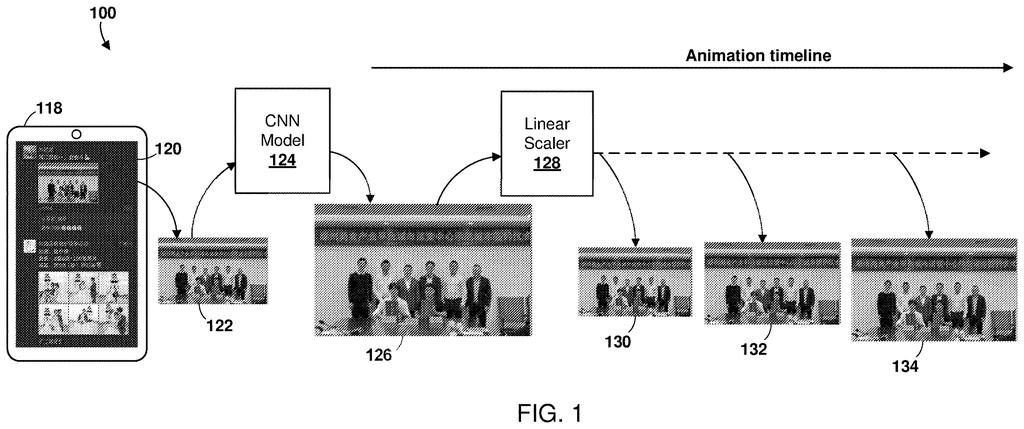
Qualcomm's patent application splits the job. When you put two fingers on the screen, the phone works out which part of the picture you're likely zooming into and how big it can get. It then uses AI once to make the final, sharp, enlarged version. After that, it shrinks that sharp picture into a series of in-between sizes.
Those frames play back as you spread your fingers, so the animation follows your hand. Every frame starts from the crisp image, so they all look good, and the AI only does its heavy lifting one time instead of for every frame.
… determining a scaling factor for a final zoomed presentation of the ROI based on one or both of an image rendering requirement or an inference speed of a frame generation convolutional neural network (CNN); …
Translation: The system figures out how much to zoom based on performance limits of the AI network.
How one sharp image becomes a whole zoom
The method starts when the device detects a zoom gesture. It finds the region of interest (the part of the screen being zoomed) by looking at how much the pixels vary compared with a plain background, or by splitting the image into objects. A thumbnail on a flat background is the filing's example.
Next it picks a scaling factor (how much to enlarge). That choice can depend on the size of the region, the size of the display, the frames per second needed, and how fast the neural network (a type of AI that is good at images) can run on that device. The filing gives sample timings: 27 milliseconds for 2x, 35 for 3x, and 52 for 4x.
Then comes the core move:
- The AI network builds the final enlarged image first, for example taking a 540×320 region to 1080×640.
- A simple, cheap linear scaler shrinks that result into in-between frames, such as 550×324 and 570×335.
- The frames play from smallest to largest, matched to how fast your fingers move.
The filing says the AI image can finish in the short gap between your first touch and your fingers visibly moving. The background can be enlarged with a cheaper method while the region you care about gets the sharp treatment. If your gesture stops early, the animation can stop on an in-between frame.
… down-scaling the final zoomed presentation to generate a sequence of intermediate size image frames each having dimensions smaller than dimensions of the final zoomed presentation of the ROI and greater than dimensions of the ROI, …
Translation: It creates smooth zoom animation frames by shrinking the maximum zoom image back down incrementally.
Why zoom could work beyond a few apps
If you've ever pinched at a screenshot, a photo thumbnail, or something in an app with no zoom of its own, you know the result is often a blurry blob or nothing at all. The filing says its aim is a zoom function for nearly any content on screen, not only inside apps that built their own.
The battery angle is the practical hook. The company says running AI for every animation frame uses too much power and struggles on 120 Hz or 144 Hz screens. Running it once and reusing the result is a much lighter load, so zooming could look sharper without noticeably draining your phone.
Qualcomm's 25th filing we've tracked in our Enterprise AI coverage since May builds on work like one on robot grip focus and one on pre-loading chip data.
Most of this is software. The filing relies on parts a modern phone already has: a touchscreen, a graphics chip, an AI chip, and a basic image shrinker. No new sensor or screen is needed.
The harder part is reach. For zoom to work on nearly any content, something deep in the operating system has to spot what you're pinching and grab it as an image. That layer belongs to the phone maker, so Qualcomm would need a partner to adopt it.
The shortest route to a product is a chip-maker software package that phone makers switch on. The filing gives timing examples (27 to 52 milliseconds) but no results on battery savings or smoothness, so those benefits remain claims. It is a sensible, modest engineering fix for something people notice every day.
Get our take in your Top Stories
Liked this breakdown? Add Patentlyze as a preferred source on Google, and our plain-English take shows up more often in your Top Stories the next time Qualcomm patent news breaks.
There are more where this came from
We read every patent application Big Tech publishes and send you the ones worth knowing. Plain English, free, every week.
The drawings
11 drawing sheets from US 2026/0350739 A1 · click any drawing to enlarge


Show the other 3 sheets


Want this weekly breakdown for a company we don't cover? Patentlyze Pro →
Be the first to weigh in