
Adobe Files Patent for Training a Small AI to Suggest Questions About Your Documents
Adobe's patent filing shows how to teach a tiny AI to suggest questions about your document, small enough to run on your own device instead of a distant server.
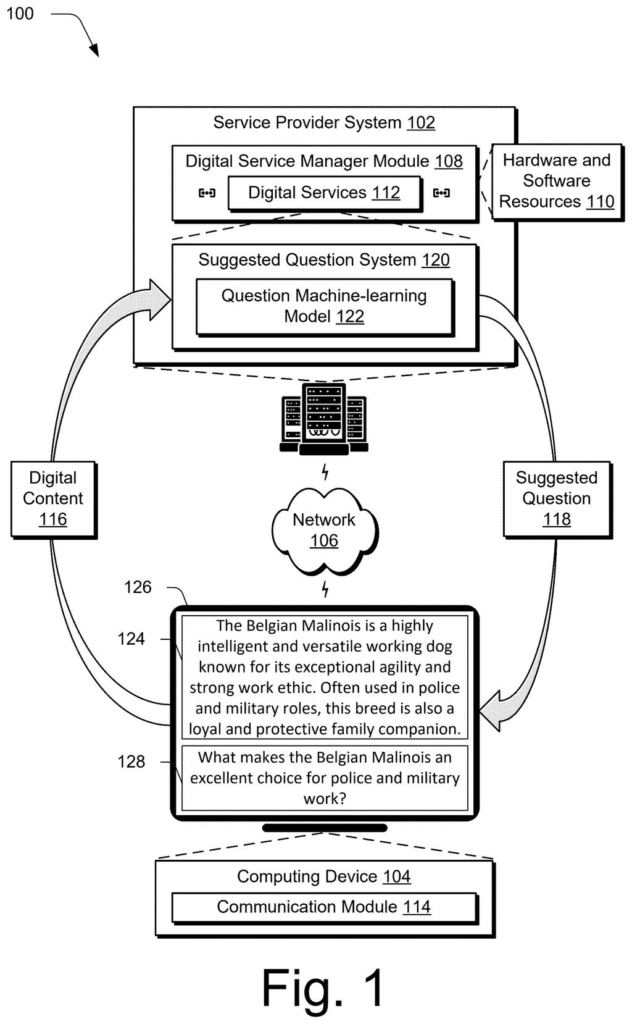
What Adobe's suggested-question patent does
Most AI tools that suggest questions about a document work by sending that document to a server run by someone else. That is a hard sell when the file holds a contract, medical notes or anything private, and the filing says many people simply skip the feature.
Adobe's patent describes a way to build a much smaller AI that could run on your own device. The catch is that small models need lots of practice examples, and no big collection exists of documents paired with questions real readers asked. So the patent has a larger AI invent them. It reads chunks of a document, imagines who might read each chunk (say, a nurse or a student), and writes questions that person would care about.
A set of filters then throws out repeats, questions the document can't answer, and ones that are too short or too long.
… forming one or more prompts to cause a language model to extract text from the item of digital content that has a likelihood of being of interest based on the one or more profiles …
Translation: The system uses prompts to make a language model pull out the most relevant parts of a document.
How Adobe invents readers to train a small model
The claims cover a pipeline for making training examples for a question model, a compact AI whose only job is to read a document and propose questions you can click. A larger language model (a chatbot-style AI) does the preparation work.
The pipeline runs in steps:
- Cut a long document into portions and write a short overview of each.
- Use each portion and overview to write a reader profile: a guess at the reader's profession, goal and background knowledge.
- Ask the language model to pull out passages that profile would find interesting.
- Ask it to write training questions from the profile and those passages.
Filters then check for repeats, whether the document actually answers each question, wording quality and length (the filing gives under four or over twelve words as example cutoffs). Training alternates between two kinds of prompts, one that includes the document portion and one that leaves it out, so the model learns to guess the reader and write the question.
A third independent claim covers testing: the small model and another AI each suggest questions, and a language model judges which set is better. The example model has about 360 million parameters (the adjustable settings inside an AI), fits in under one gigabyte, and shrinks to roughly 100 megabytes with compression (called quantization). That is about 4.5% the size of a typical 8-billion-parameter small model.
… forming at least one prompt to cause the language model to generate a set of training questions as part of the training data based on a respective said profile and the text …
Translation: It then prompts the model to create practice questions based on those interesting document sections.
Why on-device suggestions could ease privacy worries
If this works as described, a document app could offer clickable question suggestions without sending your file anywhere. The filing says the model is small enough to run on your own device, which would matter most for confidential files such as contracts or medical records.
It also tackles a less visible problem for the company itself: how to train such a model without collecting real people's documents and questions, which the filing says raises privacy and legal concerns. Made-up questions, about 23,000 in the example, built from real-world documents in areas like government, education, healthcare and research, avoid that. A patent application is only a filing, so nothing here confirms a product.
Adobe's 32nd filing we've tracked in Language AI since May follows one turning plain-English into data queries and one tracing AI text to source data.
People hold back from AI features most on the files they need help with most: contracts, medical notes, internal reports. A feature that gets skipped for that reason has a serious adoption problem, and the filing treats it that way. Shrinking the model to fit on your own device matches the problem well, because it removes the upload step entirely.
The weaker spot is the scoring. The filing grades its small model by asking another AI which set of questions looks better, using only the opening stretch of each document. That is a cheap yardstick, and the claim of matching much bigger models rests on it.
The problem is large enough that even a modest, working version would matter to anyone who opens a sensitive file and wants a nudge about what to ask.
Get our take in your Top Stories
Liked this breakdown? Add Patentlyze as a preferred source on Google, and our plain-English take shows up more often in your Top Stories the next time Adobe patent news breaks.
There are more where this came from
We read every patent application Big Tech publishes and send you the ones worth knowing. Plain English, free, every week.
The drawings
20 drawing sheets from US 2026/0320478 A1 · click any drawing to enlarge


Show the other 12 sheets


Want this weekly breakdown for a company we don't cover? Patentlyze Pro →
Be the first to weigh in