
Apple Patents a Fix for Audio Glitches That Creep In When Converting File Types
Every time a piece of audio gets converted from one format to another, tiny unwanted sound samples can sneak into the beginning or end of a track. Apple's new patent describes a way to flag and remove them before you ever hear a pop or a clip.
What Apple's audio-trimming patent actually does
Every time you stream a song or podcast, the audio file on the server may be in a different format than the one your device prefers. That means it gets converted on the fly, and conversions are rarely perfectly clean: a handful of extra audio samples can get tacked on at the edges of a track or chapter, causing a faint click, pop, or misaligned fade.
Apple's patent describes a system that embeds small markers, called trim fields, directly inside the converted audio data. Those markers tell your device's decoder exactly which samples to throw away before playing the audio. Think of it like a sticky note on a film reel saying 'cut the first three frames before you show this.'
The process covers both the sound itself and the metadata (the extra information that travels alongside the audio, like volume levels or channel descriptions). Both get converted together and both carry the right trimming instructions, so nothing falls out of sync.
receiving, by a decoder, a target bitstream including an audio frame in a target format associated with an encoder, the audio frame transcoded from an earlier audio frame in a source bitstream, the audio frame including one or more trim fields to indicate whether one or more audio samples are to be trimmed from the audio frame …
Translation: A decoder takes in converted audio data that contains special flags telling it to cut unnecessary audio samples.
How the decoder reads trim fields to cut stray samples
The patent addresses a specific problem in audio transcoding (converting a file from one compressed format to another). When audio is re-encoded, the new encoder typically adds a short buffer of silent or padded samples at the start and end of each chunk. If these aren't stripped out, playback can have audible artifacts, especially at track boundaries or during gapless playback of back-to-back songs.
Apple's approach embeds one or more trim fields inside each converted audio frame. A frame is a small, self-contained chunk of audio data, roughly analogous to a single page in a book. The trim fields act as instructions: they tell the receiving decoder (the software or chip that unpacks audio for playback) how many samples to discard from the front or back of that chunk.
The system handles two parallel streams:
- Audio frames: the actual sound data, transcoded from an older format into a new target format.
- Metadata frames: companion data describing things like loudness normalization or channel layout, also converted and kept in sync with the audio.
By carrying trim instructions in the bitstream itself rather than relying on a separate side-channel or external file, the decoder can make the right cuts regardless of where or how the audio arrives.
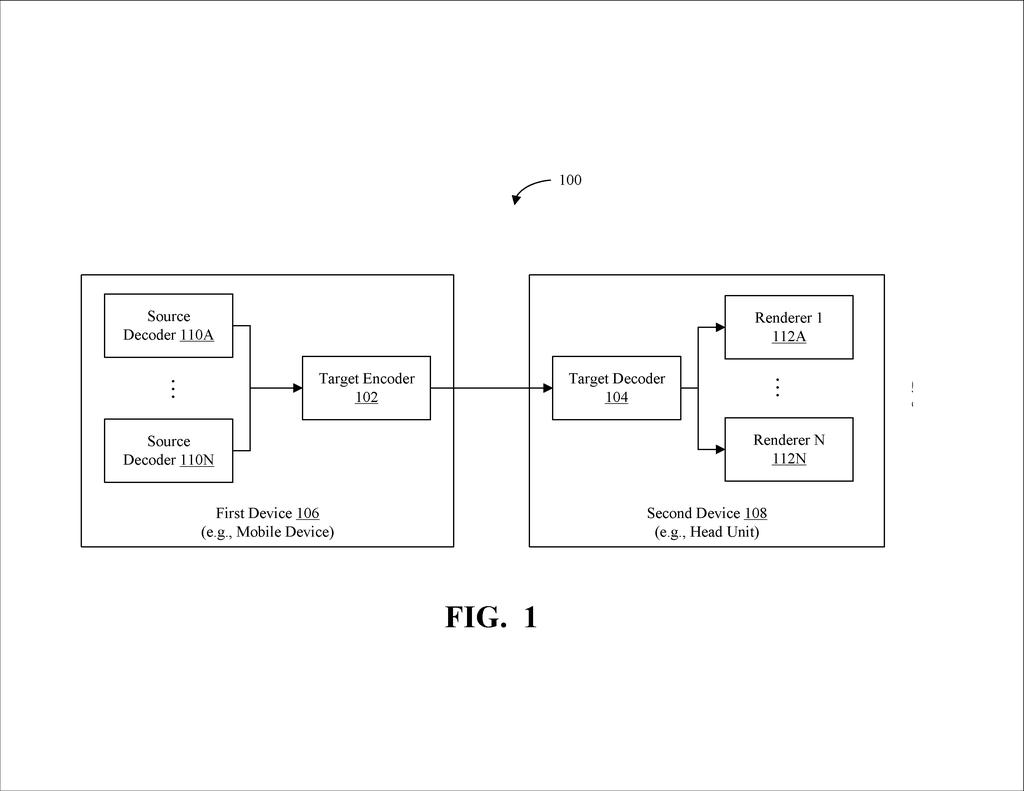
A target decoder may receive a bitstream including an audio frame in a target format associated with a target encoder and a metadata frame associated with the audio frame.
Translation: The player receives both the converted audio and its accompanying data files at the same time.
What this means for music and podcast playback quality
For most people, this is about gapless playback: the experience of a live album flowing without any awkward silence or click between tracks, or a podcast chapter starting exactly where the last one ended. Audio format conversion has always introduced small errors at these seams, and fixing them has historically required either lossless formats or careful manual encoding. Apple's approach bakes the fix into the converted file itself.
This is particularly relevant for Apple's ecosystem, where audio moves between many formats and devices, from streaming servers to AirPods to HomePods. A decoder that can trim stray samples automatically, using instructions embedded in the data it's already reading, is a quieter and more reliable solution than patching it at the app layer.
Apple's 472nd filing in our Apple coverage since May adds to a run that includes the headset audio switcher and the 3D streaming compressor.
That faint click or stutter between songs on a streaming playlist is not random noise. It happens because audio files get converted between formats as they travel through servers, and the instructions for playing them cleanly do not always survive the trip intact. At hundreds of millions of plays a day, that failure accumulates into a real and chronic quality problem.
Apple's answer is to attach those playback instructions directly to each audio chunk as it moves through the system, so nothing gets lost in translation. The fix is proportionate to the problem: modest in ambition, precise in aim, and designed for messy real-world conditions where audio passes through many hands before reaching a listener.
Most people will never know this change happened. They will just notice that the music sounds right.
There are more where this came from
We read every patent application Big Tech publishes and send you the ones worth knowing. Plain English, free, every week.
The drawings
6 drawing sheets from US 2026/0290361 A1 · click any drawing to enlarge


Want this weekly breakdown for a company we don't cover? Patentlyze Pro →
Be the first to weigh in