
Google Files Patent to Build a Custom Screen Whenever You Ask for One
Google describes an AI that answers 'Can you give me a workout routine?' by building you a small app-style screen on the spot, then deleting it when you are done.
What Google's build-it-on-request screens do
Someone types, 'Can you give me a workout routine?' into a box on their computer. Today the answer usually comes back as a block of text to scroll through. You have probably been that someone, and wished the answer came back as something you could tap.
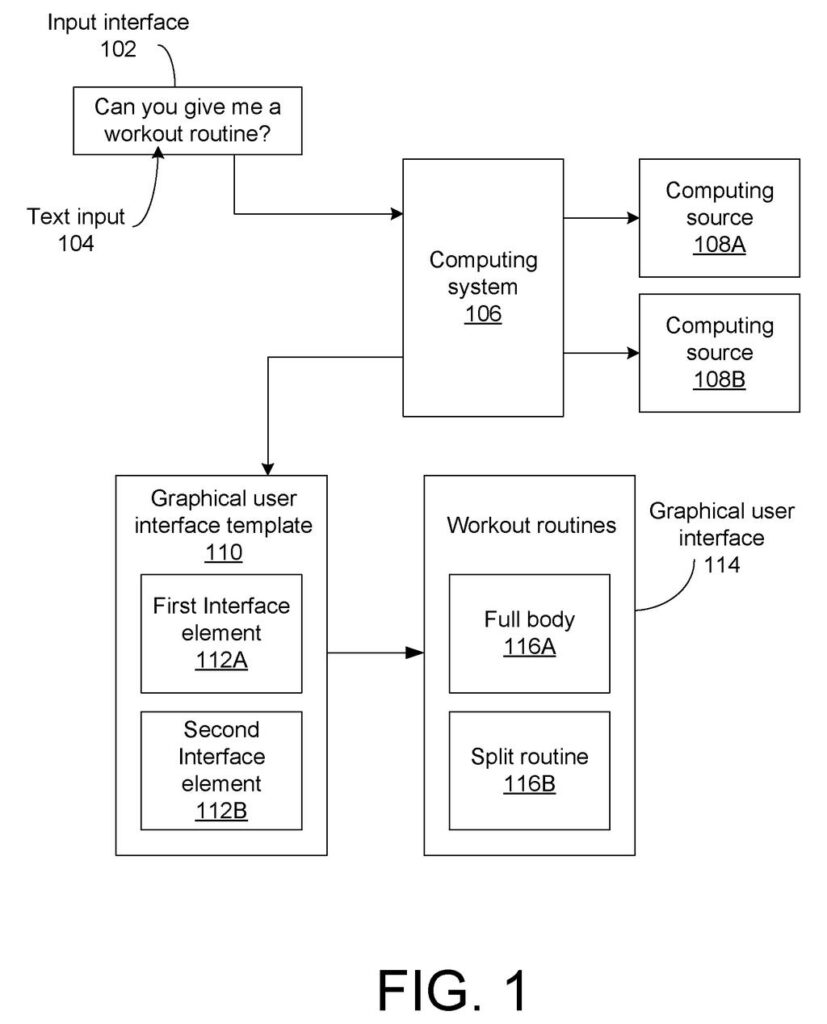
Google's patent application describes a different answer. The system works out what you are trying to do, then builds a small custom screen for it. In the filing's example, you get a 'Workout routines' screen with tappable choices like 'Full body' and 'Split routine.' The content comes from sources the system looks up for your request.
Ask for a calendar and you get a calendar layout. Say 'show a single day at a time' and the screen rearranges itself. When you are finished, the system can throw the screen away.
receiving a request from a user to generate a graphical user interface (GUI) for a task; in response to receiving the request, using a model to generate the GUI by: determining a GUI template based on the task …
Translation: The system listens for what you want to do and uses AI to pick a matching layout.
How the template gets filled with live data
The system starts with a typed request (or speech converted to text). A language model (an AI trained on huge amounts of text) works out the task. The filing says it can also check your interaction history, such as open apps or browser tabs, with your consent, to settle vague requests like 'open my routine.'
Next comes a template: a layout with blank slots called interface elements (buttons, text fields, drop-down menus). It can be picked from a library or generated. The filing describes scoring how well a template fits the data, so a list of five exercises calls for at least five slots.
- Parse the request into a task type and details, such as '30 minutes' as a time limit.
- Fetch data from the web, a search engine, or local storage, chosen to match the task and the blank elements.
- Fill the blanks with text and images, resizing elements so nothing overflows.
- Show the finished screen, and optionally add a launch icon to your desktop or home screen.
After that, the screen stays editable. A follow-up request changes its layout, and tapping an element can trigger an action. The filing also describes deleting the screen after use to free up memory.
… retrieving data from a computing source, the data being selected based on the interface element and the task; and generating the custom GUI by populating the interface element of the GUI template based on the data …
Translation: It pulls the exact information you need and fills in the blanks on the fly.
Why a disposable app screen matters to you
If something like this reached a product, an assistant's answer could arrive as a working screen you can tap instead of a paragraph you have to read. A trip planner, a comparison table, or a calendar could appear when you ask and disappear when you are done, so your device does not fill up with one-off apps. The filing says it could run on a phone, laptop, tablet, smart TV, or headset, and be built into an operating system.
The filing's own pitch is efficiency: no library of rarely used screens to store, and a layout shaped to the data it holds. The catch is that quality depends on the model choosing a sensible layout and on the fetched data being good. This is only a patent application, so there is no sign of when, or whether, you would see it.
Google's 56th filing we've tracked since May in the AI agents acting for you watch builds on earlier applications like turning plain-English into robot code and robots checking what they can do.
Claim 1 is short and wide. It covers any method where you ask for a screen for a task, a model chooses a layout with at least one blank element, data gets fetched based on that element and the task, and the blank is filled in and shown to you.
Look at what the claim leaves out. It never names a chatbot, a search engine, or a particular device. Those details show up in later claims, such as claim 7's language model. So the core idea, a model assembling a layout and filling it with fetched content, stretches across many ways of building such a screen.
That breadth is the whole story. Any assistant that turns a request into a layout plus fetched content would sit close to this language if it were granted. How much of it survives review is unknown.
Get our take in your Top Stories
Liked this breakdown? Add Patentlyze as a preferred source on Google, and our plain-English take shows up more often in your Top Stories the next time Google patent news breaks.
There are more where this came from
We read every patent application Big Tech publishes and send you the ones worth knowing. Plain English, free, every week.
The drawings
5 drawing sheets from US 2026/0329602 A1 · click any drawing to enlarge


Want this weekly breakdown for a company we don't cover? Patentlyze Pro →
Be the first to weigh in