
Microsoft Files Patent to Hide Your Private Apps Before You Share Your Screen
Everyone who shares their screen has the same fear: a private email or spreadsheet showing up mid-call. Microsoft's filing has the computer sweep those items onto a hidden desktop before anyone sees them.
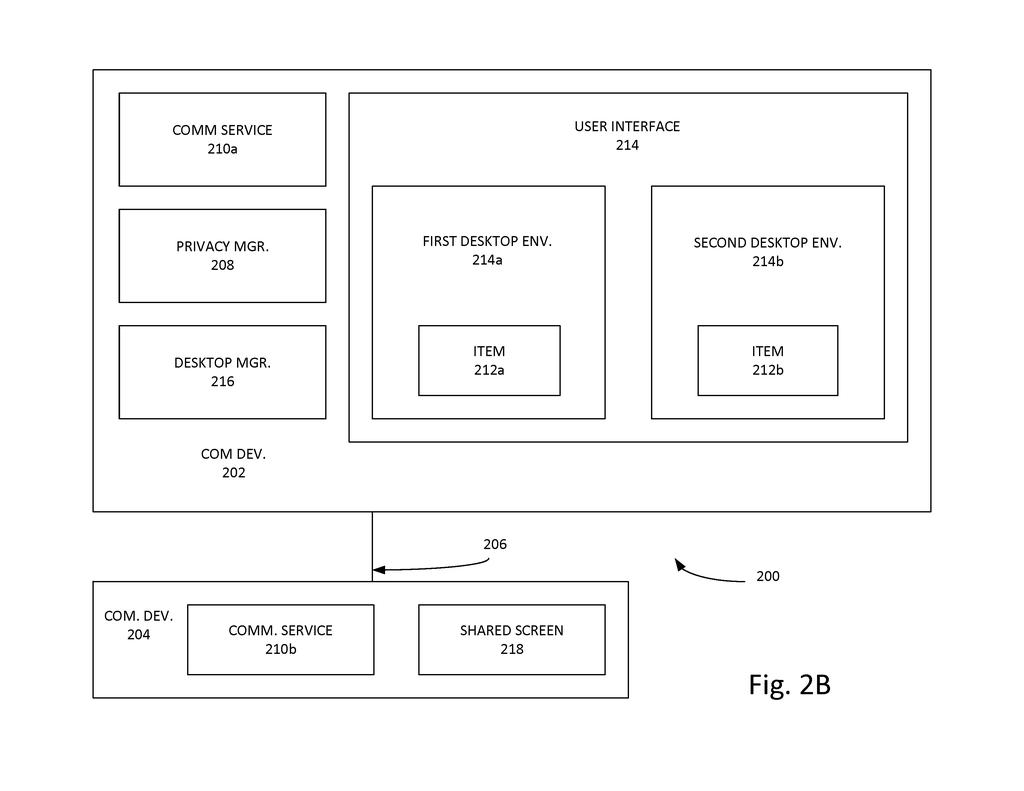
How Microsoft hides apps during screen shares
Right now, the only way to keep a private spreadsheet off a shared screen is to remember to close it first. That is easy to forget, especially when the file is buried behind other windows, and closing it means you lose your place in your work.
Microsoft's filing has your computer do the remembering. You keep a list of things you consider sensitive, such as certain apps, files or whole categories of them. When you start a screen share, the system checks what is open and moves anything on the list to a second, hidden desktop that the share cannot see. Your presentation stays on screen for everyone else.
Nothing gets closed. The hidden app keeps running, and when the call ends, everything slides back to where it was.
… initiate a screen sharing session between the first computing device and a second computing device on a computer network, wherein the screen sharing session is configured to share the first desktop environment on the first computing device with the second computing device, wherein the second desktop environment is inaccessible to the screen sharing session …
Translation: It starts sharing one desktop while keeping the second desktop completely hidden from other viewers.
How the hidden second desktop gets filled
The patent covers a privacy manager built around the virtual desktops that operating systems already offer (separate workspaces you can switch between). Before a screen sharing session starts, the operating system builds a second desktop that the session cannot see or reach. Then the system moves selected items from the main desktop into it.
What gets moved depends on a user profile, a saved list of what counts as sensitive. According to the claims, the profile can identify:
- Specific items on a sensitive list
- Whole categories of applications
- Whole categories of files
A move can also depend on a condition, such as whether someone on the call is outside your company or has weaker permissions. The system can ask you first whether to hide something. A machine learning model (software that learns from patterns) can adjust the profile based on what you hid before. The description mentions a Bayes theorem approach, a statistics method for estimating how likely you are to hide a given item.
Moved items stay open and their apps keep running. When the session ends, the two desktops merge back together. The claims also cover showing the hidden desktop in a different region of the screen from the shared one.
A selected item in the first desktop environment is moved to the second desktop environment based on a user profile.
Translation: Anything on your saved list of sensitive items gets moved to the hidden desktop that the screen share cannot show.
Why Microsoft's hidden desktop suits remote work
If you work from home or share screens with clients, you know the small dread of a stray email or spreadsheet popping up mid-call. This would take that job off your plate. You would not have to close and reopen things, and you would not lose your place in unfinished work. For companies, it addresses a real risk: the filing notes that other participants can take screenshots and post what they see online.
The filing says the privacy manager could live inside the operating system, inside a communication app, or as a standalone product. The company angle shows up in the conditions: hiding certain files only when someone outside the organization joins, or when a participant has weak permissions. That makes it a natural fit for workplace software where mixed audiences are routine.
Microsoft already holds two patents on this idea. This application splits off from one granted as US 12,699,803, and the family goes back to a 2021 application granted as US 12,056,256.
Other Microsoft privacy filings in our Security coverage include hiding your mouse clicks from your own computer and an AI that spots private data before it leaks.
Of everything in this filing, the shortest road to a real feature runs through software alone. No new hardware is needed. The filing builds on virtual desktops that operating systems already have, plus a signal from the call app saying a share has started. What is left is a settings screen for your sensitive list and some glue between the call app and the operating system.
The hard part is trust. A tool like this only works if it catches the one spreadsheet you forgot about, and a single miss undoes the promise. That makes the prompt before sharing and the learning from your past choices matter more than they sound.
Expect a modest setting tucked into a call app's menu, and that is enough. It solves an embarrassing problem most people have run into at least once.
Get our take in your Top Stories
Liked this breakdown? Add Patentlyze as a preferred source on Google, and our plain-English take shows up more often in your Top Stories the next time Microsoft patent news breaks.
There are more where this came from
We read every patent application Big Tech publishes and send you the ones worth knowing. Plain English, free, every week.
The drawings
4 drawing sheets from US 2026/0340184 A1 · click any drawing to enlarge


Want this weekly breakdown for a company we don't cover? Patentlyze Pro →
Be the first to weigh in