
Samsung Patents Per-Zone Portrait Blur That Treats Foreground and Background Differently
Portrait mode on most phones applies one blur recipe to everything behind your subject. Samsung is filing for a system that treats the foreground and background as separate canvases, each with its own blur settings.
What Samsung's zone-by-zone portrait blur actually does
Most phone cameras that blur the background in a portrait shot use a single sliding scale: more blur here, less there. The whole behind-the-subject area gets treated as one thing, which often produces a result that looks a little flat or artificial.
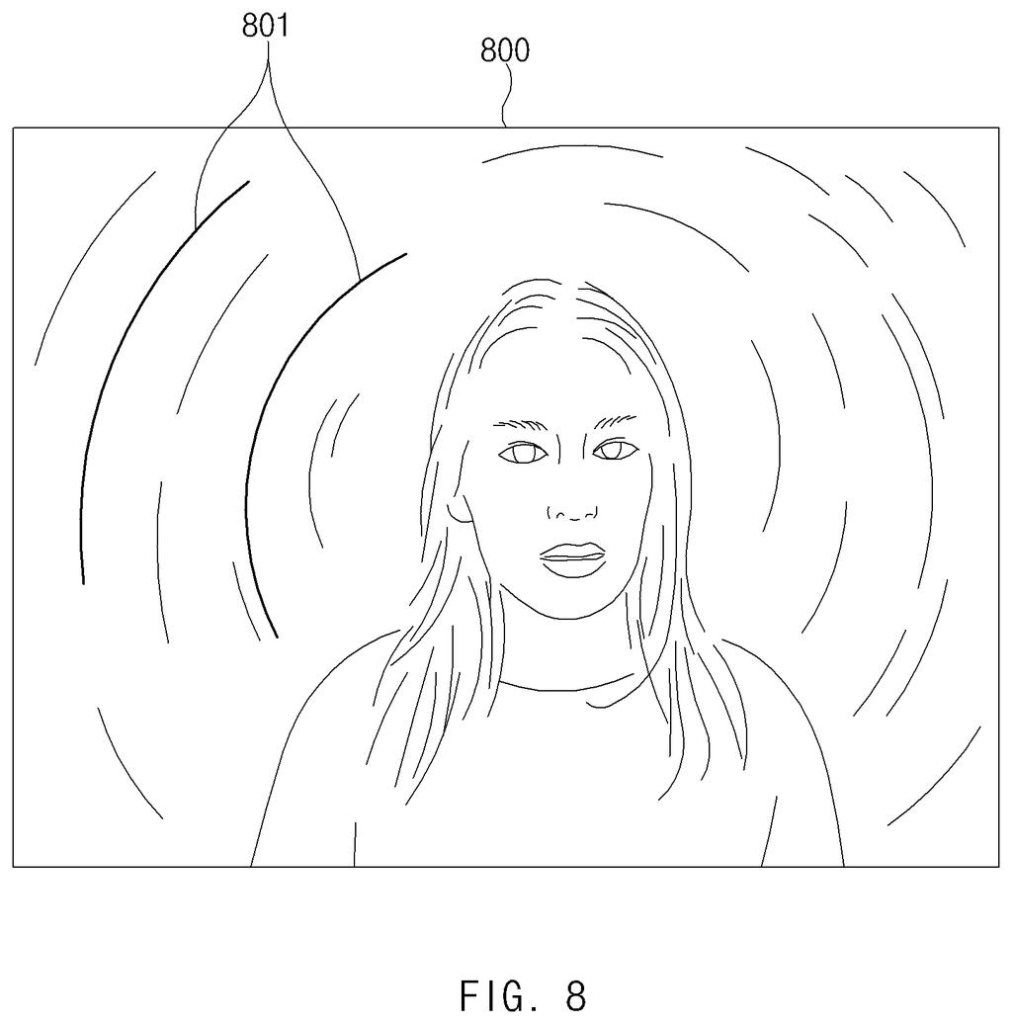
Samsung's patent describes a camera system that divides your photo into distinct zones based on how far each part of the scene is from the lens. The subject area and the background area are each broken into sub-zones, and each sub-zone gets its own blur characteristics, controlled separately. You could dial in a soft glow around the edges of a person while keeping the distant background sharper, or vice versa.
The user can adjust those settings directly, which puts real creative control in your hands rather than letting an algorithm make every call. It's the difference between a one-knob blur and something closer to what a professional photographer would do in editing software.
… determine different bokeh effects for the first region and the second region, respectively, based on a user input …
Translation: The system applies different levels of background blur to different parts of the image based on what the user wants.
How depth data splits an image into separately blurred zones
The patent describes a processor that first reads depth information (per-pixel distance estimates, either from a depth sensor or calculated from the image itself) to divide a photo into two primary regions: a region of interest (your subject, typically in the foreground) and a background region.
Each of those two regions is then further divided into sub-regions, smaller zones that may differ in distance, texture, or content. The key step is that the system assigns different bokeh characteristics to each sub-region based on separate criteria. In photography, bokeh refers to the visual quality of the out-of-focus blur; changing its characteristics means changing how strong it is, what shape the blur circles take, and how smoothly it transitions.
Critically, the system takes user input into account when deciding how to apply those differing effects. So rather than purely algorithmic decisions, the user can steer the outcome:
- Different blur intensity per zone
- Different blur style per zone (foreground vs. Background treated with separate rules)
- User-adjustable controls that override or guide the automatic depth-based split
The final image is then rendered with each zone's blur applied independently to its pixels, rather than a single uniform pass across the whole frame.
… set in the image a region of interest and a background region, using depth information, both including one or more sub-regions …
Translation: The software uses depth data to split the photo into distinct subject and background areas made up of smaller sections.
What this means for portrait-mode photography on Galaxy phones
Portrait mode has become one of the most-used camera features on any phone, but it has a well-known limitation: the blur looks computed because it is computed in a simple way. A system that can apply different blur qualities to different depth zones would let a phone produce results that are harder to distinguish from a photo taken with a professional camera and a wide-aperture lens.
For Samsung Galaxy users, this could mean more control in the camera app itself, reducing the need to export and edit portraits in a separate app. Samsung has been filing around computational photography for some time, and this patent is a specific push toward giving users the kind of per-zone editing that currently lives only in desktop photo editors.
Samsung's 127th filing we've tracked since May in our camera sensor push work builds on the AI video sharpening app and the dim photo color fix.
Portrait mode on phones fails in a way that most people feel but struggle to describe: everything behind the subject goes blurry in exactly the same way, as if distance doesn't exist. A real camera lens would blur a nearby flower very differently from a distant rooftop, and that mismatch is why portrait mode often looks processed rather than photographic.
Samsung's approach here recognizes that the background isn't flat, so the blur shouldn't be either. Splitting it into zones and treating each one according to its actual depth is the right-sized response to a problem that has undermined one of the most-used features on modern phones.
The limiting factor is depth measurement, not blur math. If the phone misjudges how far something is, especially at tricky edges or in dim light, the whole system is working from bad information. That's where this approach will either prove itself or show its ceiling.
Get our take in your Top Stories
Liked this breakdown? Add Patentlyze as a preferred source on Google, and our plain-English take shows up more often in your Top Stories the next time Samsung patent news breaks.
There are more where this came from
We read every patent application Big Tech publishes and send you the ones worth knowing. Plain English, free, every week.
The drawings
20 drawing sheets from US 2026/0278740 A1 · click any drawing to enlarge


Show the other 12 sheets


Want this weekly breakdown for a company we don't cover? Patentlyze Pro →
Be the first to weigh in