
Apple Patents a Lock Screen That Confirms Notification Actions on the Spot
Apple is patenting a way for your phone to not just show you a notification but let you act on it and immediately confirm that the action worked, all without ever fully unlocking the device.
What Apple's faster alert-action system actually does
A notification pops up on your phone while it's sitting on a table, screen off. You glance at it, tap something, and... nothing tells you whether it worked. You're left wondering if the alarm got snoozed, the message got marked read, or the timer got dismissed.
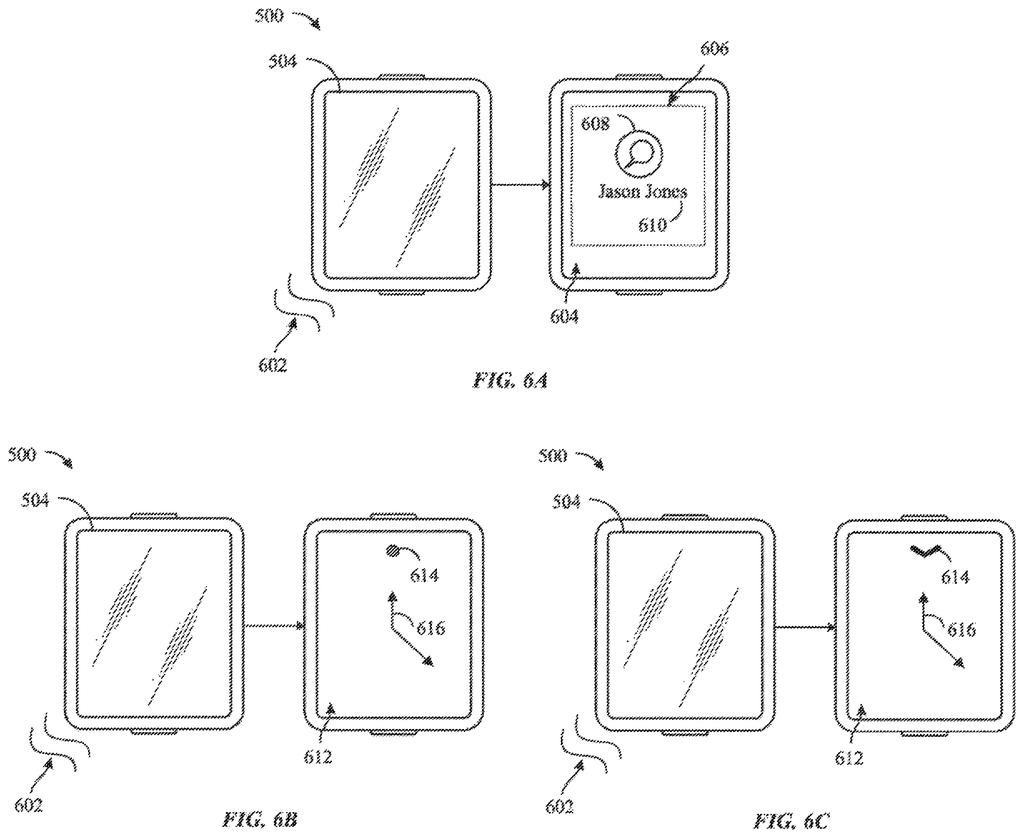
Apple's new patent describes a tighter loop for that moment. When a notification arrives, the screen wakes up and shows where the alert came from. If you interact with it quickly, the phone shows you a small set of action buttons right there on the lock screen. Tap one, and the phone immediately shows a visual confirmation that the action actually happened.
The key word is quickly. The patent specifies a time window: act within it, and you get the full interactive experience. Wait too long, and the phone skips showing that content entirely. It's a deliberate design trade-off meant to keep the screen snappy and the interaction brief.
… in response to detecting the selection of the user interface object that corresponds to the option for performing the action related to the alert and after performing the action related to the alert, displaying, via the display, a user interface including a visual confirmation of the performed action.
Translation: The phone will show you a clear confirmation message on the screen once you have successfully completed a notification task.
How the time-threshold and confirmation flow work
The patent describes an electronic device (almost certainly an iPhone or iPad) that handles alerts through a specific, timed sequence of interface states.
- The device receives an alert and wakes its display from a low-power state to show a notification.
- The notification identifies the source of the alert, such as which app or contact sent it.
- If the user provides input within a defined time threshold, the device surfaces a small user interface with action buttons specific to that alert.
- When the user taps an action button, the device performs the action and then displays a visual confirmation screen, showing that the action was completed.
The time-threshold mechanic is the most architecturally interesting piece. If a user interacts promptly, they get the rich action-and-confirm flow. If enough time has elapsed past the threshold, the device skips displaying the detailed action content entirely. This prevents stale or out-of-context interactions from cluttering the experience.
The visual confirmation step is its own distinct interface state. After the action fires, a dedicated UI appears to close the loop, telling the user exactly what happened. This separates Apple's approach from simply hiding a notification after a tap, which gives no feedback at all.
For example, if a request is detected within a time threshold, the device outputs the respective content; if the request is detected after an amount of time greater than the time threshold has elapsed, the device forgoes outputting the respective content.
Translation: The device decides whether to show you notification details based on how quickly you interact with the alert.
What this means for everyday iPhone lock-screen use
For everyday iPhone users, the practical change is small but genuinely useful: you'd stop second-guessing whether a tap on a lock-screen notification actually did anything. The confirmation screen closes an anxiety loop that anyone who has ever frantically re-tapped a notification knows well.
The time-threshold mechanic is the part worth watching from a design standpoint. It keeps the interface clean by refusing to show stale action menus, but it also means a slow or hesitant user might miss the interactive window entirely and get a degraded experience. Whether that trade reads as worth it depends entirely on how generously Apple sets the threshold. The latest Big Tech patents in the notification-management space show a broader industry push toward tighter, more contextual lock-screen interactions, and Apple's confirmation-loop approach sits squarely inside that trend.
The design choice to gate the action interface behind a time threshold is the most loaded call in this patent. It buys a cleaner, less cluttered lock screen by sacrificing access for users who pause before acting, which is a real cost for anyone with motor difficulties, older users, or anyone whose hands are briefly occupied. Apple has clearly decided that snappiness and contextual accuracy outweigh universal accessibility in this specific flow, and that reads as a defensible but not cost-free bet. The visual confirmation step, on the other hand, is an unambiguous improvement over the current nothing-happens feedback model.
There are more where this came from
We read every patent application Big Tech publishes and send you the ones worth knowing. Plain English, free, every week.
The drawings
41 drawing sheets from US 2026/0236115 A1 · click any drawing to enlarge


Want this weekly breakdown for a company we don't cover? Patentlyze Pro →
Be the first to weigh in