
Apple
Apple · Software · Filed Mar 27, 2026 · USPTO published Aug 13, 2026 · Aug 13 release
Apple Patents a Lock Screen That Confirms Notification Actions on the Spot
Apple is patenting a way for your phone to not just show you a notification but let you act on it and immediately confirm that the action worked, all without ever fully unlocking the device.
- Publication number
- US 2026/0236115 A1(US20260236115A1)
- Applicant
- Apple Inc.
- Filed · Published
- Mar 27, 2026 · Aug 13, 2026
- Inventors
- Lawrence Y. YANG, Stephen O. LEMAY, Alan C. DYE, Christopher Patrick FOSS, Jonathan R. DASCOLA, Imran CHAUDHRI, Gary Ian BUTCHER, David Chance GRAHAM, Jonathan P. IVE, Kevin LYNCH, Natalia MARIC
- Status when we published
- Waiting for an examiner
- Document
- 15 claims
- US classification
- 715/804
- Parent application
- Continuation of 18/433,262 (filed Feb 5, 2024)(18433262)
What Apple's faster alert-action system actually does
A notification pops up on your phone while it's sitting on a table, screen off. You glance at it, tap something, and... nothing tells you whether it worked. You're left wondering if the alarm got snoozed, the message got marked read, or the timer got dismissed.
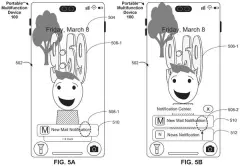
Apple's new patent describes a tighter loop for that moment. When a notification arrives, the screen wakes up and shows where the alert came from. If you interact with it quickly, the phone shows you a small set of action buttons right there on the lock screen. Tap one, and the phone immediately shows a visual confirmation that the action actually happened.
The key word is quickly. The patent specifies a time window: act within it, and you get the full interactive experience. Wait too long, and the phone skips showing that content entirely. It's a deliberate design trade-off meant to keep the screen snappy and the interaction brief.
… in response to detecting the selection of the user interface object that corresponds to the option for performing the action related to the alert and after performing the action related to the alert, displaying, via the display, a user interface including a visual confirmation of the performed action.
Translation: The phone will show you a clear confirmation message on the screen once you have successfully completed a notification task.
How the time-threshold and confirmation flow work
The patent describes an electronic device (almost certainly an iPhone or iPad) that handles alerts through a specific, timed sequence of interface states.
- The device receives an alert and wakes its display from a low-power state to show a notification.
- The notification identifies the source of the alert, such as which app or contact sent it.
- If the user provides input within a defined time threshold, the device surfaces a small user interface with action buttons specific to that alert.
- When the user taps an action button, the device performs the action and then displays a visual confirmation screen, showing that the action was completed.
The time-threshold mechanic is the most architecturally interesting piece. If a user interacts promptly, they get the rich action-and-confirm flow. If enough time has elapsed past the threshold, the device skips displaying the detailed action content entirely. This prevents stale or out-of-context interactions from cluttering the experience.
The visual confirmation step is its own distinct interface state. After the action fires, a dedicated UI appears to close the loop, telling the user exactly what happened. This separates Apple's approach from simply hiding a notification after a tap, which gives no feedback at all.
For example, if a request is detected within a time threshold, the device outputs the respective content; if the request is detected after an amount of time greater than the time threshold has elapsed, the device forgoes outputting the respective content.
Translation: The device decides whether to show you notification details based on how quickly you interact with the alert.
What this means for everyday iPhone lock-screen use
For everyday iPhone users, the practical change is small but genuinely useful: you'd stop second-guessing whether a tap on a lock-screen notification actually did anything. The confirmation screen closes an anxiety loop that anyone who has ever frantically re-tapped a notification knows well.
The time-threshold mechanic is the part worth watching from a design standpoint. It keeps the interface clean by refusing to show stale action menus, but it also means a slow or hesitant user might miss the interactive window entirely and get a degraded experience. Whether that trade reads as worth it depends entirely on how generously Apple sets the threshold. The latest Big Tech patents in the notification-management space show a broader industry push toward tighter, more contextual lock-screen interactions, and Apple's confirmation-loop approach sits squarely inside that trend.
Source: US 2026/0236115 A1 at the USPTO (PDF). Full patent text and figures are in the official publication.
Get our take in your Top Stories
Liked this breakdown? Add Patentlyze as a preferred source on Google, and our plain-English take shows up more often in your Top Stories the next time Apple patent news breaks.
Add Patentlyze on Google
One click.
There are more where this came from
We read the new patents from Big Tech, carmakers and more and send you the ones worth knowing. Plain English, free, every week.
The drawings · 41 sheets
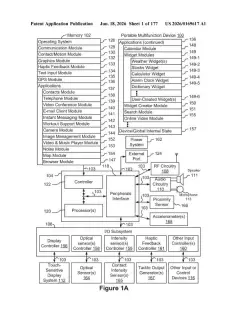
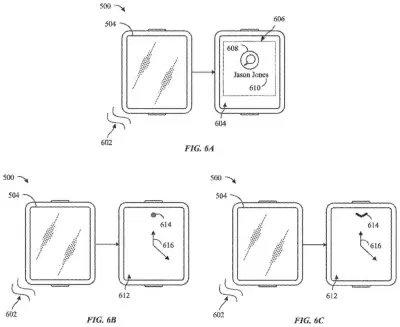
41 drawing sheets from US 2026/0236115 A1 · click any drawing to enlarge


Show the other 33 sheets


More from Apple
All 748 Apple patents →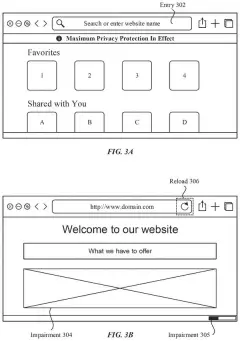
More in Software
All 816 Software patents →
Samsung
Samsung Files Patent for a System That Decides Which Phone Actions Need Your Approval
Salesforce
Salesforce Patents Push Notifications That Let You Act on Business Data From Your Lock Screen
Samsung
Samsung Patents a Way to Collapse Your Phone's Alert Pile Into One AI Summary
Apple