
Apple · Filed Apr 8, 2026 · Published Sep 24, 2026

Apple Patents a Video Player That Changes Its Info Panel for Live vs. On-Demand TV

Apple is patenting a video playback interface that knows whether you're watching live TV or a recorded show, and serves up a different information panel depending on the answer. It sounds small, but it's the kind of friction that, once removed, you stop noticing in the best possible way.
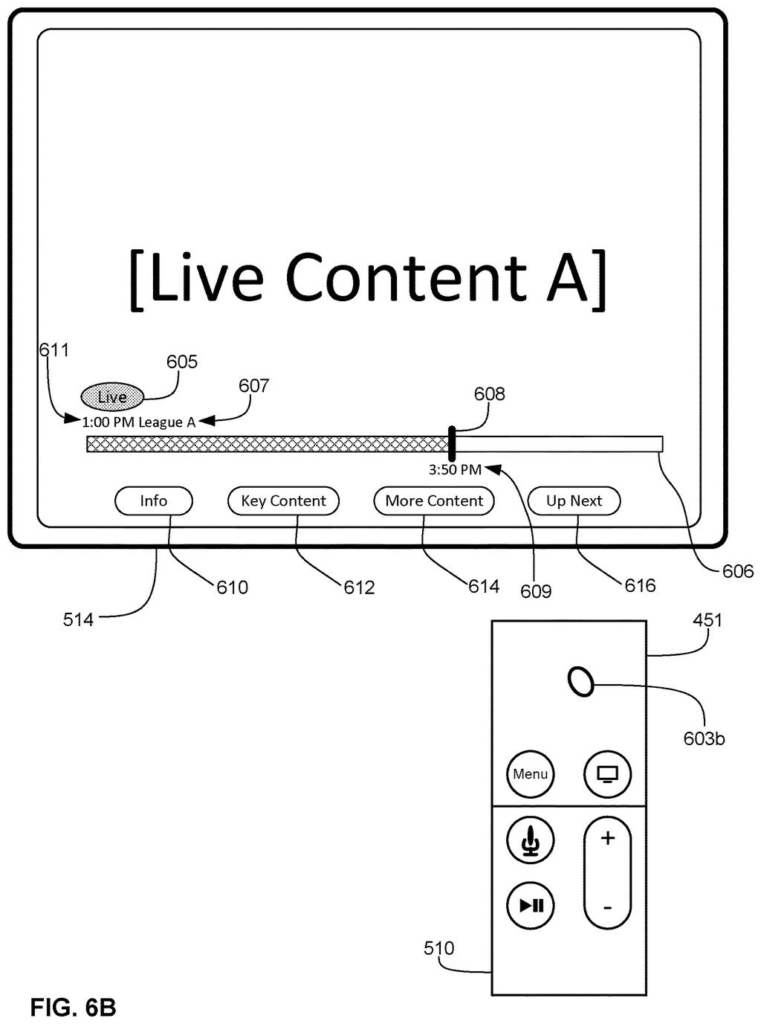
A television display shows live content with an overlaid information panel, including a timeline, current time, and content options, controlled by a remote. Drawing from patent filing US 2026/0292305 A1.
A television display shows live content with an overlaid information panel, including a timeline, current time, and content options, controlled by a remote.
See all 112 drawings from this filing ↓
Publication number US 2026/0292305 A1 US20260292305A1
Applicant Apple Inc.
Filing date Apr 8, 2026
Publication date Sep 24, 2026
Inventors Christopher J. ELLINGFORD, Lucio MORENO RUFO, Fredric R. VINNA, Policarpo B. WOOD, Antonio ALLEN, William D. CARPENTER, Anton M. DAVYDOV, Jonathan SILVIO, Brian K. SHIRAISHI, Gregory T. SCOTT, Kaitlyn E. CHU
US classification 715/716
Status when we published Waiting for an examiner (May 12, 2026)
Parent application is a Continuation of 18473244 (filed 2023-09-23)
Document 19 claims

What Apple's adaptive live TV player actually does

Imagine you're watching a live football game on your Apple TV and you tap the remote to pull up the player controls. Right now, you might get the same generic info screen you'd see for a Netflix movie. Apple's patent describes a system that would serve you something different: a live-specific panel that updates in real time, showing scores, stats, or other details tied to what's happening right now.

The system detects whether what you're watching is live or on-demand, then loads a different information view for each case. If you tap an option while live content is playing, it shows you live-specific data. If you're watching a recorded episode of a show, it shows episode or series information instead.

There's also a picture-in-picture angle: the patent describes shrinking the live content into a small window while expanding that information panel, so you can browse context without losing the game entirely. It's a modest but practical upgrade to how video players handle live content.

From the filing · CLAIM 1
in accordance with a determination that the respective content item is a live content item, displaying, via the display generation component, first information corresponding to the live content item; and in accordance with a determination that the respective content item is an on-demand content item, displaying second information corresponding to the on-demand content item …

Translation: The player shows different details depending on whether you are watching live TV or an on-demand video.

How the player detects live vs. On-demand and shifts its display

The patent describes a playback user interface that responds to user inputs in a context-aware way. When you trigger the controls (say, by tapping your remote), a content player bar appears alongside an option to view more information about what you're watching.

Here's where it gets specific: if you select that option, the device checks whether the content is live or on-demand and branches accordingly:

  • For live content, it displays a first set of real-time or contextual information tied to the live stream.
  • For on-demand content (a movie, a recorded episode), it displays a different set of descriptive information about that title.

A third input can then trigger a minimized playback state (picture-in-picture style) while simultaneously expanding the information panel with additional details. So the live content keeps playing in a small window while you read the expanded context.

The patent also references a Multiview interface for watching multiple streams simultaneously, and a key content interface for surfacing highlights or important moments. Insights (contextual stats or data about a content item) are called out as a separate display mode as well.

From the filing · THE ABSTRACT
Some embodiments described in this disclosure are directed to one or more electronic devices that facilitate concurrently display of multiple content items in a Multiview user interface.

Translation: The patent also covers a multi-view screen layout to watch several video streams at the same time.

What this means for Apple TV and live sports viewers

For anyone who watches live sports, news, or events on Apple TV, this is a direct quality-of-life improvement. The current experience of pausing or pulling up controls during live content often gives you a scrubber bar designed for on-demand video, which is functionally useless when there's nothing to scrub. A system that recognizes live content and offers live-appropriate controls and information instead could reduce the number of times you grab your phone to check a score.

Apple has been filing around live video and sports-viewing features since 2024, which tracks with its investment in live sports rights (MLS Season Pass, Friday Night Baseball). This patent reads as interface infrastructure for that broader push.

Apple's 469th filing in our Apple coverage since May adds to a pattern of audio work that includes wired-plus-wireless headphones and screen-linked 3D sound.

Editorial take

Live TV and on-demand video are different experiences, and a player that treats them the same creates constant small frustrations. You tap for information during a game and get a synopsis of the show instead of the score. This work addresses exactly that gap.

The most useful detail involves shrinking the video while expanding contextual information alongside it, so a sports viewer can follow live stats without abandoning the picture entirely. That is a problem real people hit every time they try to stay informed during a game without pulling out a second device.

Most viewers will never know this work exists, but they will feel its absence when it is not there. A player that does the right thing during a live broadcast is the whole point.

Get our take in your Top Stories

Liked this breakdown? Add Patentlyze as a preferred source on Google, and our plain-English take shows up more often in your Top Stories the next time Apple patent news breaks.

There are more where this came from

We read every patent application Big Tech publishes and send you the ones worth knowing. Plain English, free, every week.

The drawings

112 drawing sheets from US 2026/0292305 A1 · click any drawing to enlarge

Portable multifunction device system architecture., drawing sheet 1 from US 2026/0292305 A1
Sheet 1 Portable multifunction device system architecture.
Application event handling architecture., drawing sheet 2 from US 2026/0292305 A1
Sheet 2 Application event handling architecture.
Portable multifunction device with touch screen., drawing sheet 3 from US 2026/0292305 A1
Sheet 3 Portable multifunction device with touch screen.
Device system architecture with applications., drawing sheet 4 from US 2026/0292305 A1
Sheet 4 Device system architecture with applications.
Portable multifunction device home screen., drawing sheet 5 from US 2026/0292305 A1
Sheet 5 Portable multifunction device home screen.
Portable multifunction device rotation and gestures., drawing sheet 6 from US 2026/0292305 A1
Sheet 6 Portable multifunction device rotation and gestures.
Device and remote control system., drawing sheet 7 from US 2026/0292305 A1
Sheet 7 Device and remote control system.
Remote control with buttons and touchpad., drawing sheet 8 from US 2026/0292305 A1
Sheet 8 Remote control with buttons and touchpad.
Show the other 52 sheets
Apple Patents a Video Player That Changes Its Info Panel for Live vs. On-Demand TV patent drawing, sheet 9
Sheet 9
Apple Patents a Video Player That Changes Its Info Panel for Live vs. On-Demand TV patent drawing, sheet 10
Sheet 10
Apple Patents a Video Player That Changes Its Info Panel for Live vs. On-Demand TV patent drawing, sheet 11
Sheet 11
Apple Patents a Video Player That Changes Its Info Panel for Live vs. On-Demand TV patent drawing, sheet 12
Sheet 12
Apple Patents a Video Player That Changes Its Info Panel for Live vs. On-Demand TV patent drawing, sheet 13
Sheet 13
Apple Patents a Video Player That Changes Its Info Panel for Live vs. On-Demand TV patent drawing, sheet 14
Sheet 14
Apple Patents a Video Player That Changes Its Info Panel for Live vs. On-Demand TV patent drawing, sheet 15
Sheet 15
Apple Patents a Video Player That Changes Its Info Panel for Live vs. On-Demand TV patent drawing, sheet 16
Sheet 16
Apple Patents a Video Player That Changes Its Info Panel for Live vs. On-Demand TV patent drawing, sheet 17
Sheet 17
Apple Patents a Video Player That Changes Its Info Panel for Live vs. On-Demand TV patent drawing, sheet 18
Sheet 18
Apple Patents a Video Player That Changes Its Info Panel for Live vs. On-Demand TV patent drawing, sheet 19
Sheet 19
Apple Patents a Video Player That Changes Its Info Panel for Live vs. On-Demand TV patent drawing, sheet 20
Sheet 20
Apple Patents a Video Player That Changes Its Info Panel for Live vs. On-Demand TV patent drawing, sheet 21
Sheet 21
Apple Patents a Video Player That Changes Its Info Panel for Live vs. On-Demand TV patent drawing, sheet 22
Sheet 22
Apple Patents a Video Player That Changes Its Info Panel for Live vs. On-Demand TV patent drawing, sheet 23
Sheet 23
Apple Patents a Video Player That Changes Its Info Panel for Live vs. On-Demand TV patent drawing, sheet 24
Sheet 24
Apple Patents a Video Player That Changes Its Info Panel for Live vs. On-Demand TV patent drawing, sheet 25
Sheet 25
Apple Patents a Video Player That Changes Its Info Panel for Live vs. On-Demand TV patent drawing, sheet 26
Sheet 26
Apple Patents a Video Player That Changes Its Info Panel for Live vs. On-Demand TV patent drawing, sheet 27
Sheet 27
Apple Patents a Video Player That Changes Its Info Panel for Live vs. On-Demand TV patent drawing, sheet 28
Sheet 28
Apple Patents a Video Player That Changes Its Info Panel for Live vs. On-Demand TV patent drawing, sheet 29
Sheet 29
Apple Patents a Video Player That Changes Its Info Panel for Live vs. On-Demand TV patent drawing, sheet 30
Sheet 30
Apple Patents a Video Player That Changes Its Info Panel for Live vs. On-Demand TV patent drawing, sheet 31
Sheet 31
Apple Patents a Video Player That Changes Its Info Panel for Live vs. On-Demand TV patent drawing, sheet 32
Sheet 32
Apple Patents a Video Player That Changes Its Info Panel for Live vs. On-Demand TV patent drawing, sheet 33
Sheet 33
Apple Patents a Video Player That Changes Its Info Panel for Live vs. On-Demand TV patent drawing, sheet 34
Sheet 34
Apple Patents a Video Player That Changes Its Info Panel for Live vs. On-Demand TV patent drawing, sheet 35
Sheet 35
Apple Patents a Video Player That Changes Its Info Panel for Live vs. On-Demand TV patent drawing, sheet 36
Sheet 36
Apple Patents a Video Player That Changes Its Info Panel for Live vs. On-Demand TV patent drawing, sheet 37
Sheet 37
Apple Patents a Video Player That Changes Its Info Panel for Live vs. On-Demand TV patent drawing, sheet 38
Sheet 38
Apple Patents a Video Player That Changes Its Info Panel for Live vs. On-Demand TV patent drawing, sheet 39
Sheet 39
Apple Patents a Video Player That Changes Its Info Panel for Live vs. On-Demand TV patent drawing, sheet 40
Sheet 40
Apple Patents a Video Player That Changes Its Info Panel for Live vs. On-Demand TV patent drawing, sheet 41
Sheet 41
Apple Patents a Video Player That Changes Its Info Panel for Live vs. On-Demand TV patent drawing, sheet 42
Sheet 42
Apple Patents a Video Player That Changes Its Info Panel for Live vs. On-Demand TV patent drawing, sheet 43
Sheet 43
Apple Patents a Video Player That Changes Its Info Panel for Live vs. On-Demand TV patent drawing, sheet 44
Sheet 44
Apple Patents a Video Player That Changes Its Info Panel for Live vs. On-Demand TV patent drawing, sheet 45
Sheet 45
Apple Patents a Video Player That Changes Its Info Panel for Live vs. On-Demand TV patent drawing, sheet 46
Sheet 46
Apple Patents a Video Player That Changes Its Info Panel for Live vs. On-Demand TV patent drawing, sheet 47
Sheet 47
Apple Patents a Video Player That Changes Its Info Panel for Live vs. On-Demand TV patent drawing, sheet 48
Sheet 48
Apple Patents a Video Player That Changes Its Info Panel for Live vs. On-Demand TV patent drawing, sheet 49
Sheet 49
Apple Patents a Video Player That Changes Its Info Panel for Live vs. On-Demand TV patent drawing, sheet 50
Sheet 50
Apple Patents a Video Player That Changes Its Info Panel for Live vs. On-Demand TV patent drawing, sheet 51
Sheet 51
Apple Patents a Video Player That Changes Its Info Panel for Live vs. On-Demand TV patent drawing, sheet 52
Sheet 52
Apple Patents a Video Player That Changes Its Info Panel for Live vs. On-Demand TV patent drawing, sheet 53
Sheet 53
Apple Patents a Video Player That Changes Its Info Panel for Live vs. On-Demand TV patent drawing, sheet 54
Sheet 54
Apple Patents a Video Player That Changes Its Info Panel for Live vs. On-Demand TV patent drawing, sheet 55
Sheet 55
Apple Patents a Video Player That Changes Its Info Panel for Live vs. On-Demand TV patent drawing, sheet 56
Sheet 56
Apple Patents a Video Player That Changes Its Info Panel for Live vs. On-Demand TV patent drawing, sheet 57
Sheet 57
Apple Patents a Video Player That Changes Its Info Panel for Live vs. On-Demand TV patent drawing, sheet 58
Sheet 58
Apple Patents a Video Player That Changes Its Info Panel for Live vs. On-Demand TV patent drawing, sheet 59
Sheet 59
Apple Patents a Video Player That Changes Its Info Panel for Live vs. On-Demand TV patent drawing, sheet 60
Sheet 60

Sheets 61 to 112 are in the full USPTO filing.

Browse all the drawings 112 drawing sheets
Patent filing page

Source. Full patent text and figures from the official USPTO publication PDF.
Reader comments

Be the first to weigh in

Start the discussion

Real name or a handle, either is fine. Comments are read by a person before they appear, so allow a little time. Keep it about the filing.