
Google Patents an AI That Learns Your Formatting Habits to Keep Your Documents Consistent
Every time you type a heading in Google Docs, you make a small formatting decision. A new Google patent describes a system that remembers all of those decisions and uses them to nudge you toward consistency the next time around.
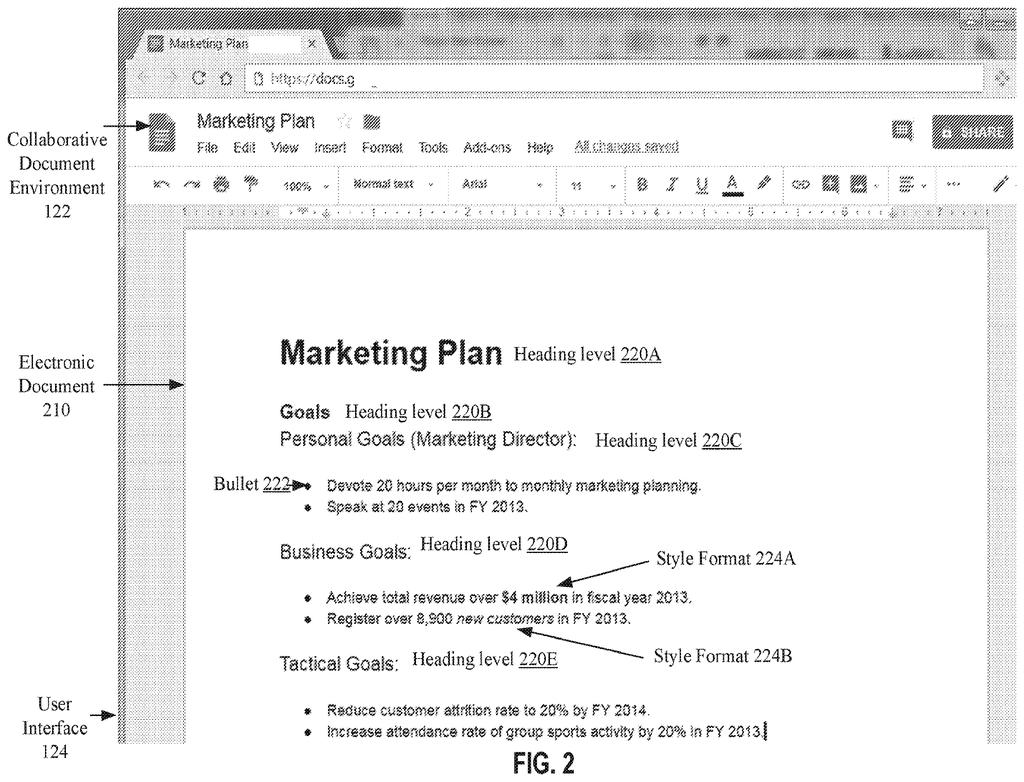
How Google's formatting AI uses your own history
Ever noticed that you sometimes bold a section title in one document and leave it plain in the next? It's a tiny inconsistency, but across a long report or a shared team document, those little mismatches add up.
Google's new patent describes a system that watches how you format text, builds a personal record of your choices, and then uses an AI model to suggest the same formatting the next time you type something similar. Type a date, and if you've always formatted dates a certain way before, the system surfaces a suggestion to do it again.
The key detail is that the record is yours. This isn't a one-size-fits-all style guide baked into the app. The system learns from your actual typing history and updates that record every time you accept or ignore a suggestion. It also only nudges you when the AI is confident enough that the suggestion actually fits.
… providing the candidate text portion and at least part of the stored text entry as input to a trained machine learning model; obtaining, from the trained machine learning model, an output identifying (i) a formatting type for the candidate text portion, and (ii) a level of confidence that the formatting type is appropriate for the candidate text portion …
Translation: An AI evaluates your typing against past habits to figure out the right style and how sure it is.
How the model compares new text to stored past entries
When you type a piece of text into a document, the system checks that text against a stored log of your previous entries. If it finds a match or a close match, it feeds both the new text and the relevant stored entry into a trained machine learning model (a system that has been shown many examples to learn patterns).
The model then returns two things:
- A formatting type recommendation (for example, bold, italic, a specific heading level, or a date format)
- A confidence score telling the system how sure it is that the suggestion fits
If the confidence score clears a threshold, the system generates a notification to the user, a prompt or highlight in the document suggesting the format. Below the threshold, it stays quiet rather than cluttering your workflow with low-quality guesses.
After each interaction, whether you accept the suggestion or not, the system updates your stored text records with the new entry and the associated formatting type. That feedback loop means the personal record grows more accurate over time, reflecting your actual habits rather than a fixed template.
A notification to a user of the electronic document of a formatting suggestion according to the formatting type is generated.
Translation: The system pops up a suggestion so you can format your text consistently.
What this means for Google Docs users and their documents
For anyone who writes long documents, fills out structured forms, or collaborates on shared files, inconsistent formatting is a genuine headache. A system that learns your own conventions and prompts you to follow them could save real time on cleanup, especially in professional or legal documents where consistent formatting carries weight.
The practical limit here is that the system is only as good as the history it builds. New users or people who write in wildly different styles across projects may find the suggestions less useful or even disruptive. But for someone with established habits in, say, Google Docs or Google Workspace, this could be the kind of background feature that you notice mainly when it prevents a mistake.
Google's 31st filing we've tracked since May on AI assistants that remember you builds on earlier applications like one on remembering requests and one on face-recognizing TVs.
The concrete payoff is real but modest. If you've ever spent time manually reformatting a 40-page report because you forgot your own conventions halfway through, you'd welcome this. The system is specifically designed to keep quiet when it isn't confident, which is exactly the right call for a formatting tool.
What makes this more than a spell-checker variant is the personal record layer. Most formatting suggestions in word processors are global rules. This one is built around your history, which means it gets more useful the longer you use it.
That said, Google's track record in document-intelligence patents suggests this kind of feature often takes years to surface in a product, if it ever does. Whether this becomes a Docs feature or stays in the patent archive is an open question.
There are more where this came from
We read every patent application Big Tech publishes and send you the ones worth knowing. Plain English, free, every week.
The drawings
6 drawing sheets from US 2026/0289314 A1 · click any drawing to enlarge


Want this weekly breakdown for a company we don't cover? Patentlyze Pro →
Be the first to weigh in