
Google Patents Automatic Table-Cell Splitting for Its Online Document Editor
Splitting a table cell in Google Docs currently means a frustrating round of manual row and column adjustments. This patent describes a way to make the editor handle all of that automatically.
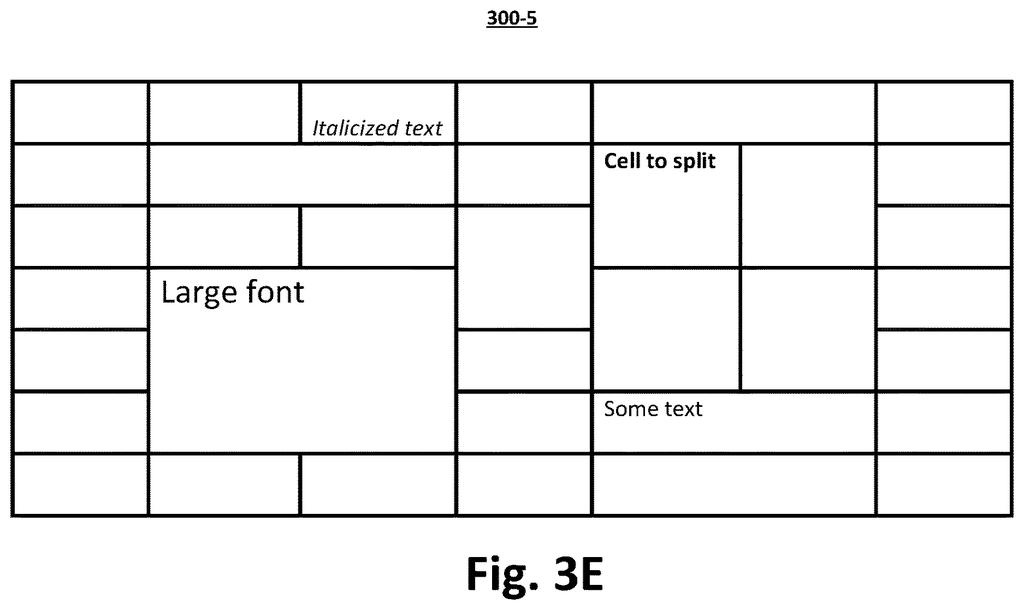
What Google's table-cell splitting actually does for you
Imagine you have a table in a document and you need to split one of the cells into, say, three columns. Right now, that kind of edit in most document editors means a chain of manual fixes: adding rows, adding columns, then re-merging dozens of surrounding cells so the rest of the table doesn't fall apart.
Google's patent describes an editor that figures out every one of those steps for you. You tell it how many rows and columns you want the split cell to become, and it works out which new rows and columns need to be inserted into the table, then automatically re-merges the other cells that got disrupted so they look exactly as they did before.
The result is that splitting a cell becomes a single action rather than a multi-step repair job. The surrounding table stays intact without you touching it.
… automatically inserting one or more new rows and one or more new columns into the table to accommodate the set of layout changes …
Translation: The software builds extra rows and columns behind the scenes to make room for the split.
How the editor inserts rows, columns, and merges in sequence
The patent covers a specific sequence of operations inside a document editing application. When you ask to split a target cell into a given number of horizontal and vertical divisions, the editor does the following:
- Calculates layout changes: It figures out exactly how many new rows and columns need to be added to the whole table to accommodate the split, based on the dimensions you requested.
- Inserts rows and columns: Those new rows and columns are added automatically, adjacent to the ones the target cell already occupied.
- Identifies affected neighbors: Any other cell in the table that happened to span one of the newly inserted rows or columns is flagged. These are cells that weren't touched by the user but whose position or span is now technically wrong.
- Restores neighboring cells: For each affected neighbor, the editor calculates a new position and a new span size, then merges the cells in that area so the neighbor looks and behaves exactly as it did before the split.
The key insight is that splitting one cell in a table is really a whole-table operation. Inserting a row or column anywhere shifts the coordinate system for every cell that crosses it, so the editor has to patch all of them, not just the one the user asked about.
… automatically merging groups of cells within an initial boundary of the cell, each group spanning a determined number of rows per group and a determined number of columns per group …
Translation: It automatically recombines specific cells inside the original border to complete the new grid layout.
What this means for Google Docs tables going forward
For anyone who has wrestled with tables in Google Docs, this is a quality-of-life fix for a genuinely annoying problem. Table editing in document editors has historically lagged behind what spreadsheet apps can do, and cell splitting is one of the rougher edges.
The broader implication is that Google is investing engineering effort in making Docs a more capable layout tool, not just a writing surface. If this system ships, it could make Docs tables practical for things like forms, schedules, and structured reports where splitting cells is a routine step, not a heroic one.
Google's 764th filing in our Google coverage since May adds to a run that includes AI grading its own answers and chatbots recalling shared images.
Claim 1 is specific but not narrow in a trivial way. It covers the full pipeline: receive a split request, calculate layout changes, insert rows and columns, identify every cell whose span now crosses the new structure, and re-merge those cells to restore their original appearance. That sequence, described as a unified automatic method, is broad enough to cover any document editor that does all of these steps together.
In practice, if this patent were granted, a competing editor that auto-splits cells using the same insert-then-re-merge logic would have to design around it carefully. The claim does not just patent the idea of splitting a cell; it patents the specific coordination of insertion and neighbor-restoration as a single automatic routine.
That said, this is table-editing plumbing. It is a real problem with a real solution, but it is not the kind of filing that signals a strategic direction. Google keeps filing on document-editor productivity in ways that suggest Docs is getting a steady stream of under-the-hood attention, even if none of it makes headlines.
There are more where this came from
We read every patent application Big Tech publishes and send you the ones worth knowing. Plain English, free, every week.
The drawings
7 drawing sheets from US 2026/0289098 A1 · click any drawing to enlarge


Want this weekly breakdown for a company we don't cover? Patentlyze Pro →
Be the first to weigh in