
Adobe Patents an AI Tool That Copies Objects Into New Parts of a Photo
Moving an object in a photo sounds simple, but getting it to look like it belongs somewhere new is the hard part. Adobe has filed a patent for an AI system that clones an object, shape and all, into any spot you choose, then generates a version that fits its new surroundings.
What Adobe's generative object cloning actually does
A designer drops a chair into a corner of a room photo. The chair looks wrong: wrong shadow, wrong angle, wrong fit. Getting it to look natural takes real skill and a lot of manual work.
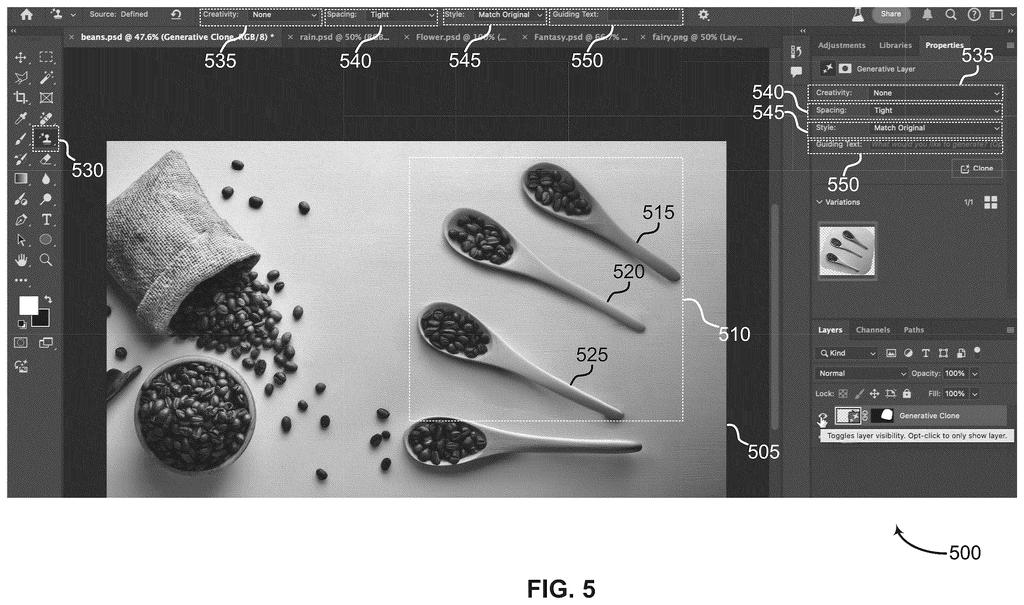
Adobe's patent describes a system that automates this. You pick the object you want to copy, pick where you want it to go, and the system figures out the object's exact outline. It places a silhouette of that shape in the new location, then hands both the original photo and that silhouette to an AI image model. The AI fills in the silhouette with a version of the object that fits its new context, adjusting for lighting, angle, and surroundings.
The result is a synthetic variant of the original object, not a pixel-for-pixel copy. It's built to look like it was always there.
… computing a target mask based on the source object and the target region, wherein the target mask has a shape of the source object and is located within the target region …
Translation: The system traces the object you want to copy and places that outline wherever you want it to go.
How the mask guides the AI to place a cloned object
The system takes an input image that contains two things: a source object (the thing you want to clone) and a target region (where you want it to appear).
From there, the pipeline has three steps:
- Mask computation: The system generates a target mask, a shape cutout that matches the outline of the source object and is placed inside the target region. Think of it as a stencil dropped into the destination area.
- Image generation: An image generation model (an AI that creates or edits images) takes both the original photo and the stencil as inputs. It fills the stencil area with a new version of the object, one that matches the new location's lighting and context rather than just copying pixels.
- Output: The result is an output image where the target region now contains a synthetic variant of the source object, generated to fit, not pasted.
The key distinction here is that the AI does not paste the original object. It generates a plausible version of it in the new position, which means shadows, angles, and surface details can adapt automatically.
What this means for everyday photo editing in Adobe tools
For anyone who edits photos regularly, this is the difference between cutting and pasting versus actually compositing. Current tools require manual masking, perspective correction, and lighting adjustments. This patent describes doing all of that in a single model pass.
If this capability lands in Adobe Photoshop or Firefly, it would put a professional-grade compositing shortcut in front of a much wider audience, including people who don't know what compositing is. The practical use cases range from product photography and interior design mockups to removing and rearranging elements in any photo without leaving obvious traces.
Adobe's 25th filing we've tracked on our controllable AI image watchlist since May builds on earlier applications like turning text into 3D worlds and prompts from cursor hover.
The whole trick here is automating a step that photo editors currently do by hand: tracing around an object and placing that traced outline exactly where you want the copy to land. The underlying fill-and-replace tool already exists in Adobe's software, so nothing new needs to be built from scratch or run on special hardware.
What still has to prove itself is whether the automatic shape-tracing holds up on difficult subjects like hair, glass, or anything with a ragged or see-through edge. The document describes the approach but says nothing about accuracy, which is the only real gate between a patent and a button someone can actually use.
If the tracing is reliable, the path to shipping this is about as short as it gets: drop it into existing software as a one-click option and call it done. If it is not, the feature works in controlled demonstrations and disappoints people the moment they try it on a real photo.
There are more where this came from
We read every patent application Big Tech publishes and send you the ones worth knowing. Plain English, free, every week.
The drawings
27 drawing sheets from US 2026/0301257 A1 · click any drawing to enlarge


Want this weekly breakdown for a company we don't cover? Patentlyze Pro →
Be the first to weigh in