
Intel Patents Video Upscaling That Skips the AI on Flat Areas Like Sky
Most of a video frame is boring: blue sky, a blank wall, a blurry background. Intel's patent says there is no reason to spend expensive AI power on those parts, and the savings could be around four times in its own tests.
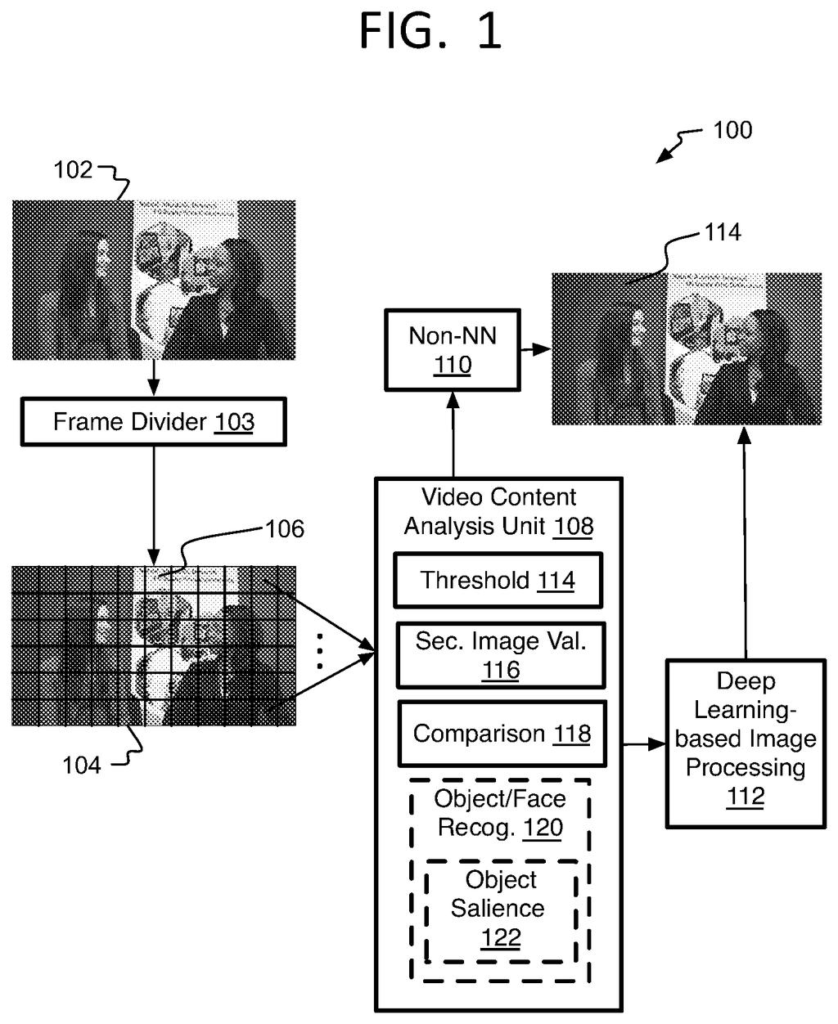
What Intel's patch-by-patch video upscaling does
Today, the AI tools that make low-resolution video look sharp need so much computing power that they mostly run on big desktop graphics cards. On a phone or tablet, they struggle to hit even 30 frames per second, and they drain the battery trying.
Intel's filing takes a shortcut. It chops each video frame into small squares and checks how much detail each one holds. A square of empty sky or a black chalkboard gets the old, cheap upscaling method, because AI would not add much there.
Squares packed with detail get the AI treatment. In the filing's tests, this made the job about four times faster in theory, with only a small drop in picture quality on average.
… automatically determining whether to apply at least one non-neural network image processing algorithm or at least one neural network image processing algorithm to the individual sections depending on at least one content-based criterium …
Translation: The system checks each part of the video to decide whether AI or standard math is better suited for it.
How Intel decides which patches get the AI
The filing describes a three-step process for improving video, mainly super-resolution (upscaling low-resolution video to a sharper, higher resolution). First, each frame is cut into small sections. In the main example they are 20 by 20 pixels, though the filing also allows sections of different sizes and shapes.
Second, a lightweight checker decides, section by section, whether to use a neural network (an AI model trained on many images) or an older non-neural method such as bicubic interpolation (a simple formula that guesses new pixels from their neighbors). The test is a texture check. It measures the standard deviation (how much the values vary) of each section's brightness. A high number means lots of detail, so the AI runs. A low number means a flat patch, so the cheap method runs. The example threshold is 10.
Third, the chosen method processes each section, and the pieces are put back together into a full frame. The filing also describes some options:
- A threshold you can adjust to trade picture quality for speed and battery life, possibly through a slider for end users.
- Face and object detection, so background areas such as the wall behind someone on a video call always get the cheap method.
- The same idea applied to de-noising and sharpening, not just upscaling.
In tests on ten video clips upscaled 2x (540p to 1080p), about 65% of sections on average counted as flat. The filing reports a theoretical speedup of about 4x with an average quality drop under 0.5 points on VMAF (a standard video quality score).
Why this matters for video on phones and tablets
Your phone or tablet is the target. The filing says today's best AI video upscaling stays on high-end computers with big graphics chips, because small devices cannot run it at 30 or 60 frames per second. Spending the AI only where it shows could bring that quality to the devices you carry, with less heat and battery drain.
It also lets one AI model fit many devices. The filing says a device maker can raise or lower the threshold to match the hardware, without redesigning the AI itself. It can also be combined with other efficiency tricks, such as shrinking the network. The tests ran on Intel's Tiger Lake and Alder Lake laptop chips, which hints at where Intel sees this fitting.
Intel's sixth filing we've tracked in AI photo editing tools since July adds to earlier applications like spotting and isolating objects and blending AI video into live footage.
If this works as described, you would notice it as video that looks sharp on a phone or laptop without a hot device or a drained battery. That is a plain, useful benefit, and easy to picture in streaming, video calls and games rendered at a lower resolution.
The idea is simple, which helps its case. Skies, walls and blurry backgrounds are the parts of a picture where nobody sees a difference, so skipping the expensive AI there costs you little. The filing's own numbers show most clips losing under one point on a 100-point quality scale. Two clips dropped more, so you might spot a softer picture in some scenes.
The slider idea is the part to watch for. If a device maker hands you a battery-versus-quality setting, you get to choose. If not, the whole thing runs out of sight and you simply get a cooler device.
Get our take in your Top Stories
Liked this breakdown? Add Patentlyze as a preferred source on Google, and our plain-English take shows up more often in your Top Stories the next time Intel patent news breaks.
There are more where this came from
We read every patent application Big Tech publishes and send you the ones worth knowing. Plain English, free, every week.
The drawings
11 drawing sheets from US 2026/0311295 A1 · click any drawing to enlarge


Want this weekly breakdown for a company we don't cover? Patentlyze Pro →
Be the first to weigh in