
Apple Files Patent for Voice Assistant Replies That Fit Around Your Phone's Camera Cutout
The black strip at the top of your phone, the one wrapped around the front camera, is a screen too. Apple's patent covers what a voice assistant shows there, and how it keeps every word and icon clear of the sensors.
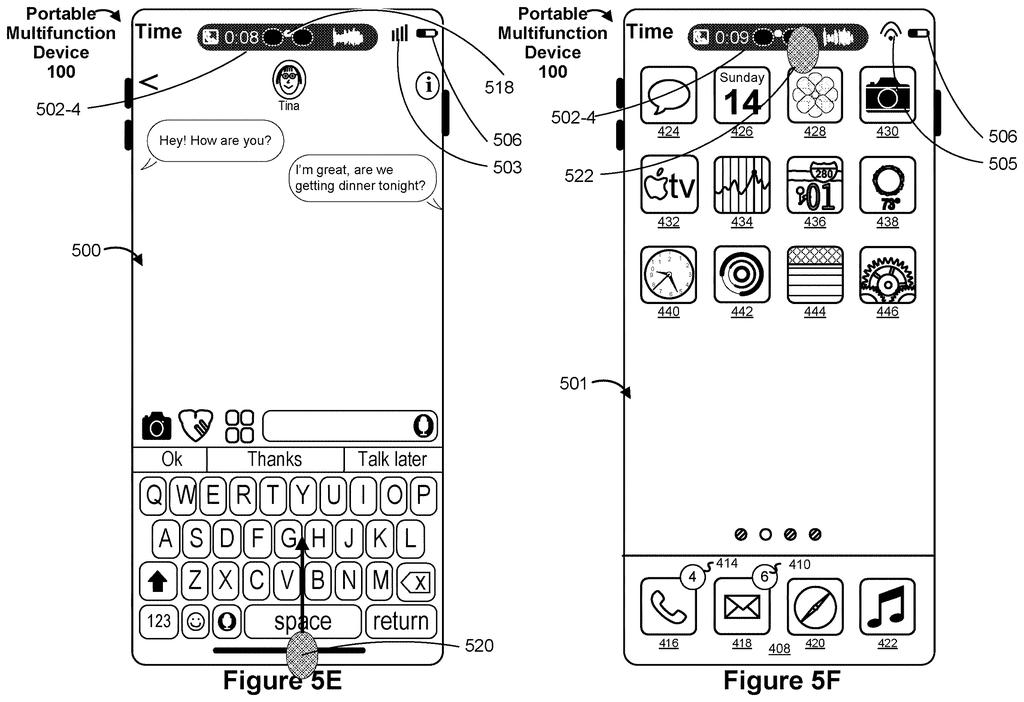
What Apple's assistant does around the camera cutout
Imagine you're elbow-deep in dinner prep and you tell your phone to set a ten-minute timer. A small timer appears in the strip at the very top of the screen, right around the front camera, and starts counting down.
That's the idea in this Apple patent application. When you wake the assistant, the strip shows that it's listening. After you speak, the phone does the job and shows the result in that same spot. Because the screen can't display anything over the camera and sensor holes, the layout is chosen so nothing lands on top of them.
The filing also describes the result sticking around. You can switch to a different app, and the timer, alarm or set of directions stays up top and keeps updating.
… displaying visual elements that are selected so as to avoid overlapping locations of the one or more sensors in the first display region.
Translation: The system designs the visual reply to steer clear of the phone camera cutout.
How replies get laid out around the sensors
The claims describe a device whose screen wraps around one or more sensors, such as a front camera or speaker. The display can't show anything directly over those spots, so the area surrounding them (called the first display region in the filing) acts as a special strip for status and replies.
The core sequence works like this:
- You invoke the virtual assistant, either by saying a keyword phrase or by using a preset button gesture, and the strip shows a visual sign that the assistant is active.
- You speak a command, and the device carries it out.
- The strip updates to show the outcome, using visual elements picked so they avoid the locations of the sensors.
The dependent claims add detail. The result can be text or images, or it can become a live "active session" (the app's ongoing task, like a running timer) for something like a timer, an alarm, or navigation directions. That session stays in the strip while you use other software, and it updates as the app's state changes. Even before you ask anything, the strip can show the current state of whichever app has a session going.
The description fills in more: tapping the strip can expand it into controls (for a phone call: end, mute, video), and a privacy indicator for camera or microphone use can sit between the sensor cutouts.
Why glanceable answers matter on your iPhone
For you, the payoff is simple: voice answers that stay visible without taking over the screen. Ask for a timer, an alarm or directions, then go back to texting or browsing, and the answer stays pinned in the same spot, updating as it goes. You don't have to reopen an app just to check where you are.
For Apple, the patent shows how much of the phone's top edge is now treated as usable screen. The sensor holes are a fixed hardware fact, and the software has to work around them. The filing's description ties this to a wider system of status updates in that strip, with the voice assistant as one more thing that can live there.
Apple's 534th filing in our Apple coverage since May follows applications like the headset keyboard and the unsafe-program blocker.
If you've ever asked your phone for a timer, switched apps, and then forgotten where it went, this patent is aimed at that small annoyance. The answer sits at the top of the screen and keeps counting while you do something else.
You'd notice it most when your hands are busy: cooking, setting an alarm half asleep, or following turn-by-turn directions while checking a message. A reply that always lands in the same place is easier to find than one that takes over the whole screen.
The sensor-avoidance detail prevents a plain failure: a word or button half swallowed by the camera hole. It's a modest, polished fix, and most people will experience it as everything simply fitting.
Get our take in your Top Stories
Liked this breakdown? Add Patentlyze as a preferred source on Google, and our plain-English take shows up more often in your Top Stories the next time Apple patent news breaks.
There are more where this came from
We read every patent application Big Tech publishes and send you the ones worth knowing. Plain English, free, every week.
The drawings
122 drawing sheets from US 2026/0310328 A1 · click any drawing to enlarge


Show the other 52 sheets


Sheets 61 to 122 are in the full USPTO filing.
Want this weekly breakdown for a company we don't cover? Patentlyze Pro →
Be the first to weigh in