
Samsung Patents a Phone Folder That Builds Itself Around the Task You're Doing
Your phone could notice that filming, filtering and captioning a video is one job, then fold those shortcuts into a single folder.
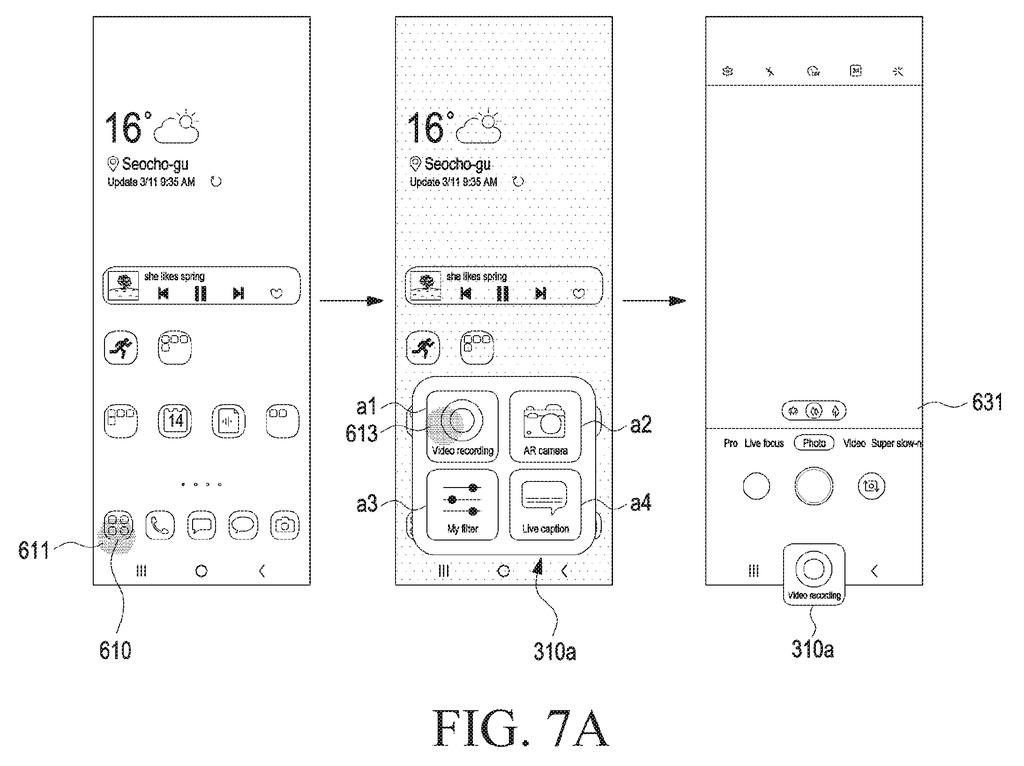
What Samsung's task-based shortcut folder does
Ever made a quick video on your phone and lost track of which app does what? You shoot in the camera app, add a filter somewhere else, then open the gallery to type a caption, bouncing between apps the whole way.
Samsung's patent describes a phone that notices this pattern. If you keep using the same handful of features in a row, it works out the job you're doing (say, video making) and bundles shortcuts for those features into one folder on your home screen.
Tap a shortcut and that feature opens. The others stay within reach as small icons, so you can move to the next step without backing out. The phone can also suggest a feature you've never tried, like a fisheye lens, and even use AI to design new shortcut icons for you.
display, via the touch screen display, a plurality of tasks executable by at least one application, wherein the plurality of tasks are displayed as a visual object indicating a task executed in relation to a context of use at least once according to the context of use of a user for the electronic device …
Translation: The phone shows a menu of tasks that adapt based on what you are currently doing.
How the phone works out which job you're doing
The phone watches which features you use back to back, even across different apps. If a video recording tool, an AR camera effect, a filter and a caption tool get used in sequence within a set time, and more than a set number of times (the example is two), it treats them as one group. Interruptions, like a text message popping up mid-recording, are ignored.
Next it names the job. It can reuse a stored label, match your features against a lookup table (the example threshold is a 75% match), or ask an AI model to infer the task. The group then lands in a folder, which can sit in the fixed row at the bottom of the home screen, with icons ordered by how often you use them.
Once you open one feature, the rest stay reachable:
- A sidebar you flick open from the screen edge
- A floating icon that appears over the screen after a set time
- A menu bar along one edge of the display
The claims also cover a second screen opening after a further delay.
The filing also describes suggesting features you rarely use (a fisheye lens is the example). It adds a tool that screenshots a screen, reads its text, and has generative AI propose new shortcut icons.
display, through the touch screen display, a plurality of functions executed by at least one application; obtain, through the touch screen display, a first input with respect to any one function among the plurality of functions; and display, on the touch screen display, a first execution screen related to the any one function on the basis of the first input.
Translation: The device lists app functions and opens the right screen when you tap one.
What this could change on your Samsung home screen
If you've ever opened three apps to finish one small job, this targets that annoyance directly. Instead of hunting for features app by app, your phone would line them up for you, in the order you actually use them. Because it learns from your habits, the folder would look different from person to person.
For Samsung, this is a phone-software play: it changes how a home screen is organized and needs no new hardware. The filing says the idea could run on other devices such as wearables, and it mentions suggestions drawn from how other people use apps, which would need usage data from an app store.
Samsung's 84th filing we've tracked since May in our foldable phone cameras watch covers camera hardware, building on a fix for self-blocking cameras and a locked LED flash cover.
Nothing here needs new hardware. Every piece is software, built from things phones already do: shortcut menus that pop up from app icons, home screen folders, a fixed row of icons at the bottom, and side panels.
The shortest route to a product is the simple half. Log which features you use back to back, then drop them into a folder. The hard half is guessing the job correctly, because a wrong guess fills your home screen with unrelated shortcuts. That explains why the filing adds checks like a 75% match against a lookup table.
The AI icon maker is a longer reach, since it needs a screen reader and a generative model working together. The folder is the near-term piece, and it is a modest, sensible one.
Get our take in your Top Stories
Liked this breakdown? Add Patentlyze as a preferred source on Google, and our plain-English take shows up more often in your Top Stories the next time Samsung patent news breaks.
There are more where this came from
We read every patent application Big Tech publishes and send you the ones worth knowing. Plain English, free, every week.
The drawings
22 drawing sheets from US 2026/0310344 A1 · click any drawing to enlarge


Show the other 14 sheets


Want this weekly breakdown for a company we don't cover? Patentlyze Pro →
Be the first to weigh in