
Adobe Files Patent for AI Video That Follows a Path You Mark With a Box
AI video tools tend to put objects wherever they like. This Adobe patent application lets you draw a starting box and an ending box, then makes the object travel between them.
What Adobe's box-guided AI video does
You have a photo of a dog standing at the left edge of a lawn, and you want an AI to turn it into a short clip of the dog trotting to the right. Most AI video tools give you the trot, but they decide for themselves where the dog ends up. The filing says that kind of precise placement is a weak spot in modern techniques.
Adobe's answer is simple to picture. You mark a box around where the object starts and another box where it should finish. The system works out a box for every frame in between, roughly a straight line with a little randomness, and then generates a video in which the object stays inside those boxes.
The filing also covers making an object leave the picture by placing the final box outside the frame. For curvier paths, you can add more boxes along the way.
receiving, by a processing device, an input defining an initial location in an initial video frame and a target location in a target video frame …
Translation: The system takes in where an object starts and where it needs to end up.
How the box path becomes video frames
The core idea is box-based motion control for an image-to-video generator. You supply a starting image, a box in the first frame, and a box in the last frame. The system fills in a box for every frame in between using linear interpolation (a straight line between the two boxes) with some randomness added.
The video itself comes from a transformer-based diffusion model. A diffusion model starts with random noise and removes it step by step until a video appears. A transformer is a network design built on self-attention (every piece of the video can look at every other piece), and the filing uses it in place of the older U-net design.
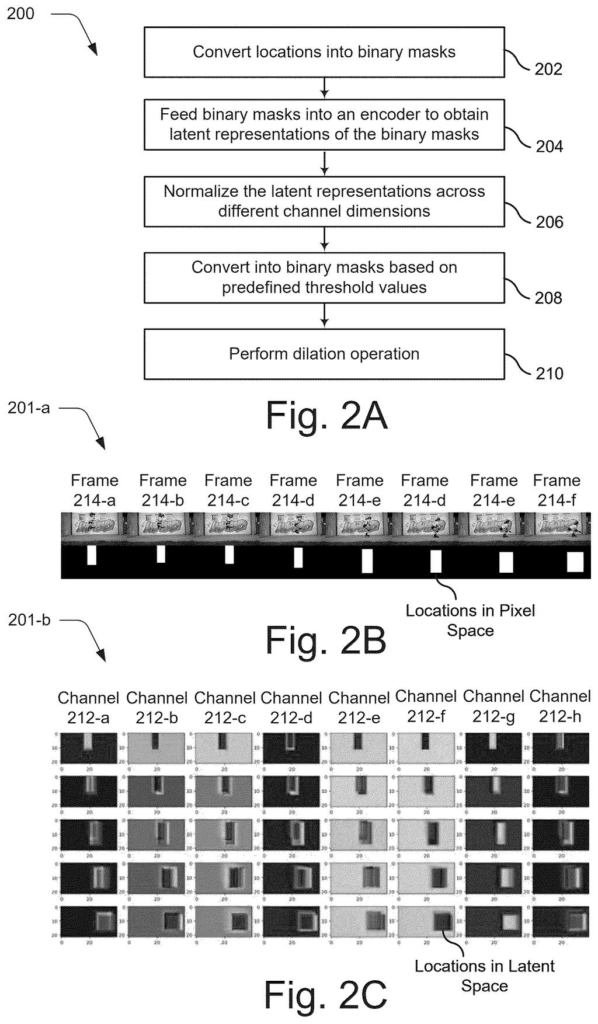
To make the model respect the boxes, the filing describes a latent mask mechanism:
- Each frame's box becomes a black-and-white binary mask.
- A 3D variational autoencoder (a tool that compresses video into a compact internal form called latent space) converts the masks.
- In one version, the first channel is used, a 50/255 threshold is applied, and the mask is widened with a kernel size of 3.
- The result feeds into a dedicated location layer inside the model.
For training, the filing favors videos with annotations, objects of suitable size (a box covering 0.04 to 0.7 of the frame in one example), and objects that move a minimum distance. Only the location layer is trained, and the text and image layers stay frozen.
… generates a digital video that includes an object as disposed at the initial location in the initial video frame, the set of intermediary locations in the set of intermediary video frames, and the target location in the target video frame using a transformer-based diffusion model.
Translation: An artificial intelligence model builds the video by animating the object along that mapped path.
What this means for Adobe's video tools
If you have ever asked an AI video tool for a specific move and gotten a different one, this is the problem the filing targets. Drawing two boxes is a control most people can use without learning anything new, and it could make AI-generated clips more predictable for editors, marketers and hobbyists. The description even mentions systems that produce customized videos for many visitors at once.
The application is still early. The examiner's first review rejected the claims as filed, which is routine and usually followed by amendments. Nothing in the filing names a product, so treat it as a look at how Adobe thinks about steering AI video, not a launch preview.
Adobe's 33rd filing we've tracked since May in our controllable AI image generation watch extends the ideas behind editable AI poster pieces and visual AI chat answers.
Nothing here needs new hardware. It is software, and the filing says it can run on a company's servers or on a user's own device. The part you would see is simple: draw two boxes on a picture.
The harder piece sits underneath. A video model has to be trained to obey the boxes, and the filing lays out that recipe: pick videos where the object is a decent size and actually moves, then train only the box-following layer while the rest stays frozen. A team with an existing video generator could add that layer without rebuilding everything.
That puts the distance to a shippable feature on the short side for the software work. The open question is quality, meaning whether objects really stay in their boxes on messy real-world footage. The filing gives no measured results, so that part is unknown.
Get our take in your Top Stories
Liked this breakdown? Add Patentlyze as a preferred source on Google, and our plain-English take shows up more often in your Top Stories the next time Adobe patent news breaks.
There are more where this came from
We read every patent application Big Tech publishes and send you the ones worth knowing. Plain English, free, every week.
The drawings
11 drawing sheets from US 2026/0320852 A1 · click any drawing to enlarge


Show the other 3 sheets


Want this weekly breakdown for a company we don't cover? Patentlyze Pro →
Be the first to weigh in