
A New Adobe Patent Turns a Black T-Shirt Into Tiger Fur, Leaving the Photo Intact
Adobe filed a patent application for changing a man's black shirt into one made of tiger fur while his face, the car behind him and the street stay exactly as shot. The trick is generating the edit on the side and pasting back only the part you picked.
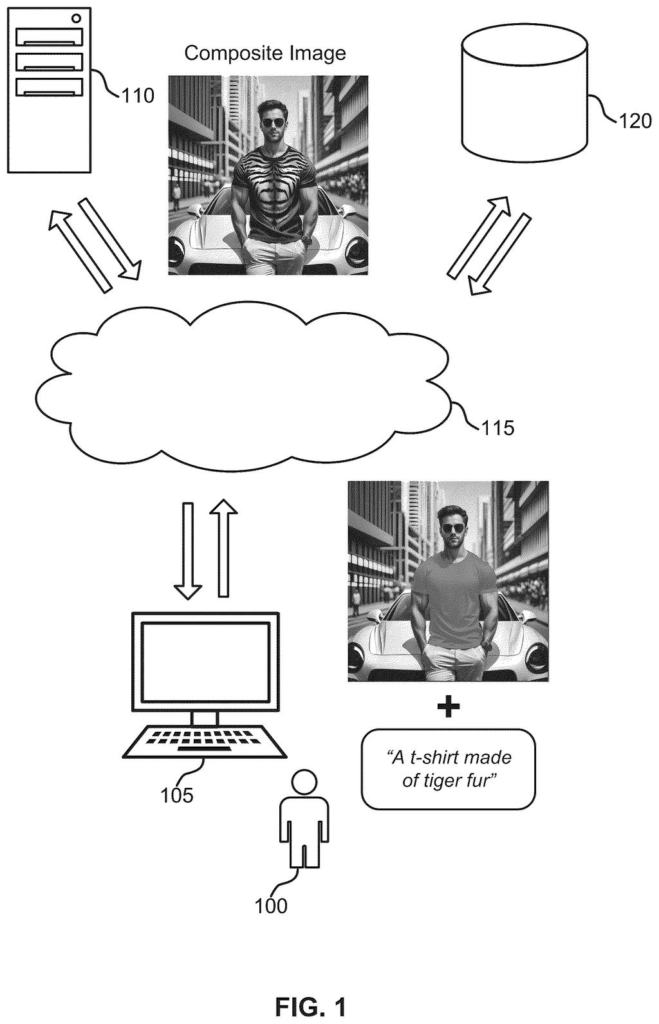
What Adobe's click-and-type photo edit does
Every time you ask an AI tool to change one thing in a photo, it tends to change a few other things too. Or the edit lands, but the edges look pasted on and you spend an hour cleaning them up.
Adobe's patent application describes a fix. You click on one part of a picture, say a man's black shirt, and type what you want: "A t-shirt made of tiger fur." The software makes a new version of the whole image where only that outlined area looks different, then copies just that area back into your original. The face, the car and the street stay exactly as you shot them.
The filing also describes a creativity slider that trades wilder results for ones closer to your original, and a way to turn a flat illustration into a realistic scene.
… generating, using an image generation model, an intermediate image based on the input image and the mask, wherein the intermediate image differs from the input image within the region indicated by the mask and is similar to the input image outside of the region indicated by the mask; …
Translation: AI alters the masked area while keeping the rest of the picture unchanged.
How the tiger-fur shirt gets stitched back in
The system starts with an image and a mask, a map that marks which pixels are the target (the shirt, say). A separate segmentation model (software that outlines objects in a photo) can build the mask from one click, so you don't draw it by hand. A diffusion model (an AI that builds pictures by gradually removing random noise) then produces an intermediate image: new content inside the mask, near-identical content outside it.
Generation runs in two phases. In the first, the mask steers the process. In the second, it doesn't. Two settings tune this. A sampling interval skips the early steps so the model starts from your photo instead of pure noise (with 50 steps and a setting of 0.3, the first 15 are skipped). A masking interval controls how long the mask is enforced; one example uses the first 85% of the steps.
To keep the folds and curves of the original shirt, a control network (an add-on that feeds the model extra guidance) pulls edge outlines from your photo. Finally, a stitching step swaps the original pixels inside the mask for the intermediate image's pixels and leaves everything else untouched.
A lower sampling setting gives more creative results; a higher one stays closer to the original. The filing exposes this as a creativity slider. For turning a vector illustration (shapes defined by math, not pixels) into a realistic image, it fills closed shapes white and outlines black to build the mask, then uses settings such as 0.15 and 0.55.
The composite image includes content from the intermediate image within the region indicated by the mask and content from the input image outside of the region indicated by the mask.
Translation: The final picture blends the new AI element inside the selection with the original photo outside it.
What this means for editing photos in Adobe apps
If you have ever tried to change one thing in a photo with AI, you know the pain: the new part looks pasted on, or the tool alters things you wanted left alone. The filing says conventional models struggle to blend a new object with the original, leaving creators to spend hours removing artifacts. Keeping everything outside your selection locked to the original pixels goes straight at that complaint.
For you, that could mean trying a new jacket pattern, a different color scheme or a restyled object in seconds, then nudging the creativity slider until it looks right. The filing also says the approach can be built into design tools, can produce outputs up to 4K, and can respond in real time, though those are the company's own claims and the document shows no test numbers.
Adobe's 29th filing we've tracked in our controllable AI image watchlist since May builds on earlier applications like the AI photo brush and the product bundle photo stager.
Of everything Adobe could file, this one sits close to the shippable end. It needs no new hardware, only software, and the pieces you would see on screen (a click to select, a text box and a slider) are controls editing apps already know how to show.
The filing leans on existing, named techniques for steering AI image models, plus an existing outlining model called Segment Anything for the click-to-select step. What has to exist first is a trained model that holds up on messy real-world photos. The filing says it beats older methods but gives no numbers to check that.
The shortest route to a product is a "restyle this part" button inside a photo editor, with the creativity slider as its one dial. The illustration-to-realistic-image piece needs its own mask-building step, so it would plausibly come second.
Get our take in your Top Stories
Liked this breakdown? Add Patentlyze as a preferred source on Google, and our plain-English take shows up more often in your Top Stories the next time Adobe patent news breaks.
There are more where this came from
We read every patent application Big Tech publishes and send you the ones worth knowing. Plain English, free, every week.
The drawings
26 drawing sheets from US 2026/0311393 A1 · click any drawing to enlarge


Want this weekly breakdown for a company we don't cover? Patentlyze Pro →
Be the first to weigh in