
Microsoft Files Patent for an AI That Answers Questions From Your Screenshot History
Microsoft's new patent application describes a computer that takes screenshots as you work, turns them into a written diary of your day, and lets an AI answer questions about it.
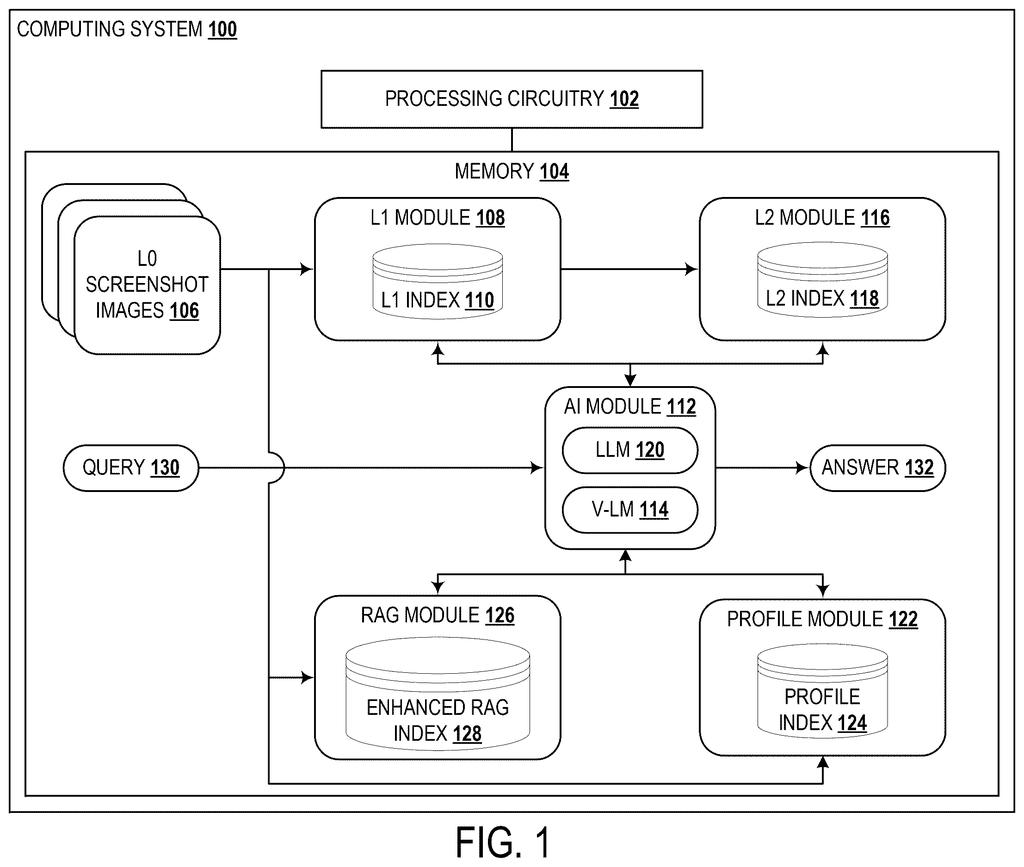
What Microsoft's screenshot memory actually does
Every time you try to remember which website had that recipe, or what you were doing before your last meeting, you end up scrolling through browser history and guessing. A new Microsoft patent application describes a way to let an AI do the remembering for you.
The idea: your computer takes screenshots at intervals while you work. An AI writes a short description of each one, then groups neighboring screens into events, such as "booking a flight" or "joining a video call," each with its own short summary. Later you ask a plain question, and the system finds the right events first, then looks at the screens inside them.
Microsoft says this beats searching screenshots directly, which tends to miss things unless the exact word appears on screen. A search for "meeting" can fail on a video call that never shows that word.
capturing a plurality of L 0 screenshot images at intervals during a user session; using an artificial intelligence module, extract information from the plurality of L 0 screenshot images to generate an L 1 index comprising a database of screen summaries …
Translation: The system periodically takes screenshots and uses artificial intelligence to summarize what is visible on the screen.
How screenshots become searchable event stories
The filing builds a three-level memory. Level 0 (L0) is the raw screenshots, captured at intervals during a user session. Level 1 (L1) is a database of screen summaries: a vision language model (an AI that looks at an image and describes it in words) writes a caption for each screenshot and fills in fields like user activity, software platform and user intention.
Level 2 (L2) is a database of event summaries. The system turns each screen summary into embedded information (a list of numbers that captures meaning, so similar things land close together), then clusters similar screens. The filing says this is often done on consecutive screenshots. A language model then writes one narrative summary per cluster.
To answer a question, the system:
- Searches the event summaries for relevant events (the L2 answer)
- Pulls up the screen summaries inside those events (the L1 answer)
- Hands your question and those summaries to a large language model, which writes the final answer
The filing also describes extras. A profile index stores facts like your name or email as key-value pairs, and the AI decides whether to append or overwrite new facts (a new email gets added, a new address replaces the old one). Another layer adds text read off the screenshots (optical character recognition) to the summaries, so the system can still pull up the original image.
… pass the query and the one or more L 1 answers to a large language model to generate an answer to the query; and output the answer to the query.
Translation: It combines your question with the relevant screenshot summaries and feeds them to an AI model to generate a final answer.
Why a final rejection and privacy both matter here
If a system like this ever reached your computer, you could ask "what was that hotel I looked at last week?" and get an answer instead of hunting through tabs. The filing says the same memory could fill in forms for you, generate insights about you, and offer personalized recommendations. It also means software that watches your screen, including names, addresses and flight numbers, so the privacy questions are as big as the convenience.
On status, the patent examiner has issued a final rejection of this application, so nothing here is approved or granted. Microsoft can still amend the claims or appeal. The filing does not name a product, so treat it as a design on paper for now.
Microsoft's 17th filing we've tracked since June on our AI memory assistants watchlist follows one that reads documents for gaps and one predicting form text, each pushing further into how AI learns what a person needs.
The pitch is easy to like: you stop losing things. Browser history only tells you that you visited a page. This system tries to remember what you were doing there, which is how people recall their own days.
You would notice it the first time you ask a vague question, like when you were last on a video call, and get a real answer. The price is a running record of your screen. Anyone who types passwords, opens bank pages or sends private messages will want clear controls over what gets captured, and the filing does not describe any.
The final rejection says not to expect this soon. As a plan for personal memory, the three-level structure of screens, events and questions is a sensible answer to the everyday problem of finding your own stuff.
Get our take in your Top Stories
Liked this breakdown? Add Patentlyze as a preferred source on Google, and our plain-English take shows up more often in your Top Stories the next time Microsoft patent news breaks.
There are more where this came from
We read every patent application Big Tech publishes and send you the ones worth knowing. Plain English, free, every week.
The drawings
7 drawing sheets from US 2026/0320095 A1 · click any drawing to enlarge


Want this weekly breakdown for a company we don't cover? Patentlyze Pro →
Be the first to weigh in