
Samsung Files Patent for a Doodle Tool That Turns Scribbles Into Objects in Your Photos
Instead of typing a prompt and hoping, you would scribble a colored shape on your photo and an AI would draw a matching object there, sized to fit how far away that spot looks.
What Samsung's doodle-to-object photo tool does
Every time you ask an AI to add something to a photo, you type a description and hope for the best. The result often lands in the wrong spot, comes out the wrong color, or sits in front of things it should be behind.
Samsung's patent application swaps the typing for scribbling. You draw a rough doodle right on your picture, in the color you want and as big as you want. The AI then creates several possible objects that match your doodle's shape and color. Next, it checks which ones make sense for the scene (a pizza belongs on a plate, not on a mountain) and for the spot where you drew.
Finally, it estimates how far away that spot is in the photo, so the new object comes out the right size and sits in the right place instead of looking pasted on top. Thicker strokes also count for more when the AI decides on color.
detecting a stroke input indicating a request to insert one or more objects in the image; identifying a shape and a color of the stroke input; generating, using an artificial intelligence (AI) model, a plurality of first candidate objects based on the shape and the color of the stroke input; …
Translation: The system watches your doodle, figures out what you drew, and uses AI to generate potential objects to add.
How the AI picks and sizes your doodled object
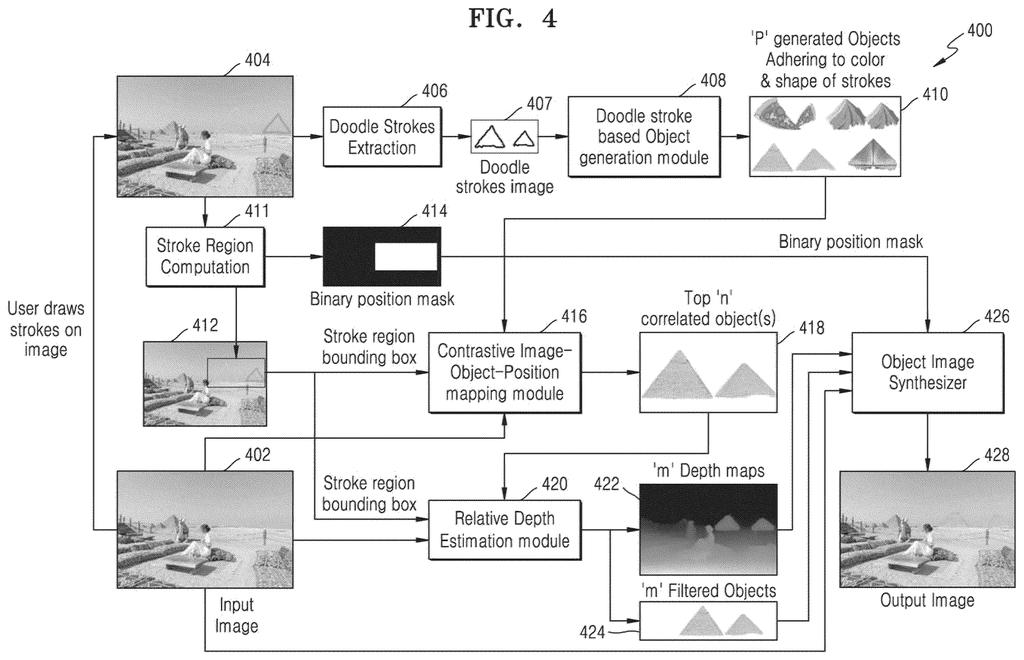
The filing describes a three-stage pipeline. First, you draw on a layer that sits over your photo, and the system saves your strokes as a separate image. It then pulls out two things: color, using a low-pass filter (a filter that keeps broad patches of color and blurs fine detail), and shape, using a high-pass filter (the opposite, which keeps edges and outlines).
Those two readings guide a diffusion model (an AI image generator that starts from random static and cleans it up step by step) to produce several candidate objects. Thicker strokes give more weight to color. A second model, trained on sets of photos, objects and positions, then scores each candidate for how well it fits the scene and the spot you drew on, so a pizza scores high on a plate and low on a mountain.
Next comes depth. The system builds a depth map of the photo (an estimate of how far away each part is) and uses the bottom edge of the box around your stroke to find that spot's distance. If a similar object is nearby, it compares sizes and filters out candidates that would look too big or too small at that distance.
Finally, an image synthesizer blends the winner into the marked region using a binary mask (a black-and-white map showing where the new object goes). The description also says the scene-matching step could flag inappropriate objects and suggest replacements.
… selecting one or more second candidate objects among the plurality of first candidate objects based on the context of the scene and the location of the stroke input; and updating the image by inserting the one or more second candidate objects …
Translation: It picks the best matching item based on where you drew it and what is already happening in the photo.
Why doodle-based photo editing could matter to you
For anyone who edits photos on a phone, the pitch is control. Text prompts are poor at saying exactly where something goes, how big it is, or what color it should be. A doodle says all three at once. The filing names smartphones and tablets as target devices, and it describes the system running either on the device or on a server connected to it.
The depth step is the part you would most likely notice. Added objects often sit on top of a photo like a sticker. Here, the system is built to place things behind or beside existing objects at believable sizes, without the manual fixing the filing says current doodle tools require. That is the gap between a fun edit and an obvious fake.
Samsung's 30th filing we've tracked since July in the AI photo editing race adds to earlier applications like a before-and-after slider and an undo button for deleted originals.
If you have ever tried to add something to a photo with a text prompt, you know the frustration: the color is off, the thing lands in the wrong place, or it floats in front of everything. Drawing a blob where you want it is a far more natural way to say what you mean, and this filing is built around fixing exactly those failures.
The sizing check is the feature you would feel most. An object that respects how far away its spot is looks like it belongs in the picture. The scene check helps too, since it keeps a pizza off a mountain.
The filing includes no test results, so how well it works is unknown. Still, for anyone who touches up photos on a phone, it targets the right annoyances.
Get our take in your Top Stories
Liked this breakdown? Add Patentlyze as a preferred source on Google, and our plain-English take shows up more often in your Top Stories the next time Samsung patent news breaks.
There are more where this came from
We read every patent application Big Tech publishes and send you the ones worth knowing. Plain English, free, every week.
The drawings
28 drawing sheets from US 2026/0320865 A1 · click any drawing to enlarge


Show the other 20 sheets


Want this weekly breakdown for a company we don't cover? Patentlyze Pro →
Be the first to weigh in