
Samsung Files Patent for a Menu That Lets You Pick How Your Notes Get Summarized
Samsung's patent lets you choose whether an AI turns your rambling notes into meeting minutes, a schedule, or a tidy outline. The summary comes back already shaped the way you asked.
What Samsung's pick-a-format summary does
You're staring at a wall of rambling meeting notes you typed on your phone, and all you need is who was there and what got decided. You tap summarize, and the AI hands back a generic paragraph that looks nothing like meeting minutes.
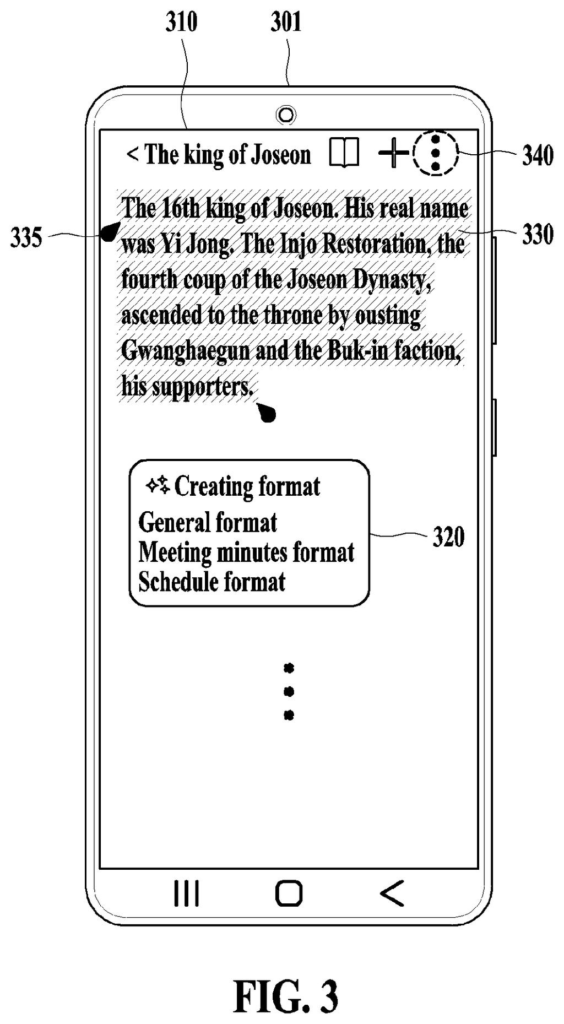
Samsung's patent adds a menu of formats to that moment. Examples in the filing include a general outline with a title and subheadings, meeting minutes with a date, place, participants and agenda, and a schedule. You pick one, and your device writes detailed instructions for an AI service so the summary comes back in that shape.
Long notes get chopped into pieces and fed to the AI one at a time, with each piece carrying the running summary so far. You can also flip between several visual styles of the result and switch formats with a button.
receive a selection of a target format from a display menu of a set of predefined formats for text content; generate a prompt requesting the text content to be summarized in the target format; …
Translation: The user picks a summary style from a menu so the device knows how to format the notes.
How the phone builds the AI's instructions
The core idea is a menu of predefined formats shown on screen. When you pick one, the device builds a prompt (the written instructions an AI model receives) and sends it to a server. The server returns a summary shaped to that format.
Each prompt has three parts:
- Explanatory text: a plain description of the format, such as how to write a fresh title and short subheadings without repeating it.
- Example text: a sample input paired with the output it should produce, so the model can copy the pattern.
- Input text: your actual notes, or the part you highlighted.
Because every format has its own explanation and examples, each one produces a different prompt. The meeting format, for instance, asks for a title, date, time, place, participants, agendas and contents.
When notes exceed what the AI can handle at once (the filing gives 2,000 characters as an example), the device splits them into parts. A 10,000-character note becomes five. Each prompt after the first uses the previous part and its summary as the example, and tells the model to fold the earlier summary in. The final summary therefore covers the whole document.
The filing also describes recommending formats after analyzing your text, an "autoformat" option, a command to answer in the device's language, and five styled versions (fonts, highlights, underlines) you swipe between. The AI model could also run on the device itself.
Why summaries in your own format matter
If you take notes on a phone, tablet or watch, you already know AI summaries often come back in a shape you didn't want. A format menu means you decide the output before you tap, and you can switch afterward without retyping anything. Notes about a trip could come back as a schedule, and a recorded meeting converted to text could come back as minutes.
The filing says the same approach could apply to notes in a note app or text from a web page, on phones, tablets, laptops, smart watches and smart TVs. The long-note handling matters too, since long documents are where AI summaries tend to lose details. Samsung's filing describes a way to keep earlier context from dropping out.
Samsung's 25th filing we've tracked in Language AI since May follows one blending AI skills for requests and one linking photo description to search.
The benefit here is easy to picture and easy to notice. You stop getting one generic paragraph and start getting a summary already laid out like meeting minutes or a schedule. That saves the reformatting you would otherwise do by hand.
The long-note handling is the part most likely to show up in daily use. Anyone who has pasted pages of text into an AI tool knows the ending of the document tends to get the best treatment and the beginning gets lost. Feeding the running summary forward is a sensible fix for that.
The core steps are fairly ordinary: pick a format, send instructions to an AI, show the result. Whether you would ever notice this depends on how well the finished feature works, since the patent only describes the plumbing.
Get our take in your Top Stories
Liked this breakdown? Add Patentlyze as a preferred source on Google, and our plain-English take shows up more often in your Top Stories the next time Samsung patent news breaks.
There are more where this came from
We read every patent application Big Tech publishes and send you the ones worth knowing. Plain English, free, every week.
The drawings
11 drawing sheets from US 2026/0320280 A1 · click any drawing to enlarge


Show the other 3 sheets


Want this weekly breakdown for a company we don't cover? Patentlyze Pro →
Be the first to weigh in